
You have a process you want off your team’s plate, and every list of AI automation tools ranks the same names in a different order. This guide is for the person who picks the tool and then has to live with it, usually an operations or business lead. It compares seven tools on the things that decide whether an automation is still running six months later. Those are what it costs, what happens when a run fails, who can maintain it, and what you own.
As of October 2026, these seven tools charge in four different units, which are tasks, credits, workflow executions, and users or bots. That’s why their headline prices can’t be compared directly, and why this guide prices one workflow on each of them. If you’re still deciding whether to automate at all, start with our guide to how AI automation works, step by step.
For a team without developers, Zapier or Make. For a team with one developer who wants control and a flat cost per run, n8n. For a company that runs on Microsoft 365, Power Automate. For enterprise-scale programmes with their own IT and security teams, UiPath or Workato. For developers building an AI application itself, Langflow. We’re a UAE-based team that builds AI automations on platforms and as custom code, then hands over the code and systems the client owns.
In this guide:
- The seven tools at a glance
- What is an AI automation tool?
- How do AI automation tools charge, and what does one workflow cost on each?
- Where does AI fit in each tool?
- What happens when a run fails?
- Who can maintain it after the person who built it moves on?
- Where does your data run, and what do you own?
- Where each tool fits
- How to decide
- When a platform is the wrong tool
- FAQ
The seven tools at a glance
Prices are the entry paid plans as of October 2026, on yearly billing where the vendor offers it. Each one rises with volume, and the unit it rises with is in the third column.
| Tool | What it’s for | Charges per | Entry paid plan | Runs on your own servers | Best for |
|---|---|---|---|---|---|
| Zapier | Connecting cloud apps with no code | Task (each action step) | Professional, $19.99 a month for 750 tasks | No, Zapier’s cloud | Non-technical teams that need the widest set of app connections |
| Make | Visual workflows with branches and data mapping | Credit (each module action) | Core, $9 a month for 10,000 credits | No, Make’s cloud; an on-prem agent on Enterprise reaches local systems | Teams that want to see every branch of a workflow on one screen |
| n8n | Workflows with code steps, cloud or self-hosted | Workflow execution (each complete run) | Starter, $20 a month for 2,500 executions | Yes, Community Edition or the Business plan | Teams with a developer who want to choose where it runs and pay per complete run |
| Microsoft Power Automate | Flows across Microsoft 365, plus desktop automation | User, or bot for unattended desktop flows | Premium, $15 per user a month | Attended desktop flows run on the user’s own computer | Companies already running on Microsoft 365 |
| UiPath | Enterprise RPA, agents and document processing | Plan, users and robots; Standard and Enterprise quoted | Basic, $25 a month, limited users and robots | Robots on your own infrastructure, on Enterprise | Large automation programmes with screen-based and document work |
| Workato | Enterprise integration and process orchestration | Edition plus usage, quoted on request | Quoted on request | Cloud, with on-premise agents to reach your systems | Enterprises connecting many business systems under central governance |
| Langflow | Building AI apps, agents and MCP servers in Python | Free and open source (MIT); you pay for hosting | Open source; free cloud account | Yes | Developers building AI agents and applications |
What is an AI automation tool?
An AI automation tool is software that runs a workflow, a trigger followed by a series of steps, and lets some of those steps use an AI model to read, decide or write. The trigger might be a new email, a form submission or a new order. The steps then move data between apps, and the AI steps handle the parts that used to need a person’s judgement, such as reading a CV or sorting a support request.
The tools on page one of any search fall into five kinds:
- App-connector platforms link cloud apps with little or no code. Zapier and Make are the best known.
- Workflow engines add code steps and let you run the whole thing on your own servers. n8n is one.
- Suite automation with RPA automates inside one vendor’s software and drives desktop screens the way a person would. Power Automate and UiPath sit here.
- Enterprise integration platforms connect a large company’s core systems under central control. Workato is one.
- AI app builders are for developers building agents and AI applications. Langflow is one.
Chatbots, writing assistants and AI note-takers often appear on these lists too. They don’t run a process for you, so they’re outside this comparison. If a task needs the system to choose its own next step each time, read our guide to what AI agents are and when to use one.
How do AI automation tools charge, and what does one workflow cost on each?
Each tool charges in its own unit, so the same workflow can cost very different amounts depending on how many steps it has and how often it runs.
Tasks (Zapier)
Zapier counts a task for every action step in a Zap and every external connector call. As of October 2026, AI steps, code steps and Zapier’s SDK draw from the same task pool, and “AI model tier, code runtime, and connector type each affect how many tasks an action uses” (Zapier pricing). Triggers never use tasks, and neither do steps that error (Zapier help). An AI step uses 1 task on a standard model or your own model key, 3 on an advanced model and 5 on a premium one (Zapier task rates). If you hit your limit, Zapier switches you to pay-as-you-go unless you turn that off.
Credits (Make)
Make bills in credits, which replaced operations as its billing unit. Each module action in a scenario uses one credit, and some AI features use more. A trigger uses one credit each time it checks for new data, however many items it finds (Make help). Error-handler modules and the router module don’t use credits (Make pricing). When credits run out, scenarios stop until you add more, and incoming webhooks queue in the meantime.
Workflow executions (n8n)
n8n charges for each complete run of a workflow, “regardless of complexity”, with unlimited steps, users and workflows on every plan. Its cloud plans start at $20 a month for 2,500 executions, billed annually (n8n pricing). A ten-step workflow and a two-step workflow cost the same per run. The self-hosted Community Edition has no execution charge, and you pay for the server instead.
Users and bots (Power Automate)
Power Automate’s Premium plan is priced per user, at $15 a month paid yearly as of October 2026. Unattended automation, where a bot runs a desktop flow with nobody logged in, is priced per bot at $150 a month, or $215 a month with a virtual machine Microsoft hosts for you (Power Automate pricing).
Quoted on request (UiPath and Workato)
UiPath publishes a free Community plan and a Basic plan at $25 a month with limited users and robots, then quotes Standard and Enterprise after a 60-day trial (UiPath pricing). Workato sells editions with a usage component it tracks as tasks, and quotes both on request (Workato pricing).
One workflow, priced on four tools
Take a job-applications workflow that a hiring team might automate first. An application arrives through the careers form with a CV attached. An AI step reads the CV and fills in the candidate’s name, contact details, current role, years of experience and skills. The workflow looks up the role’s requirements in a spreadsheet, creates the candidate in the applicant tracking system, updates the role’s row with the new application, and posts a message to the hiring channel for a recruiter to review. The AI step only fills in the fields, and a recruiter makes every decision. That’s six steps, a trigger and five actions, and the team receives about 1,000 applications a month.
This table prices that workflow on each tool’s cheapest plan that covers it, on yearly billing, as of October 2026. The AI step runs on the tool’s standard model or on your own model key, and the trigger fires instantly when an application arrives. The table counts the tool’s own charges only. The AI model’s usage is billed separately by whoever holds the model account.
| Zapier | Make | n8n cloud | Power Automate | |
|---|---|---|---|---|
| Unit | Task | Credit | Execution | User |
| Units per run | 5, one per action; the trigger uses none | 6, one per module including the trigger | 1 | Not counted per run |
| Units per month at 1,000 runs | 5,000 | 6,000 | 1,000 | 1 user |
| Plan that covers it | Professional, 5,000 tasks | Core, 10,000 credits | Starter, 2,500 executions | Premium |
| Price a month | $89 | $9 | $20 | $15 |
UiPath and Workato would price this workflow in a quote, so they’re left out of the table. Langflow isn’t built for this kind of business workflow.
The table shows which way each bill moves. On Zapier and Make, the bill follows the number of steps times the number of runs. On n8n, it follows the number of runs alone. On Power Automate, it follows the number of people who own flows, plus any unattended bots.
A few things change the result for your own workflow:
- More steps per run. Adding an app step adds 1,000 units a month on Zapier and Make in this example, and nothing on n8n. Zapier’s built-in tools, such as Filters, Paths and Formatter, use no tasks.
- A stronger AI model. On Zapier, an advanced model makes the AI step 3 tasks, so the workflow uses 7,000 tasks a month and moves to the 10,000-task tier at $129 a month.
- More runs. Doubling the applications doubles the units on Zapier, Make and n8n, and leaves Power Automate’s per-user price where it was.
- Trigger checks. On Make, a trigger that checks for new applications every 15 minutes uses a credit on every check, about 2,880 in a 30-day month, even when nothing has arrived. With the five action credits for each application, that takes this workflow to 7,880 credits, still inside Core. Zapier’s checks are free, and an instant trigger, such as a webhook, avoids checks altogether.
- Failed runs and retries. On Zapier, steps that error use no tasks, but replaying a whole run charges its successful steps again (Zapier help).
Where does AI fit in each tool?
Every tool on this list now has AI steps, but they differ in which models you can use, who pays for the model, and whether the AI can act on its own as an agent.
- Zapier adds AI steps and agents to Zaps. AI steps draw on your task pool at a rate set by the model tier, and a step can use your own model provider account. Zapier MCP lets an AI assistant run Zapier actions as tool calls, at 2 tasks a call (Zapier task rates).
- Make builds AI agents, in beta, that act across its connected apps, and has an MCP server. AI steps run on Make’s own AI Provider, charged in credits by tokens, or on your own OpenAI, Anthropic or Gemini key on paid plans, where you pay the provider for tokens (Make help).
- n8n has an AI Agent node, AI steps, an MCP Server Trigger and human approval for an agent’s tool calls, all included from the Starter plan up (n8n pricing). Its built-in assistant, which helps you build workflows, uses separate Assistant credits.
- Power Automate works alongside Copilot Studio, Microsoft’s agent builder, across Microsoft 365.
- UiPath runs agents alongside its robots and lists human-in-the-loop steps for agents, robots and API workflows on every tier (UiPath pricing).
- Workato sells Agent Studio for AI agents, AI by Workato steps and an AI and MCP gateway, by edition (Workato pricing).
- Langflow is built around agents, retrieval (RAG) apps and MCP servers, and supports the major model providers and vector databases (langflow.org).
Whichever tool you pick, hold the account with the model provider yourself and pay its usage directly. That keeps the cost visible to you, and it keeps the relationship with the provider in your name if you change tools or change who builds for you.
What happens when a run fails?
A run fails when something outside the workflow lets it down, such as an app that’s offline, a rate limit, or a document with a field missing. A good tool tells you which run failed and at which step, retries what can be retried, and lets you route the failure somewhere a person will see it.
For example, take the applications workflow on a morning when the applicant tracking system is down for an hour. Every application that arrives in that hour fails at the step that creates the candidate. Where the tool retries automatically, those runs try again and go through once the system is back. Where it doesn’t, they sit as failed runs until someone notices and replays them by hand.
| Tool | Retries | Route for failures | Run history kept on the entry paid plan |
|---|---|---|---|
| Zapier | Autoreplay of errored runs, on Professional and above | An error-handler path on a step | 29 to 69 days |
| Make | Rate-limit, connection and timeout errors retried 8 times over about 8 hours; Break and Retry handlers for other errors | Error-handler modules (Rollback, Break, Resume, Commit, Ignore) | 30 days on Core |
| n8n | Retry On Fail, a setting on each node | An error workflow, on every plan | 7 days on Starter |
| Power Automate | Resubmit a failed run from the run history | A repair-tips email to the flow owner, with a link to retry | 28 days |
Sources: Zapier replay, Zapier data retention, Make automatic retry, Make pricing, n8n nodes, n8n error handling, n8n pricing, Power Automate troubleshooting.
UiPath and Workato set retries and log retention in each customer’s deployment, so ask for both in the quote. Langflow runs an AI application that something else calls, so its retries sit with whatever calls it.
Whatever the table says for your tool, decide before launch who gets the alert and how fast they act on it. Our guide to AI automation covers what goes wrong once an automation runs in more depth, including the exceptions nobody listed and the test set that tells you whether a change made things worse.
Who can maintain it after the person who built it moves on?
A forum thread on the first page of this search asks it directly. Its author wants to know which tools “are actually being used beyond pilots and experiments”, because a lot of them “sound great until you try to run them on real devices or hand them off to a team that didn’t build them” (r/automation).
Four things decide whether a second person can take over a workflow:
- How it’s built. A no-code workflow can be read by anyone who knows the tool. A workflow full of code steps needs someone who reads the code.
- Versions and environments. A tool that keeps versions lets you see what changed and roll it back. Separate development and production environments let you test a change before it touches live runs. n8n lists environments and Git version control from its Business plan, which is self-hosted only, and on Enterprise (n8n pricing).
- Roles and shared credentials. The second person needs access to the workflow and to the app connections it uses, without someone sharing a personal password. Make adds teams and team roles on its Teams plan, at $29 a month billed annually (Make pricing).
- Notes inside the workflow. A one-line note on each step, saying what it does and why, lets a second person read the workflow without its builder.
A practical test is whether a second person could fix the applications workflow at 9 a.m. without calling whoever built it. If the answer is no, the workflow depends on one person, and that’s the first thing to fix.
Maintenance can also sit outside your team. For one e-commerce client with no automation platform in place, we chose n8n on a single self-hosted instance over a custom build. Budget, the scope of the work and the results we wanted tipped it, and the site already had everything else the business needed. The client’s CRM suite had its own workflow tool, and we picked n8n over it for its flexibility and its AI nodes. We set up multi-step workflows that run each time an order is placed. The client wasn’t going to manage them, so we took on the maintenance, watching the execution logs and stepping in when a run errored, for example on a rate limit or missing data. If you’d rather have one person own your automations, our guide covers what an AI automation expert should own.
Where does your data run, and what do you own?
Zapier and Make run your workflows in their cloud, so the data each run touches passes through their servers. Make’s Enterprise plan adds an on-prem agent to reach systems on your local network. n8n and Langflow can run entirely on servers you control, UiPath’s Enterprise plan runs robots on your own infrastructure, and Power Automate’s attended desktop flows work on the computer of the person running them (UiPath pricing, Power Automate pricing). Workato runs in its cloud and uses on-premise agents to reach systems inside your network (Workato pricing).
What you own also depends on the licence:
- n8n’s Community Edition is on GitHub under n8n’s Sustainable Use License. It allows use for your own internal business purposes, and it lets a builder charge clients for setting up and maintaining workflows. It doesn’t allow hosting n8n as a service where clients build their own workflows (n8n licence FAQ).
- Langflow is open source under the MIT licence, so you can run and change it freely.
- Cloud-only tools keep the workflow in their own format, so moving to another tool means rebuilding it there.
In our e-commerce example, n8n runs on the client’s own licence, instance and hosting. That means the workflows stay with the client whoever maintains them.
Where each tool fits
Zapier
Zapier connects more than 9,000 apps and builds workflows, called Zaps, in a no-code editor where you add AI steps and agents. It suits a non-technical team that wants to connect two cloud apps and add an AI step between them. The free plan includes 100 tasks a month on two-step Zaps, which is enough to prove a simple workflow before paying (Zapier pricing).
Best for: small and mid-sized teams with no developer, connecting popular cloud apps.
Look elsewhere when: a workflow has many steps and runs thousands of times a month, because the bill follows steps times runs.
Make
Make connects more than 3,500 apps in a visual builder where each workflow, called a scenario, is drawn as a map of modules, routers and filters. Seeing every branch on one screen makes complex logic easier to follow and easier to hand over. Its error-handler modules let you decide what happens when a step fails, without paying credits for them (Make pricing).
Best for: teams that build workflows with several branches and want to see them laid out.
Look elsewhere when: the data must stay on your own servers.
n8n
n8n offers more than 2,000 integrations, code steps in JavaScript or Python, and AI agent workflows, and it runs either in n8n’s cloud or on your own server. Charging per complete run makes long workflows cheaper than on per-step tools. The self-hosted Community Edition is on GitHub, and with it you pay only for the server you run it on (n8n pricing).
Best for: teams with a developer, or a partner, who want to choose where the data runs and keep long workflows affordable.
Look elsewhere when: nobody on the team or around it can read a code step or look after a server.
Microsoft Power Automate
Power Automate runs cloud flows across Microsoft 365 and other apps, and desktop flows that click through screens the way robotic process automation (RPA) does. Copilot Studio adds AI agents on top. If your company already runs on Outlook, Teams, SharePoint and Excel, the connections are already there (Power Automate pricing).
Best for: companies on Microsoft 365, especially with older desktop software that has no API.
Look elsewhere when: most of your apps sit outside Microsoft’s world.
UiPath
UiPath combines robots that work through screens and documents with AI agents and API workflows, and orchestrates agents, robots and people in one process. It’s built for automation programmes that run across many departments, with the governance and security a large company needs. The free Community plan lets you learn it before a trial (UiPath pricing).
Best for: large companies with a dedicated automation team and a lot of document or screen-based work.
Look elsewhere when: you need one or two cloud workflows running this week.
Workato
Workato connects a company’s core business systems through workflows it calls recipes, with more than 1,200 pre-built connectors, unlimited workspaces and users, and a usage dashboard that tracks consumption by capability (Workato pricing). On-premise agents reach systems inside your network.
Best for: enterprises standardising integration and automation across many systems and teams.
Look elsewhere when: you want to start on a published price.
Langflow
Langflow is an open-source, Python-based builder for AI agents and the tools they call, with a visual editor on top of the code. You can deploy it yourself or use a free cloud account (langflow.org). It’s for building the AI application itself, which a workflow tool can then call.
Best for: developers building an AI agent or assistant who want Python underneath the visual builder.
Look elsewhere when: the job is moving data between business apps on a trigger.
Also on the lists
Several other names come up in searches for AI automation tools. Lindy describes itself as an AI employee that connects to your tools, and Gumloop as an AI agent builder for whole companies. Agentforce in Salesforce and Copilot Studio in Microsoft 365 add AI to software you may already pay for, which our AI automation guide covers as its own route. OpenAI’s Agent Builder, which some lists still recommend, is scheduled to shut down on 30 November 2026. Desktop assistants that click through apps on your own computer are a separate kind of tool. Pipedream, which older lists describe as a workflow tool, now sells integrations for developers to build into their own products (Pipedream pricing).
How to decide
Three questions narrow the seven to one or two.
- Does your company run on Microsoft 365? If yes, look at Power Automate first, because its connections to your mail, files and Teams are already in place.
- Does anyone on your team, or working with it, write code? If not, start with Zapier or Make. If yes, n8n opens up, and so does Langflow if you’re building an AI application.
- Must the data stay on servers you control? If yes, n8n self-hosted, or UiPath at enterprise scale. If you also need central governance across many systems, add Workato to the shortlist. If not, n8n’s cloud plans avoid running a server.
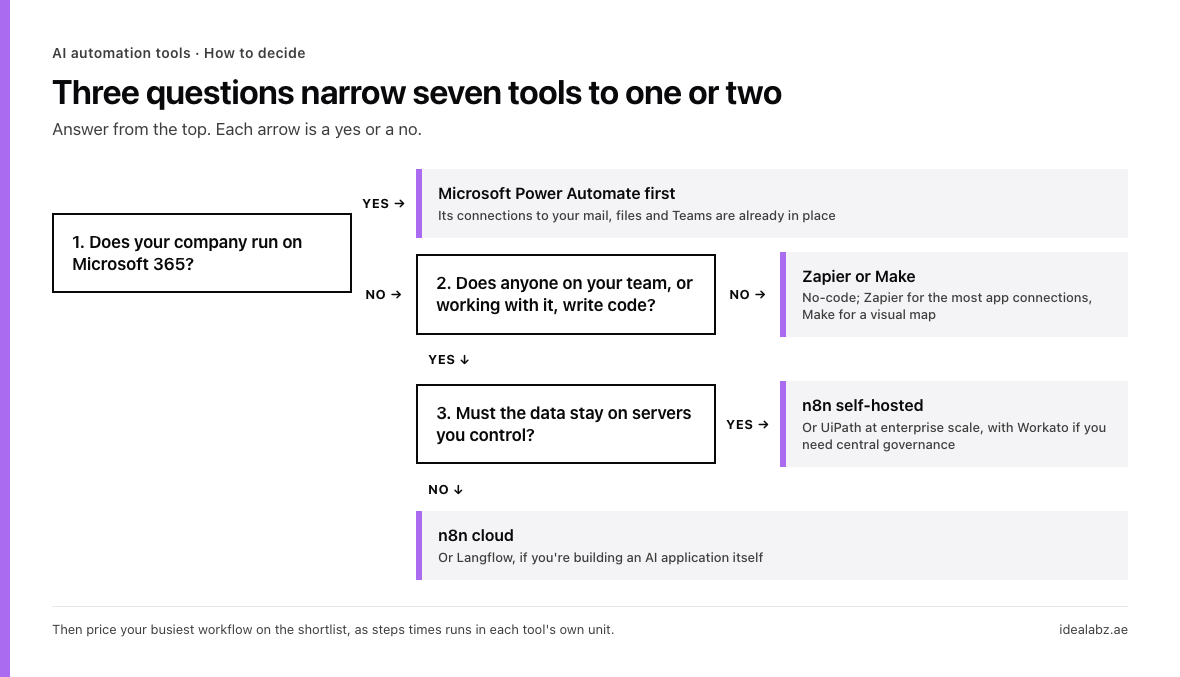
The three questions, in order. Each answer points at a tool or the next question.
Then price your own busiest workflow with the method above, steps times runs in each tool’s unit, before you commit.
When a platform is the wrong tool
Sometimes none of the seven fits. A custom build is the better answer when the process needs its own review screen for the people checking the AI’s work, spans systems with no connector, runs at a volume where per-step units add up, or handles data that can’t pass through anyone else’s servers. With a custom build, you own the code, the prompts and the tests, and nothing is billed per step.
If that’s where you are, our AI strategy and execution service is how we scope and build it with you. If you’re comparing teams to build it, our guide to choosing an AI automation agency covers what to ask and what should be in your name when the work ends.