
You run a business, or a team inside one, and you keep hearing that AI can take work off your people’s plates. To act on it, you need to know which of your processes qualify, what the AI would do in each one, and who would still check its work.
In McKinsey’s State of AI survey, published in August 2026, nearly nine in ten respondents said their organisation regularly uses AI in at least one business function, and 44 per cent said AI is scaling across the enterprise (McKinsey). Among respondents from organisations with less than $1 billion in annual revenue, one-third said the same.
This guide covers 12 processes across seven teams, each with its inputs, what the automation does with them, and who checks the result. It also covers the work to leave with people, a short inventory to find the right processes in your own business, and what to have in place before anything is built. If you want to see how a single automation works from start to finish first, read our guide to how AI automation works, step by step. We’re a UAE-based team that builds AI automations for businesses and hands over the code and systems they own.
In this guide:
- What does AI automation do in a business?
- AI automation examples by function
- What to leave to people, for now
- How to find the right processes in your own business
- Does the size of your business change what to automate?
- What to have in place before anything is built
- Who builds it: you, an expert, or an agency
- AI automation for business: common questions
What does AI automation do in a business?
AI automation takes over the reading, sorting, matching and drafting work that sits between your systems and your people. A model reads something a person used to read, such as an email, a PDF, a photo or a call recording. Rules and the model then decide what it is, and the automation writes the result into the system where it belongs.
Older automation could only follow fixed rules on tidy data, such as copying a form into a spreadsheet. AI handles the untidy inputs, so a scanned receipt or a voice note can start a workflow too.
Every example in this guide is marked one of two ways:
- Automate. The automation does the work and a person handles the exceptions. This suits work where the output can be checked by rules or by sampling.
- Assist. The automation prepares the work and a person decides. This suits work where judgement, a relationship or a commitment is involved.
The distinction comes from Harvard Business School professors Karim Lakhani and Iavor Bojinov, who argue that AI often creates the most value when it augments a person’s judgement, so leaders have to decide when to automate a task and when to support the person doing it (HBS Online). For example, matching bank lines to invoices can be automated, because a match is either right or wrong. Drafting a quote is assisted, because the salesperson’s name goes on the price.
AI automation examples by function
Each process below names its inputs, its output and the person who checks it, which shows which systems need to connect and whose time it takes.
| Team | Process | What the AI reads | What it does | Who checks | Automate or assist |
|---|---|---|---|---|---|
| Sales | Call notes into the CRM | The call recording or transcript | Summary, next step and deal fields, into the CRM | The salesperson confirms | Assist |
| Sales | Quote drafts | The enquiry and your price list | Drafts a quote with line items | The salesperson edits and sends | Assist |
| Customer service | Routine questions on WhatsApp and email | The message, your FAQ and the order status | Replies in Arabic or English, or hands over to a person | A person takes complaints and anything outside the FAQ | Automate the routine |
| Customer service | Warranty and service claims | The photo, the message, the purchase record and the warranty terms | Suggests covered or not, with the reason | A person approves every outcome | Assist |
| Finance | Overdue payment reminders | The ageing report and each customer’s payment history | Writes and sends the reminder, with the tone set by rules | Finance handles disputes and key accounts | Automate |
| Finance | Bank lines matched to invoices | The bank statement and open invoices | Matches each line, or marks it unmatched | Finance clears the unmatched lines | Automate |
| HR and people | Staff document expiry | ID document copies | Records names, numbers and expiry dates, then sends renewal reminders | HR checks the readings the model is unsure of | Automate |
| Operations and procurement | Supplier quotes compared | The PDFs each supplier emailed | Builds one comparison of price, terms, delivery and gaps | The buyer chooses | Assist |
| Operations and procurement | Site and facilities requests | Photos and voice notes from staff | Creates a ticket with the location, the issue and a priority | A supervisor reviews high-priority tickets | Automate |
| Marketing | Product descriptions | Spec sheets and brand rules | Drafts the description in English and Arabic | A person reads every one before it’s published | Assist |
| Admin and legal | Contract renewals | Signed contracts | Records the renewal date, the notice period and the owner, and sets reminders | The owner confirms each date | Automate |
| Admin and legal | Incoming NDAs | The NDA and your standard clauses | Flags every difference from your standard | A person decides | Assist |
Sales
After a sales call, the automation reads the recording or transcript and writes a short summary and the agreed next step, and updates any changed deal fields. The salesperson checks the update instead of writing it from memory at the end of the day. It’s assist, because only the salesperson knows whether “send something next week” meant a proposal or a brochure.
Quote drafts work the same way. For example, an enquiry asks for 200 units of two products delivered to Abu Dhabi. The automation reads it, looks up both products and the delivery rate in your price list, and drafts the quote. The salesperson checks the discount and sends it, because a quote is a commitment in their name.
Customer service
Routine questions, such as opening hours, delivery times or where an order is, can be answered by the automation from your FAQ and your order system. In the UAE, those questions arrive on WhatsApp as often as by email, and in Arabic as well as English. A business system connects to WhatsApp through the APIs of Meta’s WhatsApp Business Platform. The automation answers in the customer’s language and hands the conversation to a person when the message is a complaint, a refund, or anything the FAQ doesn’t cover. When a reply needs a judgement about what to do next, such as offering a replacement, that’s a job for an AI agent, which our guide to AI agents and when to use one covers.
Warranty claims stay assist. The automation reads the customer’s photo and message, finds the purchase record, checks the dates against your warranty terms, and suggests whether it’s covered and why. A person signs off every decision, because a wrong refusal costs you a customer.
Finance
Overdue payment reminders can run on their own. The automation reads the ageing report each morning and writes each reminder from the customer’s payment history, polite for a first late payment and firmer for a repeat. Rules set the tone and the timing. Finance takes over when a customer disputes the invoice, and for the key accounts you’d rather handle in person.
Bank reconciliation is the clearest case for automating. The automation reads each line on the bank statement, finds the open invoice it pays, and records the match. Lines with a partial payment or a missing reference are marked unmatched for finance to clear. A match is easy to check, so finance only reviews the exceptions.
HR and people
In the UAE, every expatriate employee’s residence visa and Emirates ID has an expiry date, and renewing late costs money. For example, as of October 2026, an Emirates ID renewed more than a month after it expires carries a late fee of AED 20 a day, up to AED 1,000 (u.ae). The automation reads the passport, visa and Emirates ID copies HR already holds, records each number and expiry date in the HR system, and sends reminders at set points before each one expires. It scores how sure it is of each reading, and HR checks the ones below the threshold, such as a blurred scan.
This is automate, because a date is either read correctly or it isn’t. Hiring decisions are different and stay with people, as the section on what to leave alone explains.
Operations and procurement
When three suppliers send quotes as PDFs, each in its own layout, the automation reads them into one comparison. It lines up the unit price, payment terms, delivery time and anything one supplier left out. The buyer chooses, because the cheapest quote isn’t always the supplier you trust to deliver on time.
Site and facilities requests are often a photo and a voice note sent by a member of staff. The automation reads both, works out the location and the issue, sets a priority by your rules, and opens a ticket in your job tool. A supervisor reviews anything marked high priority, such as a water leak, before it’s assigned.
Marketing
For a business that sells online, product descriptions are steady, repetitive work. The automation reads the supplier’s spec sheet and your brand rules, then writes English and Arabic drafts for your catalogue. Each one gets a human read before it goes live. A wrong dimension or a clumsy translation is visible to every customer, so this stays assist however good the drafts get.
Admin and legal
Contract renewals are easy to miss when the contracts sit in a shared folder. The automation reads each signed contract, notes when it renews, how much notice it needs and who owns it in a contract register, and sets calendar reminders before the notice period starts. The owner confirms each date once, when the contract is added.
Incoming NDAs stay assist. The automation compares each one against your standard clauses and flags every difference, such as a longer term or a missing carve-out for information you already hold. A person decides whether to accept, change or reject it.
What to leave to people, for now
Some work doesn’t pay back as an automation, or shouldn’t be handed over at all. Five kinds are worth leaving with people:
- Rare work. A process that happens once a year, such as an insurance renewal, takes longer to automate than to do.
- Judgement-led work. Hiring decisions and a key client’s complaint depend on context the model doesn’t have.
- Work with no written rules. Pricing a one-off project depends on what the person pricing it knows, and an automation can only follow rules someone has written down.
- Mistakes that are costly and hard to spot. A payment run released without review can send money to the wrong account before anyone notices.
- Data you can’t share. If a contract or a regulator says some data can’t leave your systems, it can’t go to a model provider either.
These change as a business grows. A pricing process gets written rules once the business has priced enough projects, and a rare process becomes a weekly one as you grow. Our pillar guide covers what goes wrong once an automation runs, which is the other half of choosing well.
How to find the right processes in your own business
To find the right processes, list the work that repeats, write down how often it happens and how long it takes, test each process against five questions, and start with one.
For example, one client came to us with a problem on the accounts side and no idea what to automate. Our team had a discussion with their accounts team, and the automation came out of that conversation. Their travelling staff were collecting receipts, typing them into a spreadsheet, and the accounts team was checking and keying every one by hand. That process is now the eight-step worked example in our pillar guide, with the accounts team reviewing only the receipts scored below 75 per cent.
You can run the same inventory yourself in five steps:
- List the recurring processes in each team
- Write down the volume, the time and the systems
- Test each one against the five questions
- Mark each one automate or assist
- Rank them and pick one
1. List the recurring processes in each team
Spend an hour with each team lead and list everything their team does every week. Include the work people do between systems, such as copying, checking, chasing and re-typing, because that’s where AI automation fits.
2. Write down the volume, the time and the systems
For each process, write down how many times it happens a week, roughly how many minutes each one takes, which systems it touches, and who signs it off. Rough numbers are enough to rank.
3. Test each one against the five questions
A good candidate is frequent, painful, easy to check, reachable by software, and owned by one person. Our pillar guide explains the five tests for a first automation with an example of each. Cross out any process that fails one, or note what would have to change for it to pass.
4. Mark each one automate or assist
Use the distinction from the start of this guide. A reconciliation can run on its own with a person on the exceptions, while a quote needs someone to decide before it goes out.
5. Rank them and pick one
Multiply the volume by the minutes to get the time each process takes a week, then rank the ones that passed. Start with the top one, run it as a pilot alongside the people who do the work, and add the next once the first is running well.
For example, take a made-up trading company with a sales team, a small finance team and a warehouse. The numbers are this example’s own.
| Process | Each week | Minutes each | Minutes a week | Passes the five tests? | Automate or assist |
|---|---|---|---|---|---|
| Bank lines matched to invoices | 300 lines | 2 | 600 | Yes | Automate |
| Quote drafts | 25 quotes | 20 | 500 | Yes | Assist |
| Overdue payment reminders | 60 reminders | 5 | 300 | Yes | Automate |
| Supplier quotes compared | 8 comparisons | 30 | 240 | Yes | Assist |
| Pricing one-off project tenders | 1 tender | 240 | 240 | No, no written rules | Leave to people |
| Staff document expiry | 3 documents | 15 | 45 | Yes | Automate |
This company would start with bank reconciliation. It takes the most time of the processes that pass, a wrong match shows up at once, and finance owns it. Quote drafts come next. Staff document expiry ranks last on minutes, but a missed visa renewal costs more than its minutes suggest, so a company with many staff on visas might move it up.
To run the same inventory in your own business, print the sheet below or copy its columns into a spreadsheet, and fill in one row per process with each team lead.
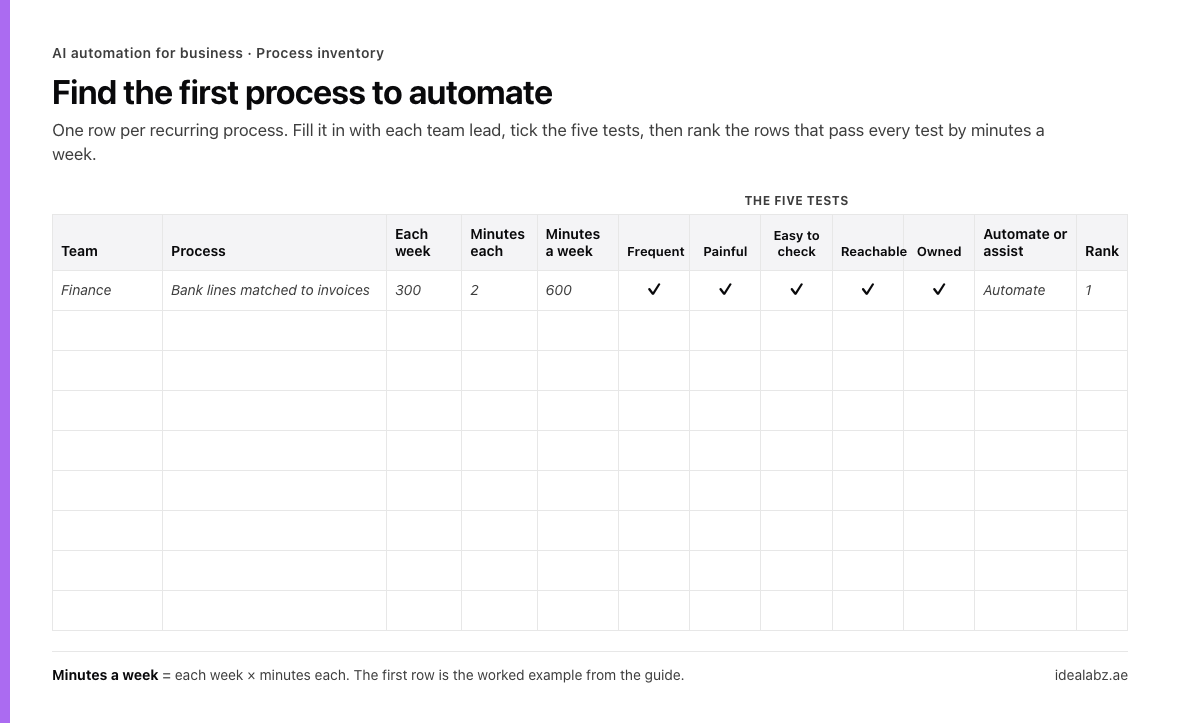
The process inventory. The first row is the trading company’s top process.
Does the size of your business change what to automate?
Size changes how you build it more than what you automate. A five-person company and a 500-person company both chase overdue invoices. What differs is how many tools the work touches and who looks after the automation once it’s running.
A small business
Start with the AI features inside the software you already pay for, then add one workflow platform for anything that crosses two tools. The owner, or one person in the team, can build and run the first automation. For example, Zapier’s Xero connector has an Overdue Sales Invoice trigger, so the overdue reminders from the finance section can run from Xero and Zapier without writing code (Zapier). Our comparison of AI automation tools for business teams covers which platform suits which kind of team.
A growing team
Once processes cross the CRM, the accounting system and the helpdesk, someone has to own the connections between them and keep a set of past cases to test changes against. For example, quote drafts need the CRM, the price list and the quoting tool to agree on product codes, and a price change has to reach all three.
A larger company
With several automations running, the work becomes shared accounts, access rules, and a regular review of what each automation did. For example, contract renewals across several business units need one contract register, an owner per contract, and access limited to the people who should see each one.
What to have in place before anything is built
Five things decide whether an automation runs well after it’s built:
- Systems software can reach. The automation needs to read the input and write the result. If your accounting system has no API and no import, the automation stops at the first step.
- One owner per automation. Someone has to say what “right” looks like, review the exceptions, and decide when the rules change. For example, the finance lead owns bank reconciliation and decides what happens when the company opens a new bank account.
- Accounts in your company’s name. That includes the workflow platform and the model provider. When you hold the model provider account and pay its usage directly, the cost and the data relationship stay yours, whoever builds the automation.
- A test set. Collect real past cases with the right answer written down for each, such as 50 bank lines and the invoices they paid. You’ll use it to check the automation before it goes live and after every change.
- Rules for personal data. Staff documents and customer messages are personal data. In the UAE, the Personal Data Protection Law (Federal Decree-Law No. 45 of 2021) sets the rules for processing it, including transfers of personal data outside the country, which matters when a model provider’s servers are abroad. The DIFC and ADGM free zones have their own data protection laws (ADGM). Decide before the build which data may leave your systems and which providers may process it.
If someone else builds it for you, our guide to choosing an AI automation agency lists what you should own when the work ends.
Who builds it: you, an expert, or an agency
Who builds it depends on how many systems the work crosses and how often it will change.
You, or someone on your team, when it’s one process on one workflow platform with no integrations to build. Overdue reminders from your accounting system are a good first project to do yourself.
An AI automation expert when you have a few automations on one platform and want one person to own them. Our guide covers when one expert is enough and how to hire one.
A team when the work needs its own review screen, crosses several systems, or will keep changing as the business grows. Warranty claims with an approval queue, or document processing across HR and finance, usually need design, development and someone to maintain them. That’s the work our AI strategy and execution service covers, and we’ve written up how to compare AI automation agencies if you’re weighing several.