
You have three repos open and five Claude Code sessions running across them. One of them has finished and is waiting for you, and every tab says the same thing. So you click through them one by one until you find it.
As of October 2026, Claude Code lets you name a session when you start it, rename it while it runs, or let a hook name it for you. We use the hook. It reads the first real prompt in a new session, asks Haiku 5.5 for a short name, and sets it as the session’s title. The work itself runs on Opus 5.5, so the bigger model never spends a turn naming itself.
This article explains why the name helps, what Claude Code already does on its own, and how to install the hook. It’s one small part of how we run Claude Code, and you can add it without the rest.
Short on time? Paste this into Claude Code. It reads the article and offers to install the hook for you.
Read https://idealabz.ae/blog/name-claude-code-sessions-automatically and summarise it for me. Then ask whether I want this hook in my own setup. If I say yes, install it, show me what you changed, and tell me how to test it.- Why name sessions automatically?
- What does Claude Code already do to name a session?
- How does the hook work?
- How do you install it?
- Does it slow the prompt down, and what does it cost?
- What if the session doesn’t get a name?
- Frequently asked questions
- What to do next
Why name sessions automatically?
A name tells you what a session is doing without opening it. We work across several repositories with several sessions running in each, and the names let us see them all at a glance instead of flipping between tabs. Without them, you click through to remember which one is fixing the signup bug and which one is writing release notes.
For example, a tab called signupEmailTrailingSpace sits next to one called releaseNotesV23. You know which one to answer before you click. You could type /rename in every session, but you’d have to remember to, and with five sessions open that’s easy to forget.
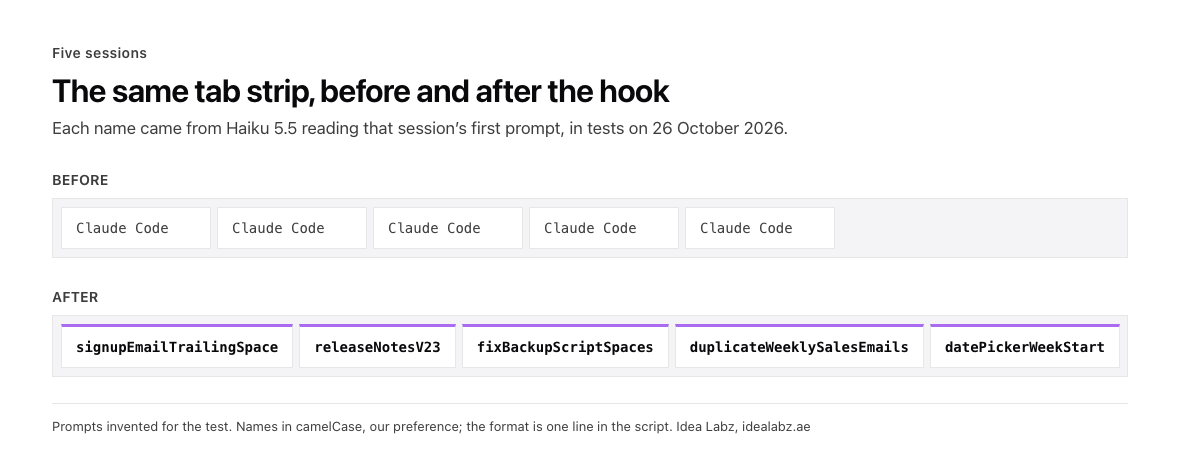
Five sessions before and after the hook, with names from our 26 October tests.
The same name also shows up when you come back later. Left to itself, Claude Code titles each session with a longer summary of its first prompt. With the hook, /resume lists your sessions by the same short names you saw on the tabs.
What does Claude Code already do to name a session?
Claude Code gives you several ways to name a session, and it names one for you if you don’t. If you never name a session, Claude Code writes a generated title for it, a short summary of your first prompt made by a background request to a small, fast model (Anthropic’s sessions guide). It works, but you don’t choose its length or its style.
| Method | When it runs | Who writes the name | You type something |
|---|---|---|---|
claude -n <name> | At startup | You | Yes |
/rename <name> | During a session | You | Yes |
Ctrl+R in the session picker | After the fact | You | Yes |
| Accepting a plan in plan mode | When you accept the plan | Claude Code, from the plan | No |
| Generated title | After your first prompt | A small, fast model, as a summary | No |
A hook that returns sessionTitle | On a prompt you choose | Your hook, in your format | No |
The last row is the one this article uses. A UserPromptSubmit hook can return a sessionTitle field, and Claude Code uses it as the session’s name (hooks reference). It counts as a custom title, the same kind /rename sets, so you can pass it to claude --resume and /resume. Claude Code also sends that name to your terminal as the window title (settings reference). Whether a tab shows it depends on the tool you run Claude Code in. Many terminal apps display the title Claude Code sets. tmux passes it on only when its set-titles option is turned on, which it isn’t by default.
How does the hook work?
Hooks are shell scripts that Claude Code runs on events. This one runs on UserPromptSubmit, which fires each time you press Enter on a prompt, and it does its work only once per session.
- It skips what it shouldn’t name. A prompt under 15 characters, such as “hi” or “continue”, says too little to name anything. A session that already has a custom title keeps it, because Claude Code passes the current title to the hook as
session_title. A session the hook has already handled is skipped through a small marker file. - It claims the session first. The marker file is written before the model call, so two quick prompts can’t both trigger a name.
- It asks Haiku 5.5 for two to four words. The call runs
claude -pwith no settings loaded, no tools and hooks turned off. That keeps the call small, and it stops the hook from triggering itself. - It formats the name itself. The script keeps only letters and digits from Haiku’s answer and builds the name in code, so a stray label or markdown in the reply doesn’t reach your session list. For example, Haiku answered “Release notes v2.3” and the session was named
releaseNotesV23. - It returns
sessionTitleto Claude Code. The session takes the name straight away.
If the call fails, the hook removes its marker and exits quietly, so the next prompt tries again and your prompt is never blocked.
We format names in camelCase, releaseNotesV23, because that’s how we name files, and you can choose your own. The format lives in one function, so release-notes-v23 or Release notes v2.3 is a one-line change.
Session names work wherever Claude Code runs, because they’re built in. Tab names depend on what your terminal or workspace lets a script do. We run our sessions inside Biscuit, the local-first workspace app we build in our Labs, which lets a script rename any terminal tab. So our version of the hook renames the Biscuit tab too, and leaves alone any tab someone named by hand. The script above sets the session name only, and that part works in any terminal.
How do you install it?
The hook is one Python file and one entry in your settings. It needs Python 3 and the same claude command you already run.
- Save the script.
- Register it in your settings.
- Test it in a new session.
1. Save the script
Save this as ~/.claude/hooks/nameSession.py.
#!/usr/bin/env python3
"""UserPromptSubmit hook: name a Claude Code session after its first real prompt."""

import json
import os
import re
import subprocess
import sys

MARKERS = os.path.expanduser("~/.claude/nameSession")
MIN_PROMPT_CHARS = 15
MAX_WORDS = 4


def to_title(words):
    # Change this line to name sessions your way. This gives camelCase.
    return words[0].lower() + "".join(w[:1].upper() + w[1:] for w in words[1:])


def main():
    # The title call below is itself a Claude session; never let it name anything.
    if os.environ.get("NAME_SESSION_CHILD"):
        return
    payload = json.load(sys.stdin)
    prompt = (payload.get("prompt") or "").strip()
    marker = os.path.join(MARKERS, payload["session_id"])
    # Skip short prompts, sessions already named, and sessions this hook has seen.
    if len(prompt) < MIN_PROMPT_CHARS or payload.get("session_title") or os.path.exists(marker):
        return
    os.makedirs(MARKERS, exist_ok=True)
    open(marker, "w").close()

    ask = ("Reply with only 2 to 4 plain words, no markdown and no punctuation, "
           "naming the task in this request:\n\n" + prompt[:2000])
    # No settings, no tools and no hooks, so the call is small and can't recurse.
    result = subprocess.run(
        ["claude", "-p", "--model", "claude-haiku-5-5", "--setting-sources", "",
         "--tools", "", "--settings", '{"disableAllHooks":true}', ask],
        cwd="/tmp", env={**os.environ, "NAME_SESSION_CHILD": "1"},
        capture_output=True, text=True, timeout=20,
    )
    words = re.findall(r"[A-Za-z0-9]+", result.stdout)[:MAX_WORDS]
    if result.returncode != 0 or not words:
        os.remove(marker)  # let the next prompt try again
        return
    print(json.dumps({"hookSpecificOutput": {
        "hookEventName": "UserPromptSubmit",
        "sessionTitle": to_title(words)[:40],
    }}))


if __name__ == "__main__":
    try:
        main()
    except Exception:
        pass  # a naming hook must never get in the way of the prompt
2. Register it in your settings
Add this to ~/.claude/settings.json. If you already have a hooks block, add the UserPromptSubmit entry inside it.
{
  "hooks": {
    "UserPromptSubmit": [
      {
        "hooks": [
          {
            "type": "command",
            "command": "python3 \"$HOME/.claude/hooks/nameSession.py\"",
            "timeout": 30
          }
        ]
      }
    ]
  }
}
3. Test it in a new session
Start a new Claude Code session and type a real request, at least a sentence long. A couple of seconds after you press Enter, the session takes its new name, and /resume lists it under that name. If your terminal shows window titles, the tab changes from “Claude Code” to the same name. For example, on 26 October 2026 a prompt about the nightly backup script skipping files with spaces in their names came back as fixBackupScriptSpaces.
Does it slow the prompt down, and what does it cost?
It adds about two and a half seconds to the first prompt of each session and nothing noticeable after that. Claude Code waits for a UserPromptSubmit hook before it sends your prompt, and that wait is what lets the hook hand back a title. A hook set to run in the background can’t return one, because Claude Code has moved on by the time it finishes (hooks reference).
| Run, 26 October 2026 | Prompt | Name returned | Seconds |
|---|---|---|---|
| First prompt, new session | Signup form accepts an email with a trailing space | signupEmailTrailingSpace | 2.49 |
| First prompt, new session | Release notes for version 2.3 | releaseNotesV23 | 2.51 |
| Second prompt, same session | Trim the password field too | none, already named | 0.04 |
| Short prompt | “continue” | none, too short | 0.04 |
The times include starting the claude command, measured on a Mac. Five more first-prompt calls the same day took between 2.41 and 2.73 seconds.
The cost is a fraction of a cent per session. As of October 2026, Anthropic’s price list puts Haiku 5.5 at $0.10 per million input tokens and $0.50 per million output tokens. Across five naming calls on 26 October 2026, Claude Code reported between $0.000039 and $0.000148 a call, less than two hundredths of a cent. The call stays that small because it loads no settings, uses no tools, and answers in 8 to 11 tokens.
What if the session doesn’t get a name?
Most misses come from one of these:
- The first prompt was short. “hi” or “continue” is skipped on purpose. The next prompt over 15 characters gets the name.
- The session already had a name. A session started with
-nor renamed with/renamekeeps its name. - The hook can’t find
claude. Runwhich claudein your terminal and put that full path in place of"claude"in the script. - Python 3 isn’t found. Replace
python3in the settings entry with its full path.
To test the script on its own, pipe it a sample payload:
echo '{"session_id":"test-1","prompt":"The signup form accepts an email address with a trailing space"}' | python3 ~/.claude/hooks/nameSession.pyIt should print a line with a sessionTitle. Delete ~/.claude/nameSession/test-1 before you run it again, or the hook will skip it as already named.