
You’ve installed Claude Code, typed a request into the terminal, and watched it build in ten minutes what used to take a day. A week later it has also rewritten a file you didn’t ask it to touch, passed a test by changing the expected value, and left you unsure what state the repo is in. Both experiences come from the same tool, and the setup around it decides which one you get.
Every coding project we run at Idea Labz goes through the same setup, and so does work that has nothing to do with code. As of October 2026 it runs on Claude Code with the Claude 5 models, but none of the structure depends on the model, and most of it would carry over to another coding agent.
This article describes that setup in full. It covers the files that tell Claude Code how we work, the skills that package our procedures, the servers that let it reach our tools, and the spec workflow that takes a feature from an idea to code on main with evidence at every step.
Short on time? Paste this into Claude Code. It reads the article for you, then offers to set the same thing up where you work.
Read https://idealabz.ae/blog/how-we-run-claude-code and summarise it for me. Then ask whether I want this setup in my own environment. If I say yes, explain how it would work here, set up what you can, and tell me what to do next.- Why does Claude Code disappoint people who just moved to it?
- What does the setup look like?
- How does a feature get from idea to main?
- Why three model roles and a human one?
- What are the mechanical gates?
- Where does the work happen?
- How do skills, MCP servers and hooks fit in?
- Does the same setup work outside code?
- How to start your own setup
- Frequently asked questions
- What to do next
Why does Claude Code disappoint people who just moved to it?
The chat habit comes along from the chat window. One long conversation stays open, the same instructions get repeated every morning, and the work gets reviewed by reading the output and hoping. Claude Code is an agent that edits files and runs commands, and it rewards structure the way a new hire does. Tell it once how you work, give it a safe place to work, and ask it to prove what it did.
For example, ask for a feature in a single prompt and you get the feature plus whatever the model decided belonged with it. Ask for tasks one to four of an approved task list, inside a copy of the repo, with a rule that an unnamed file in the diff stops the run, and you get tasks one to four. The model is the same in both cases. The second request carries the context the first one left in your head.
Everything in our setup does one of those three jobs. It tells the model how we work before it starts, it gives it a place where mistakes are cheap, or it makes the model show evidence for what it did.
What does the setup look like?
Seven layers, each a plain file or a saved connection. None of them needs a build step.
| Layer | What it is | What it does for us |
|---|---|---|
| Global instructions | One CLAUDE.md in the home folder, read by every session | Writing rules, file naming, when the model must ask first, how time and cost are logged |
| Project instructions | CLAUDE.md and AGENTS.md in each repo | Build and test commands, where the data lives, and the managed block the spec workflow installs |
| Skills | Folders of instructions, invoked by a slash command or a phrase | Package a procedure once (cut a release, deploy with staging, onboard a client, run a spec) so it runs the same way every time |
| MCP servers | Saved connections to the tools we use | Let the model read and act inside those tools instead of us copying things across |
| Hooks | Shell scripts that fire on session events | A desktop notification when a session stops or needs input, so several sessions can run without being watched |
| The spec workflow | Installed into a repo with one command | The route from a roadmap entry to landed code, one command per step |
| Biscuit | Our local-first workspace app, built in our Labs | Isolated workspace copies, visible terminals, encrypted databases, and the roadmap itself |
Ours holds the things we found ourselves repeating. For example, no sub-agent starts without asking, file names are camelCase, and every finished piece of work is logged with its minutes and cost. Every session reads it before anything else.
How does a feature get from idea to main?
Every piece of work is a roadmap entry with a number, such as RM12, in a database that every command reads and writes. The three spec phases are adapted from Basecamp’s Shape Up, the method we deliver client work with. The entry moves through fixed statuses, from Backlog through the three spec phases, Ready for Implementation, Implementing, Acceptance, Landed, Staged where the project has a staging environment, and Completed. One command moves it one step. As of 22 October 2026 the workflow is installed in more than a dozen of our repos, and Biscuit’s own roadmap holds 464 entries, 353 of them completed.
- Create.
/spec create <idea>classifies the work as a feature, an enhancement, a bug fix or a refactor, and creates the row. Each type gets a lighter or fuller spec. - Start.
/spec start RM<n>opens an isolated copy of the repo, named after the entry, installs dependencies inside it, and writes the requirements, then the design, then the task list. Each document is approved by a person before the next one begins. - Handoff. At task approval the author writes a handoff packet, a fixed prompt that lists the spec files, the build and test commands, the checkpoint tasks and the forbidden actions. The phase isn’t finished until the packet exists and the row says Ready for Implementation. There is no skip clause, even when the same model will implement.
- Babysit.
/spec babysit RM<n>launches the implementer in a visible terminal inside the copy, pastes the handoff as its first message, and supervises it to the end. - Land.
/spec land RM<n>verifies the feature against the running build, then, on approval, commits inside the copy and applies the commits to main as patches. The full gates run on main. Nothing is pushed. - Stage. Where a project has a staging environment,
/spec stage RM<n>pushes main to the staging branch after a “go”, verifies the staging build, and prints the addresses for the client to review. - Complete.
/spec complete RM<n>kills the terminals, confirms the commits exist on main, and deletes the copy. It refuses to run before landing.
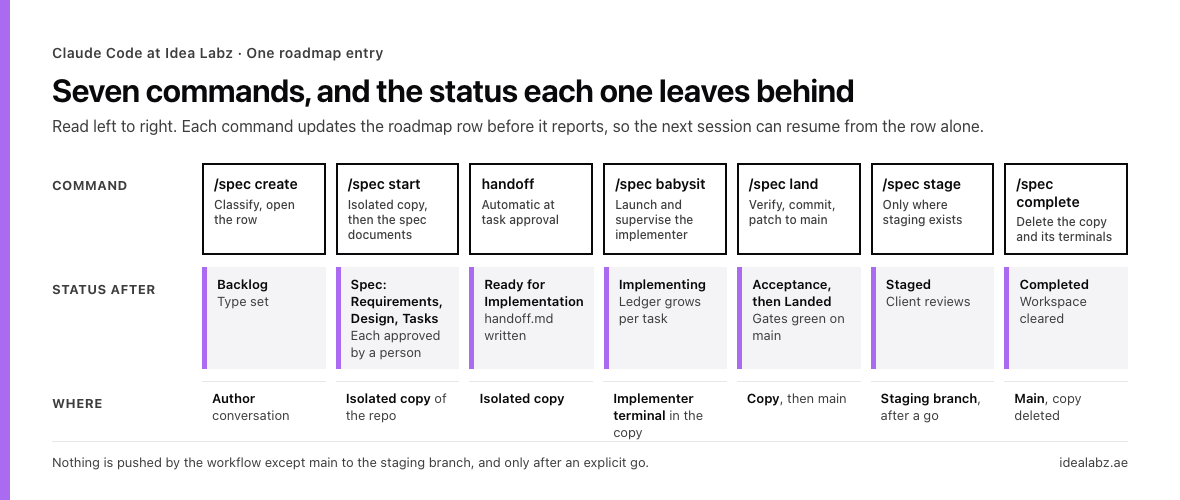
Seven commands, the status each one leaves behind, and where each one runs.
Every step updates the row before it reports. That is what makes /spec status and /spec resume true for the next session, even when the conversation that started the entry ended two days ago.
Why three model roles and a human one?
Writing a spec and executing it are different jobs, and the model that is best at one is wasteful at the other. As of 22 October 2026, Anthropic’s price list puts Fable 5.1 at two and a half times the price of Opus 5.5 per token, on input and on output alike. So every entry runs with three roles. The author, on the strongest model, writes the specs and does the bookends. The babysitter, on a strong model, launches the implementer and verifies evidence after every task. The implementer, on a fast model, executes the approved tasks exactly as written. One model can play several roles, and the rules bind whoever is playing.
The fourth role belongs to a person, and it doesn’t move to a model. That doesn’t mean one individual. The idea and the requirements can come from a product owner, from business development with a client’s request in hand, or from the client directly. Whoever owns the architecture approves the design. Acceptance is run by whoever tests. The commit is approved by whoever owns the repo, and publishing stays with whoever owns the site. Every role on a software team is still there. What changes is that each of them works through a spec and a gate, and every gate waits for their decision before the model moves on.
The implementer is not a sub-agent. It is a full Claude Code session in its own terminal, visible on screen, and we can step into it at any point. We wrote about the first time one session watched the others when this was still an experiment. Three different implementers have run under the same handoff packet since, and the packet itself has not changed.
In practice the babysitter is often the same conversation that wrote the spec. What matters is that it reads the ledger and the diff rather than the implementer’s summary. A claim that the tests pass counts for nothing until the runner output is pasted in.
What are the mechanical gates?
Every gate is binary, runs as a command, and leaves evidence behind. The implementer reads them in the handoff and the babysitter checks them after each task.
- Baseline check. Before task one, run the build, the typecheck and the unit tests in the untouched copy and paste the result into the ledger. A red baseline is a stop, because nobody debugs old breakage inside a feature entry.
- Scope diff. After each task,
git diff --statmust match the task’s file list exactly. A file the task didn’t name is a stop, never a judgement call. - Mutation check. For every new test, break the line it covers, confirm the test fails, restore the line, confirm it passes, and record which line was broken. A test that survives its broken line is invalid.
- Progress ledger. After each task, an entry in the task file with the files changed, the commands run, the exit codes and the tail of the runner output. The ledger is where a resumed session picks up.
- Forbidden actions. Adding or upgrading a dependency, editing build or test configuration, weakening a test, changing an expected value to make a test pass, any git command that writes, and touching a file outside the copy. Each one is a stop.
- Stop protocol. When the spec and the code disagree, the implementer prints what is blocked, quotes the spec line, states what it found, lists one or two options, and halts. A wrong guess costs more than a stop.
The babysitter re-runs the mutation check on risky tasks and runs the full gates itself at the end. On drift it reverts the change and restates the rule. A second drift on the same rule ends the session.
For example, the entry that landed in Biscuit on 22 October 2026 had seven tasks, and the implementer stopped four times. Each stop was a gap in a task’s approved test list, each was ruled and written into the task file before the implementer continued, and the babysitter re-ran two of the mutation checks itself before the gates ran on main.
Where does the work happen?
Never in the original folder. At /spec start the repo is copied into an isolated workspace, git-backed, and every edit for that entry happens in the copy. Main stays clean until the patches land, and if a run goes wrong the copy is deleted and nothing is lost. We described the thinking behind this for ordinary files in building a safe playground for non-developers and AI, and the same idea holds for code.
The copy also carries state that git doesn’t see. Permission allowlists earned during the run and the notes the implementer kept travel back to main as a copy at landing, so the next entry starts with the same approvals in place.
How do skills, MCP servers and hooks fit in?
A skill is a folder with a SKILL.md and whatever templates it needs, and Claude Code loads it when a slash command or a trigger phrase matches. Ours include installing the spec workflow into a repo, the daily /spec driver, cutting a release, starting a new client project and deploying it to Neon and Vercel with staging, onboarding a client into our content studio, and logging the time. Something becomes a skill once we’ve done it three times by hand.
An MCP server is a saved connection that gives the model tools inside another system. As of October 2026 eight are global, so every session gets them. Biscuit for workspaces, terminals and databases. Playwright and Chrome DevTools for the browser. Neon for Postgres. Vercel for deployments. Composio as a bridge to Google Search Console, Calendar and similar. Amplitude for analytics and AI visibility. HeyGen for video. Project folders add their own, for example a Payload CMS server inside a CMS repo, so the full list is longer and changes with the work.
Hooks are shell scripts that Claude Code runs on events. Ours fire on stop and on notification and send a desktop notification titled with the workspace, so when four sessions are running we’re told which one needs a decision. We’re in the chair for every decision, and each session waits until we’ve made it.
The last piece is the ledger of our own time. When a piece of work finishes, the session reads its own transcript for the minutes it ran, the cost of the conversation and the cost of any implementer it launched, and writes a row to a Time Tracker database against the project. The cost of a delivered feature is visible in one row.
Does the same setup work outside code?
Yes. Installing the workflow into a repo with no build or test commands drops those gates and keeps the specs, the roadmap, the changelog and the isolated copy. The content studio that produced this article runs on the same shape. One command per stage, from onboarding a client to closing out a published page. Three gates where a person rules, at the brand profile, the outline and the finished package. Every founder story is a database row, every measurement is a dated row, and a checker runs on every page before it is handed over. In September 2026 three comparison pages ran in their own sessions with one session coordinating them, and the batch finished in about two and a quarter hours, roughly what a single page takes on its own.
How to start your own setup
You don’t need all seven layers on day one. This is the order we’d build them in again.
- Write a global instructions file. Put the rules you keep repeating into
CLAUDE.mdin your home folder. Writing style, file naming, and what the model must ask before doing. - Write one per repo. The commands to build and test, the location of the data, and what never to touch.
- Turn one procedure into a skill. Pick the thing you’ve explained three times and write it down as steps the model follows.
- Connect one MCP server. Choose the tool you copy from most often.
- Spec the next feature before prompting it. Requirements and a task list, approved, then give them to a new session working in its own copy of the repo.
- Ask for evidence after each task. The diff stat and the test output, pasted in full.
- Add a stop hook. A notification when a session finishes, so you can run two.
The workflow arrived last for us, after the other six had made its gaps obvious.