
You have a Next.js project, or you’re about to start one, and you keep hearing that Payload is “Next.js native”. Before you commit, you want to know what that means for your codebase, your deploys and your editors. As of October 2026, we manage 29 Payload codebases, all built on Next.js.
The latest stable release of Payload is 3.92.1, published on 27 October 2026, and Payload 4 has been in beta since 9 October 2026, adding TanStack Start as a second option beside Next.js. This guide covers how the two fit, the setups you can choose between, and the decisions each one brings.
- How Payload runs inside a Next.js app
- Three ways to set it up
- Starting a project: a new app or an existing Next.js app
- How your pages read content
- Keeping pages fresh after an edit
- Previews for editors
- Sign-in: Payload’s users and your app’s users
- Deploying a Payload and Next.js app
- Upgrading Next.js and Payload together
- Do you have to use Next.js?
- Frequently asked questions
- What to do next
How Payload runs inside a Next.js app
Payload runs as part of your Next.js app, inside its /app folder. Its admin panel and its REST and GraphQL endpoints are routes in a (payload) route group, and your own pages sit in a second route group beside it (Payload’s installation docs). A withPayload wrapper in next.config handles the packages Payload depends on, and a payload.config.ts file holds your collections, fields, hooks and access rules.
Because Payload lives in the same server process, a React Server Component can call Payload’s Local API and read the database directly, with no HTTP request in between (Payload concepts). The same codebase can then ship as one deployment, with the admin at /admin, the API at /api and your site everywhere else.
For example, take a training company with marketing pages, course pages and a blog that its team edits, plus a signed-in area where learners see their bookings. In one Next.js app, the course page, the booking area and the admin panel all deploy together, and the course page reads its course straight from the database. If you’re new to Payload itself, our guide to what Payload is and how its content model works covers collections, fields and access control first.
Three ways to set it up
You can run Payload and your site as one Next.js app, as two Next.js apps, or with Payload as the backend for a front end built on something else. All three are supported, and the choice decides how your pages read content, how you deploy and what a schema change costs you.
| Setup | Pages read content through | Fits when |
|---|---|---|
| One Next.js app | The Local API | One website is the only consumer |
| Two Next.js apps | REST or GraphQL | A second front end reads the same content |
| Payload as the backend | REST or GraphQL | The front end isn’t Next.js, or it’s a mobile app |
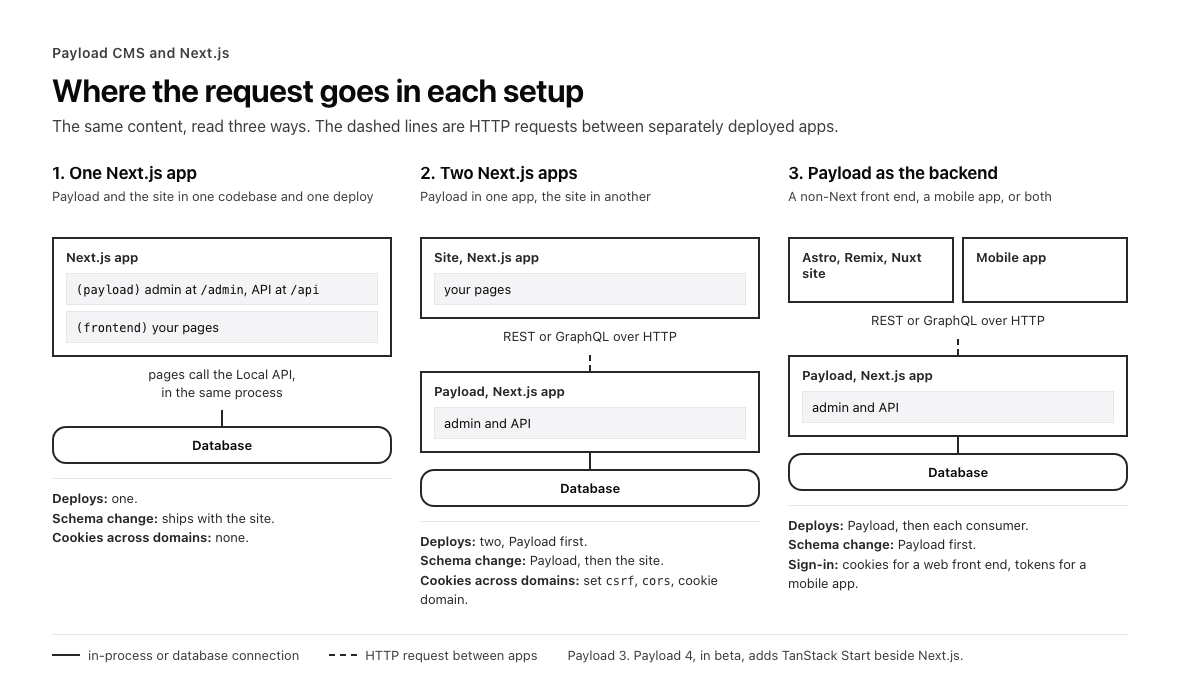
Where the request goes in each setup. Dashed lines are HTTP requests between separately deployed apps.
The one-app setup is the shortest path when one website is the only thing that will read the content, because there is one deploy and no network hop between your pages and your data. The training company’s course pages, blog and booking area fit it well. Keep Payload’s code apart from your site’s code inside the app, with collections, blocks, hooks and access rules in their own folders, and your components in the site’s route group.
The two-app setup earns its extra deploy once more than one thing reads the content, or once you know one will. For example, if the training company plans a mobile app for learners, the mobile app and the website can both read the same Payload backend over REST from the first release. Payload then has to deploy before any consumer that depends on a new field, and requests now cross domains, so cookies, CORS and CSRF need settings that the one-app setup never needed. Running the two apps on different hosts adds its own trade-offs.
Whichever you pick, settle it before the first collection is written, because moving between setups later means rewriting how every page fetches. Shaping the setup before the first build is part of how we scope Payload work.
Starting a project: a new app or an existing Next.js app
A new project starts with npx create-payload-app, which asks for a template and a database and gives you a working app (Payload’s installation docs). The templates include blank, website and ecommerce, plus versions set up for Vercel and for Cloudflare (Payload’s templates on GitHub). The website template is the closest match to the training company, with pages, posts, layout blocks, redirects, previews and revalidation already wired.
Adding Payload to a Next.js app you already have takes five steps:
- Install
payload,@payloadcms/nextand a database adapter for MongoDB, Postgres or SQLite. - Copy Payload’s files into a
(payload)route group in/app, and move your existing routes and root layout into their own route group, such as(frontend). - Wrap your Next.js config in
withPayload, with the config set up as an ES module. - Create
payload.config.tsand add the@payload-configpath to your TypeScript config. - Run the dev server and create your first admin user at
/admin.
Check the requirements before you start. Payload 3 needs Node.js 22 (from 22.23.4) or 24 (from 24.22.1), a supported release of Next.js 15 or 16, and a package manager, with pnpm preferred.
If your content lives in another CMS today, moving existing content onto Payload covers the schema, the import and the redirects.
How your pages read content
Use the Local API wherever your code runs on the server in the same app, and REST or GraphQL everywhere else. All three expose the same operations, and every collection you define is available through each of them (Payload concepts).
| API | Where it runs | What it costs |
|---|---|---|
| Local API | Server Components, route handlers, server actions, hooks and scripts in the same app | No HTTP request, typed results |
| REST | Any client, including a separate app, client components and other systems | One HTTP request per call |
| GraphQL | Any client that wants to shape its own query | One HTTP request, plus query cost limits to set |
In the one-app setup, the training company’s course page reads its course with the Local API:
import { getPayload } from 'payload'
import config from '@payload-config'

export default async function CoursePage({ params }: { params: Promise<{ slug: string }> }) {
  const { slug } = await params
  const payload = await getPayload({ config })
  const { docs } = await payload.find({
    collection: 'courses',
    where: { slug: { equals: slug } },
    limit: 1,
  })
  // render docs[0]
}
The Local API skips access control by default, because overrideAccess is true on every Local API call (Payload’s Local API docs). That’s fine for public course pages. For the learner’s bookings, pass overrideAccess: false and the signed-in user, so the same access rules that protect the REST API also protect the page.
Payload also generates TypeScript types from your config, so docs[0] arrives typed as a course, and code that still uses a renamed field fails the type check before it reaches the site.
Keeping pages fresh after an edit
When an editor publishes, an afterChange hook on the collection tells Next.js which cached pages to rebuild, and the next visitor gets the new version without a full site rebuild. Payload’s website template does this for pages and posts, calling revalidatePath for the page’s URL and revalidateTag for its sitemap (the template’s revalidation hook).
import type { CollectionAfterChangeHook } from 'payload'
import { revalidatePath } from 'next/cache'

export const revalidateCourse: CollectionAfterChangeHook = ({ doc }) => {
  if (doc._status === 'published') {
    revalidatePath(`/courses/${doc.slug}`)
  }
  return doc
}
For example, when the training company’s team corrects a course date and publishes, the course page is regenerated on the next request, while every other page stays cached. Pair the hook with generateStaticParams, so course pages are built at deploy time and only the edited one changes afterwards. Also revalidate the old path when a slug changes or a page is unpublished, as the template does, or the old URL keeps serving the old page.
In the two-app setup the hook can’t call revalidatePath on the site, because the site is a different app. Instead, the hook calls a revalidation route on the site with a shared secret, and that route calls revalidatePath itself.
Next.js Cache Components can be switched on alongside Payload without breaking the admin panel, but full compatibility isn’t guaranteed yet (Payload’s installation docs), so test them on a branch before production.
Previews for editors
Payload gives editors two ways to see a draft before it goes live. Draft preview opens the real page on your site in Next.js Draft Mode, and Live Preview shows your site inside the admin panel and updates it as the editor works (Payload’s preview docs).
Both start with drafts switched on for the collection, so a save creates a draft version and only a publish changes what visitors see (Payload’s drafts docs). Draft preview then needs a preview URL in the admin config and a small route on your site that checks a secret and turns on Next.js draft mode, so the page fetches the draft version. Live Preview needs admin.livePreview with your site’s URL and, in the App Router, the RefreshRouteOnSave component from @payloadcms/live-preview-react, which refreshes the server-rendered page each time the editor saves (Payload’s server-side Live Preview docs).
For example, the training company’s marketing lead can rewrite a course description, watch it render at mobile and desktop widths inside the admin, and publish once it reads right. Payload’s draft-preview and live-preview examples show both wired into a Next.js app (Payload’s examples on GitHub).
Sign-in: Payload’s users and your app’s users
Payload can run your app’s sign-in as well as the admin’s. Any collection can be auth-enabled, and Payload then handles login, logout, password resets and an HTTP-only cookie for the signed-in user (Payload’s authentication docs). For the training company, a learners collection with auth switched on gives learners their own accounts, separate from the staff who use the admin.
In the one-app setup, a Server Component passes the request headers to the Local API’s payload.auth, gets the signed-in learner back, and then fetches their bookings with overrideAccess: false (Payload’s Local API docs). No token has to be passed between apps.
If you already sign users in with another provider, Payload doesn’t have to replace it. A custom auth strategy takes the incoming request, checks it against your provider and returns a Payload user or nothing (Payload’s custom strategies docs). For example, if the training company’s learners already sign in with Clerk, the strategy reads the Clerk session from the request headers, finds the learner with the matching Clerk user ID, and Payload’s access rules then apply to that learner as usual.
The two-app setup adds settings, because the cookie is now sent across domains. List your site’s domain in Payload’s csrf option so cookie-based requests from it are accepted, and set the allowed origins in cors (Payload’s cookie strategy docs; Payload’s docs on preventing API abuse). Then set the auth cookie’s domain with auth.cookies.domain on the collection, so both apps can read it.
Deploying a Payload and Next.js app
A Payload app deploys like any other Next.js app, serverless or on a long-running server. Choosing where to run it compares Vercel, Cloudflare, a VPS and managed containers in detail.
Plan for these before the first deploy:
- The build may need the database. Next.js prerenders static pages at build time, and any of them that calls the Local API needs a database connection during the build. If your build runs where the database can’t be reached, such as inside a Docker build, compile without static generation using
next build --experimental-build-mode compile, or mark those routes as dynamic (Payload’s docs on building without a database connection). - Uploads need storage that lasts. On serverless hosts and on hosts with ephemeral filesystems, files written to disk disappear, so course images go to a storage adapter such as Vercel Blob or S3 (Payload’s storage adapters).
- The secret and the container need settings. Set a long, random
PAYLOAD_SECRETin production, and for a container setoutput: 'standalone'in the Next.js config so the image carries only what it needs (Payload’s production deployment docs).
Upgrading Next.js and Payload together
You can’t upgrade Next.js the day a release lands without checking Payload first. @payloadcms/next declares the Next.js releases it supports as a peer dependency, so your package manager flags a mismatch. As of October 2026, Payload 3.92.1 accepts Next.js 15.2.9 to 15.2.x, 15.3.9 to 15.3.x, 15.4.11 to 15.4.x, and Next.js 16 from 16.3.3. That Next.js 16 minimum moved from 16.2.6 to 16.3.3 in Payload 3.90.0 (the Next.js range in Payload’s package.json), so read the range again with each Payload upgrade by running npm view @payloadcms/next peerDependencies.
Keep payload and every @payloadcms/* package on the same version, and upgrade them together. Upgrade to the latest stable release of Payload first, then move Next.js within the range that release supports.
For example, when Next.js ships a patch release, check that range before the training company’s site takes it. If the range doesn’t include it yet, stay on your current release until a Payload release does.
Payload 4’s beta needs Next.js 16.4 or later, moves admin router imports from next/navigation and next/link to @payloadcms/ui, and ships a codemod that applies the breaking changes to a v3 app, run with npx @payloadcms/codemod@beta (the Payload 4 beta release notes; the v4 migration guide). Try it on a branch, and keep production on Payload 3 until 4 reaches a stable release.
Do you have to use Next.js?
On Payload 3, the admin panel and Payload’s HTTP endpoints run in a Next.js app, but the site in front of them can be built with anything. Any front end can read Payload over REST or GraphQL, and Payload ships Astro and Remix examples to start from (Payload’s examples on GitHub). Nuxt and SvelteKit read the same APIs.
Payload also runs outside Next.js for scripts and separate backend services. A seed script or a background worker can import your config, call getPayload and use the Local API, and payload run loads your environment variables the same way Next.js does (Payload’s docs on using it outside Next.js).
Payload 4’s beta docs say Payload “works with the Next.js App Router or TanStack Start”, with a TanStack Start adapter and a blank TanStack template (Payload 4 beta docs). Our wider review of Payload covers where it fits beyond the Next.js question.