
Choosing a content management system often starts with a simple question, do you need a website editor, or do you need a content platform that can support an entire product?
A traditional CMS may work well for a marketing site, while a modern application might need structured content, custom workflows, API access, user authentication, and complete control over hosting and data. Payload CMS sits in that second category. It combines a developer-focused backend with an admin panel that content teams can use without editing code.
This guide explains what Payload CMS is, how it works, what it actually costs to run, and where it fits compared with platforms such as WordPress, Strapi, Sanity, and Contentful.
What is Payload CMS?
Payload CMS is an open-source, TypeScript-based headless content management system. You use it to create content models, admin interfaces, APIs, authentication systems, and application-specific workflows from a single codebase.
Unlike a traditional page-focused CMS, Payload separates content management from the front end. A Payload project can deliver content to:
- A Next.js website
- A mobile application
- An ecommerce storefront
- A customer portal
- An internal app
- A digital product
- Multiple websites or channels
We have shipped all of those on Payload, all are built on the same four-layer monorepo template we maintain and reuse, which serves one content model to a CMS admin, two web apps, and a mobile app. Others like Hello Bello and divbrands run headless commerce on Payload at considerably larger scale. Since the official Ecommerce plugin landed, the cart-and-orders layer no longer has to be hand-rolled the way some of ours was.
Payload is built with JavaScript and TypeScript, and runs on MongoDB, PostgreSQL, or SQLite. As of September 2026 the current release is v3.89.0, shipped on 10 September 2026, from a repository carrying 44.7k stars and 4.1k forks. Payload 4.0 is announced but not shipped: an admin UI redesign, a move to TanStack, and MCP support, posted in June 2026 with a beta targeted “within the next quarter.”
It uses a code-first configuration model, which means you define collections, fields, access rules, hooks, and admin behavior in code rather than relying only on settings stored in a database.
That approach creates a strong connection between the CMS and the application around it. The content model becomes part of the project’s source code, which makes it easier to review changes, reproduce environments, and manage deployments through standard development workflows.
Payload is MIT licensed, and you self-host it. As of September 2026, Payload's get-started page offers three deployment routes plus enterprise, and all three are self-hosted: deploy anywhere you can run a Node.js app, use the Vercel template, or use the Cloudflare template. Payload Cloud, the managed option that older write-ups point to, currently has new projects paused following Figma's June 2025 acquisition. Our guide to hosting Payload compares the routes and what each one changes for jobs, migrations and uploads.
The acquisition has an article of its own. Payload CMS acquired by Figma reads the license file's own history, fifteen months of release cadence, and the separate integration package, rather than the announcement posts.
Why are companies looking at Payload CMS?
The CMS market includes products built for very different needs. WordPress remains widely used for websites. W3Techs puts WordPress at 40.3% of all websites, and 58.8% of every site whose CMS it can identify, as of 14 September 2026, which explains why many companies start there. However, high adoption doesn’t mean it fits every project.
A growing application may need:
- Structured content rather than page-only editing
- A custom data model
- Role-based access control
- REST and GraphQL APIs
- Content relationships
- Custom validation
- Application-specific business logic
- A front end built with modern JavaScript frameworks
- Hosting and database control
The adoption answers the "is this a real platform" question faster than any feature list. Mazda, Vodafone, Microsoft, Sonos, ASICS, and Blue Origin all ship on Payload. Blue Origin's Club for the Future platform sends student postcards to space. Microsoft built an AI tips-and-tricks site on it. Sonos runs a GDPR-compliant campaign hub. Hello Bello runs an ecommerce backend serving both its website and its mobile app from one Payload install.
Payload brings those needs into one development environment. You don’t have to build a separate admin dashboard for every custom data type, and your editors never touch a raw database or an API tool.
The technical ecosystem also supports this direction. Stack Overflow’s 2025 Developer Survey puts JavaScript first at 66% of respondents, with TypeScript sixth at 43.6%. If your team already works in that ecosystem, Payload’s TypeScript-first approach fits it.
The result is a CMS that can serve as both a content platform and an application backend.
How Payload CMS works
Payload projects revolve around collections, globals, fields, access control, hooks, and APIs.
Collections
A collection represents a group of related documents. Common examples include:
- Posts
- Products
- Authors
- Customers
- Events
- Locations
- Testimonials
- Orders
The site you are reading this on runs on Payload, and its collections are a working example: Pages, Posts, Works, Work Categories, Authors, Media, Users, and Tenants, plus separate public and private header, footer, and navigation collections.
On Little Sprouties, a UAE children's nutrition brand we build and run a very different shape. Products, Product Categories, Cart, Orders, Coupons, Addresses, Delivery Areas, Emirates, Fee Rules, and Subscription Durations, alongside the ordinary Pages and Media. Delivery Areas and Emirates exist because delivery economics in the UAE are geographic, and Fee Rules exists because those economics change without a developer.
You define these structures in TypeScript. Payload then uses those definitions to generate the admin interface and API behavior.
Globals
Globals are used for single records that don’t belong in a repeating collection. Typical examples include:
- Site settings
- Header navigation
- Footer content
- Homepage configuration
- Global SEO defaults
- Company information
This distinction keeps the content model organized. A site footer doesn’t need to exist as one item inside a large collection when it can be defined as a dedicated global.
Fields
Payload supports common fields such as text, numbers, checkboxes, dates, relationships, uploads, arrays, blocks, and rich text. Blocks are the most flexible.
For example, a landing page could use a blocks field containing reusable sections such as:
- Hero areas
- Feature grids
- Pricing tables
- Testimonials
- Logo clouds
- Call-to-action sections
- FAQ accordions
We run 24 block types on this site. Five are the generic ones: Hero, Content, Media, Archive, and Call To Action. The other 19 we built because a page needed them: a page hero, a big heading band, an eyebrow two-column, a service offering, a work grid, a work list, filter chips, a blog grid, an article body, a case study hero, a case study content block, a client logos strip, office locations, an FAQ accordion, a contact form, and a CTA band. Editors arrange approved blocks without asking for help from developers.
Access control
Payload includes access control rules that can be applied to collections, fields, and operations. The distinction that matters in practice is not roles, it is scope. Three patterns do most of the work on the projects we run. A published-or-authenticated rule is what makes draft content invisible to the public but still visible in preview. An ownership rule restricts a record to the account it belongs to, which is the marketplace-vendor problem and the customer-portal problem solved in the same place. And field-level rules lock individual fields rather than whole documents, so an editor can change a post's body without being able to touch its publication state.
Access rules can also use request data and document data. That gives you more control than a simple administrator-versus-editor permission model.
Hooks and custom logic
Hooks let you run custom logic before or after actions such as creating, updating, or deleting content. A hook might validate a record, update a related document, send data to another service, or trigger a revalidation request. On this site, hooks drive two plugins we wrote: a workflows plugin, where hooks advance a content workflow when a record changes state, and an Intercom plugin, where hooks push data outward to a third-party service on write. Both live as plugins rather than as loose hooks scattered through collections, which is the habit worth copying. A hook that matters enough to debug is a hook that deserves a folder.
This is one of Payload’s strongest differences from a basic hosted CMS. The content system can respond to application events without forcing you to build a separate service for every small workflow.
Plugins
Payload ships official plugins, and they cover most of what teams otherwise build twice: Form Builder, SEO, Redirects, Search, Nested Docs, Import/Export, Stripe, Sentry, Multi-Tenant, Ecommerce, and an MCP plugin that exposes your collections to AI agents. The Ecommerce plugin is the significant recent one, since "add a full ecommerce backend to any Payload app" removes the main reason teams used to reach for a separate commerce platform. What it covers, and what a store still builds on top of it, is in our Payload CMS ecommerce guide. Our guide to Payload’s MCP plugin covers setting it up and keeping an assistant inside the access you grant.
A Payload plugin is a package you write, install and configure in your config file, versioned with your code and reviewed in a pull request like anything else. There is no marketplace, no auto-update that changes production behavior overnight, and no plugin admin screen.
Payload CMS and Next.js
Payload is closely associated with Next.js, and if you are building a content-rich web application, it is the common pairing.
Next.js provides the front-end application framework, while Payload manages structured content, media, users, and APIs. Depending on the project architecture, both can live in the same repository or operate as connected applications.
A typical setup might look like this:
- An editor creates or updates an article in Payload.
- Payload stores the structured content and media references.
- Next.js requests that content through a local API, REST, or GraphQL.
- The website renders the article using server-side or static rendering.
- A webhook or revalidation action updates the public page.
The monorepo template we build client projects on goes further than one front end. It runs four layers against a single Payload backend: the CMS itself on the Local API, a Next.js site consuming GraphQL through Apollo, a second Next.js app consuming REST, and an Expo mobile layer sharing that same REST client. One content model, four consumers, three API styles.
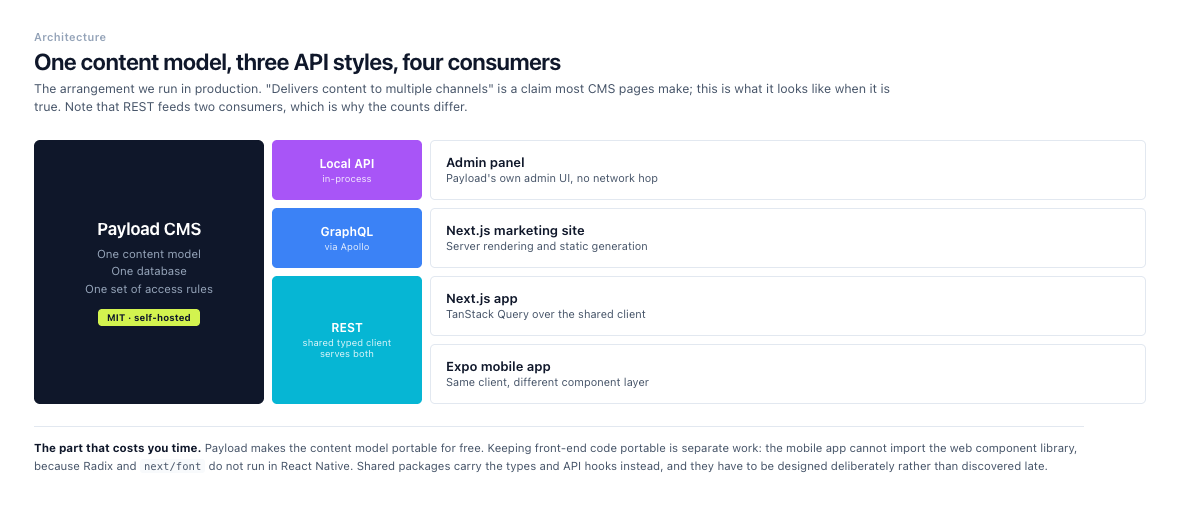
One content model, three API styles, four consumers. REST feeds two of them, which is why the counts differ.
For scale, bizee migrated and rebranded 2,500 pages onto Payload in a single redesign, and Sonos built its campaign hub on the Next.js pairing specifically. These are not demos. They are the arrangement described above running in production at companies with real legal and brand review.
The arrangement works well for websites that need strong content editing alongside custom front-end behavior. It also gives you more control over routing, rendering, caching, and deployment than a hosted CMS with a fixed presentation layer.
Next.js gives you server rendering, static generation, and route handlers, all of which pair naturally with a headless CMS. Payload provides the content and administrative layer, while Next.js handles the user-facing experience.
Payload CMS compared with other platforms
The differences that actually decide this are narrower than most comparisons suggest: who hosts it, where the content model lives, and how the bill scales. Our round-up of Payload CMS alternatives covers the wider field and how to choose between them.
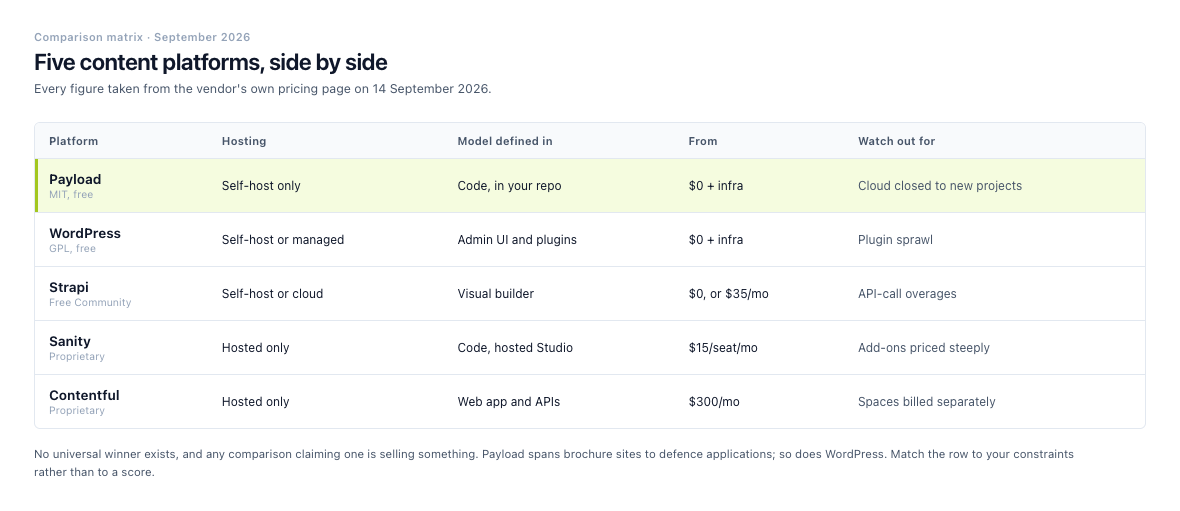
Every figure taken from the vendor pricing page on 14 September 2026.
Payload CMS vs. WordPress
WordPress is a strong choice if you want a familiar publishing interface, a large plugin ecosystem, and a wide selection of themes. It can support blogs, marketing sites, membership sites, and ecommerce projects through extensions.
WordPress's ecosystem is vastly larger, and that is a genuine advantage for anything off the shelf. Payload's is official plugins plus whatever you write, which is a real limitation if you expected to solve a problem by installing something, and a real relief if you have ever inherited a site with forty plugins and no idea which one is rendering the footer.
Payload inverts that. The data model and the application architecture are yours to shape rather than to extend. If you are building a custom product, you may prefer Payload because the CMS can be shaped around the product rather than extended through a growing collection of plugins.
WordPress can also operate as a headless CMS, but that setup often requires additional configuration and decisions around plugins, APIs, authentication, and front-end integration. Payload begins with a developer-oriented, API-first architecture.
This comparison has an article of its own. Payload CMS vs WordPress carries current prices on both sides, the market-share and vulnerability data in full, and a WordPress-to-Payload migration we ran end to end, including the parts that did not go to plan. If you’re planning the move itself, from WordPress or anywhere else, our step-by-step guide to moving onto Payload covers it from the schema to the redirects.
Payload CMS vs. Strapi
Strapi and Payload are both open-source headless CMS platforms. Both support structured content, APIs, custom content types, and self-hosting.
The main difference often comes down to development style. Strapi traditionally emphasizes an interface-driven content type builder, while Payload emphasizes configuration in code. If you want to create and review content models in pull requests, Payload’s approach fits.
Strapi gives you a content-type builder, REST and GraphQL APIs, and a plugin ecosystem. Payload gives you collections, TypeScript configuration, access control, hooks, and integrated application development.
The cost shape differs too. Strapi's self-hosted Community edition is free, but Strapi Cloud starts at $35 per month (100k API requests, 50 GB asset storage, 50 GB asset bandwidth), rising to $90 per month (1M requests, 250 GB storage, 500 GB bandwidth) and $450 per month (10M requests, 1,000 GB of each). Extra environments are +$60 per month on Pro and +$300 per month on Business, and overages run +$1.50 per 25k API requests and +$0.60 per GB of storage. Those figures are current as of September 2026. Payload has no equivalent metered tier, because it has no hosted tier at all.
Neither product is automatically better. Strapi may suit you if you want a more visual modeling experience. Payload may suit you if you want content architecture living close to the rest of the application code. Our full comparison of Payload and Strapi covers where each one runs, who changes the content model after launch, and what each charges for.
Payload CMS vs. Sanity
Sanity is a hosted, composable content platform known for its flexible editing experience and real-time collaboration features. It separates the content studio from the front-end application and provides a hosted content infrastructure.
Sanity's free tier is genuinely generous: $0 forever for up to 20 user seats, 10k documents, 1M CDN requests, 250k API requests, and 100 GB of bandwidth per month. Growth is $15 per seat per month, covering up to 50 seats and 25k documents. The costs that surprise teams are the add-ons: a quota increase is +$299 per month, an extra dataset +$999 per dataset per month, and dedicated support +$799 per month, with overages at $1 per 250k CDN requests, $1 per 25k API requests, $0.30 per GB of bandwidth, and $0.50 per GB of assets. All figures are current as of September 2026.
With Payload the application and data layer stay in your hands. You run your own infrastructure, customize server behavior, and place content management inside a broader TypeScript application.
Sanity can reduce infrastructure work because the hosted platform manages much of the operational layer. Payload can be a better fit when your project requires deeper control over hosting, authentication, database behavior, and backend logic than Sanity's hosted platform and Studio architecture are designed to give you. We cover more in Payload CMS vs Sanity.
Payload CMS vs. Contentful
Contentful is a hosted headless CMS designed for structured content delivery across websites, applications, and digital channels. Its managed infrastructure appeals if you want a platform without maintaining the underlying CMS server.
Contentful is also, as of September 2026, officially part of Salesforce, which matters if your procurement team treats Salesforce as a strategic vendor, or if it treats vendor consolidation as a risk. Its pricing has three tiers. Free is $0 forever: 10 users, 2 roles, 2 locales, 100K API calls per month, and 50 GB of CDN bandwidth, both hard-capped with no overages allowed. Lite is $300 per month: 20 users, 3 roles, 3 locales, 1M API calls, and 100 GB of CDN bandwidth, with paid overages permitted. Enterprise is quoted on application and brings unlimited API calls, custom bandwidth, and an uptime SLA of up to 99.99%.
The detail that catches teams out is Spaces, which are priced separately from plans. Every plan includes one free Starter Space, capped at 25 content types, 2 environments, and 10,000 records. A single additional Lite Space costs $850 per month and raises those caps to 50 content types, 4 environments, 50,000 records, up to 5 workflows, 2M extra API calls, and 750 GB of extra asset bandwidth. A Lite plan running one extra Space therefore lands at $1,150 per month before any overage.
Payload is the self-hosted counterpart. Codebase, database, deployment process, and server-side behavior all sit on your side of the line. That matters if you have specific compliance requirements, internal infrastructure policies, or a preference for owning the full application stack.
Contentful organizes content into spaces, environments, and a delivery API. Payload's model sits closer to the application code, which shortens the distance between content configuration and product development.
No CMS is the right choice for every team. With the specifics above on the table, the answer comes down to your technical requirements, editorial needs, hosting preferences, and budget. If your SQL database already exists and other systems write to it, our Payload CMS vs Directus comparison covers Directus, which introspects existing tables.
Real-world Payload CMS scenarios
Scenario 1: a multi-tenant distributor portal
The textbook version of this is a company running several brands off one platform, each with its own colors, navigation, pages, authors, and SEO settings. Payload handles that. You model brands, sites, pages, reusable blocks, and global settings, restrict editors to the brands they manage, and let a Next.js front end render each site from the domain or brand configuration. One installation, many surfaces, shared structure centrally managed.
We built the harder version of the same shape: a distributor order portal for a hardware manufacturer's Middle East operation, replacing an intake process that ran entirely on emailed spreadsheets. Over 100 distributors, 5,000+ orders a year, commonly 100 to 150 line items on a single order, across several regions.
Each distributor is a tenant, and that one decision is what makes everything downstream tractable. Data isolation stops being a filter that every query has to remember to apply and becomes a property of the model: a distributor sees only its own orders because it cannot address anyone else's, not because a where clause was written correctly on every endpoint by every developer who ever touched the project. Pricing resolves from the tenant's tier and currency. Part-number mappings, credit terms, delivery preferences, and regional routing all hang off the tenant rather than off the order.
The lesson generalizes well past distributors. If you are about to add a brandId or customerId field to every collection and filter on it everywhere, you are building tenancy by hand, and you will get it wrong in one place eventually. Model the tenant first. Our guide to how tenancy, roles, and field rules combine in Payload walks through five full builds.
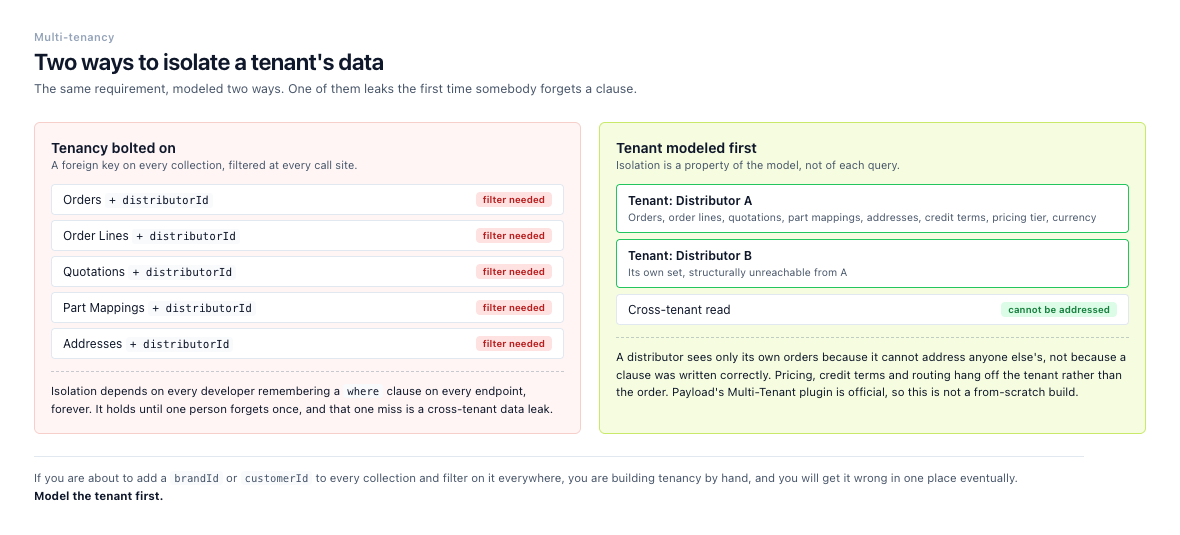
The same requirement modeled two ways. Only one of them survives a developer forgetting a where clause.
You do not have to build it from scratch either. Payload's Multi-Tenant plugin is official, which matters when the alternative is rolling your own isolation and discovering the gap.
Scenario 2: a product catalog with editorial content
The textbook version of this is a manufacturer with hundreds of products, technical documents, related accessories, and buying guides, where product data comes from an internal system while marketing manages descriptions, images, and editorial content. Payload handles that shape too: it stores relationships between products, categories, manuals, authors, and articles, hooks validate records or synchronize selected fields with another service, and one content API feeds product pages, comparison tools, and resource libraries.
The interesting problems in a catalog are rarely the products. On the distributor portal above, the catalog is a read-only mirror of the manufacturer's item master: the CMS never owns that data, it imports it. What the CMS does own is the mapping layer, because distributors order using their own internal part numbers rather than the manufacturer's SKUs. One distributor reference can resolve to several canonical SKUs, or to none at all. So the model carries a distributor-part-number entity sitting between the two, and ambiguity surfaces for a human to resolve at the moment of ordering instead of three emails later. Add per-region availability and minimum order quantities and the "catalog" turns out to be four related entities wearing one word.
The editorial half is a separate discipline. On Little Sprouties, products carry categories, tags, highlights, top labels, and FAQ entries, and every one of those is a relationship rather than a text field, because marketing changes them weekly and engineering does not want to be in that loop. That is the real test of a catalog model. Not whether it can hold the products, but whether the people who change them daily still need developers in the room.
This kind of project needs more than blog publishing. It needs a content model that reflects the business. Two scenarios only go so far. What can you build with Payload CMS walks through ten of them, from content APIs to multi-tenant builds and AI pipelines. It names the official plugin behind each one.
A gap many CMS evaluations miss: editorial operations
CMS comparisons often focus on features, but the day-to-day editorial experience deserves equal attention.
Before choosing Payload, ask:
- Who creates content?
- Who reviews it?
- Do different teams need different permissions?
- Should unpublished content be visible in previews?
- How will editors manage media?
- What happens when a field changes?
- How will the team handle redirects and SEO metadata?
- Does content need approval before publication?
- How will you test schema changes?
- Who owns backups, monitoring, and upgrades?
We learned the answer to several of those the expensive way. We built a digital asset management system for a design studio running six to eight client projects at any one time, with a four-step approval chain on top of our workflow plugin. What we got wrong first, and the reason this section exists at all, is that we modeled approval as a property of the client. It is not. It is a property of the work. The same client sending in a graphic design job and a UI/UX job needs two different approval paths, because the reviewers, the artifacts, and the definition of "done" are different in each case. Model the workflow against the type of work rather than the account, or you end up with one client's process forked three ways and nobody able to say which fork is correct.
No feature comparison would ever have surfaced that. It is not a CMS capability question, it is a question about how a business actually works, and it only appears once someone asks the ten questions above out loud.
Payload supports every one of those requirements, and none of them by default. You define the roles, naming conventions, content relationships, validation rules, preview behavior, and publishing procedures. They are implementation decisions rather than platform features, and no CMS will make them for you.
One practical evaluation step costs an hour and is worth more than any comparison table: read Payload's documentation, open GitHub discussions and its Discord before you commit. You learn what is genuinely unfinished. All of it is the kind of thing you would rather know in week one than week twenty.
What does Payload CMS cost?
Payload is open source, but a production project still has operating costs. Those may include:
- Hosting
- Database infrastructure
- File storage
- CDN usage
- Monitoring
- Backups
- Development and maintenance
- Third-party services
- Enterprise support, if required
The exact cost depends on traffic, media volume, deployment architecture, uptime requirements, and team size. A small marketing site and a multi-tenant application won’t have the same infrastructure needs.
Here is what those line items actually cost, at list price, as of September 2026:
| Layer | Option | Price |
|---|---|---|
| CMS license | Payload (MIT) | $0 |
| App hosting | Vercel Hobby / Pro | $0 / $20 per month, including a $20 usage credit |
| App hosting | Netlify Personal / Pro | $9 / $20 per month (1,000 / 3,000 credits) |
| App hosting | Railway Hobby / Pro | $5 / $20 per month, each with a matching usage credit |
| App hosting | DigitalOcean Droplet | $4 to $12 per month (512 MiB to 2 GiB, 10 to 50 GiB SSD) |
| Postgres | Neon Free / Launch | $0 (0.5 GB, 100 CU-hours) / $0.35 per GB-month plus $0.106 per CU-hour |
| MongoDB | Atlas M0 / Flex / M10 | $0 (512 MB) / $8 to $30 per month (5 GB) / from $56.94 per month |
| File storage | Cloudflare R2 | $0.015 per GB-month, egress free |
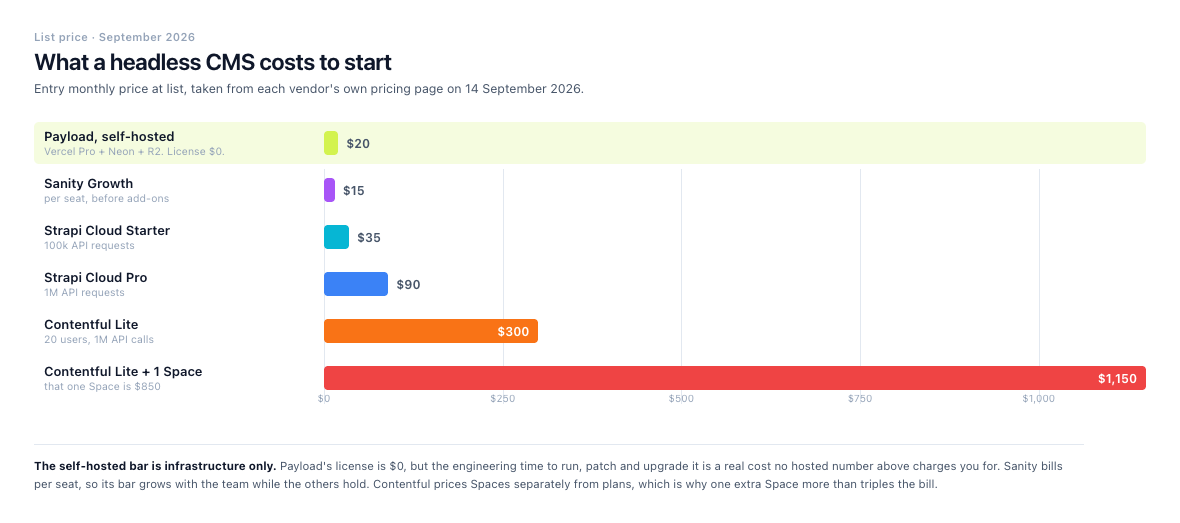
The same figures as the table above, to scale. The gap between the cheapest and dearest entry point is 57x.
The rates that bite are the metered ones. Vercel Pro includes 10M edge requests, 1 TB of fast data transfer, 1M function invocations, and 5k image optimizations; past that you pay from $2 per 1M edge requests, $0.15 per GB of transfer, $0.60 per 1M invocations, $0.05 per 1k image optimizations, and $0.40 per 1M ISR reads. Neon bills $0.10 per GB of egress beyond the 500 GB included and $1.50 per branch per month past the included set. Railway meters at roughly $10 per GB-month of memory and $20 per vCPU-month, with $0.05 per GB of egress. Cloudflare R2 is the outlier: egress is free on every storage class, which is why media-heavy Payload projects tend to land there rather than on S3.
A self-hosted Payload stack on Vercel Pro, Neon, and R2 starts at that $20 seat and scales with what you actually use. The engineering time to run it is a real cost that none of the hosted numbers charge you for. We have a more detailed guide to Payload CMS pricing if you want the full cost breakdown.
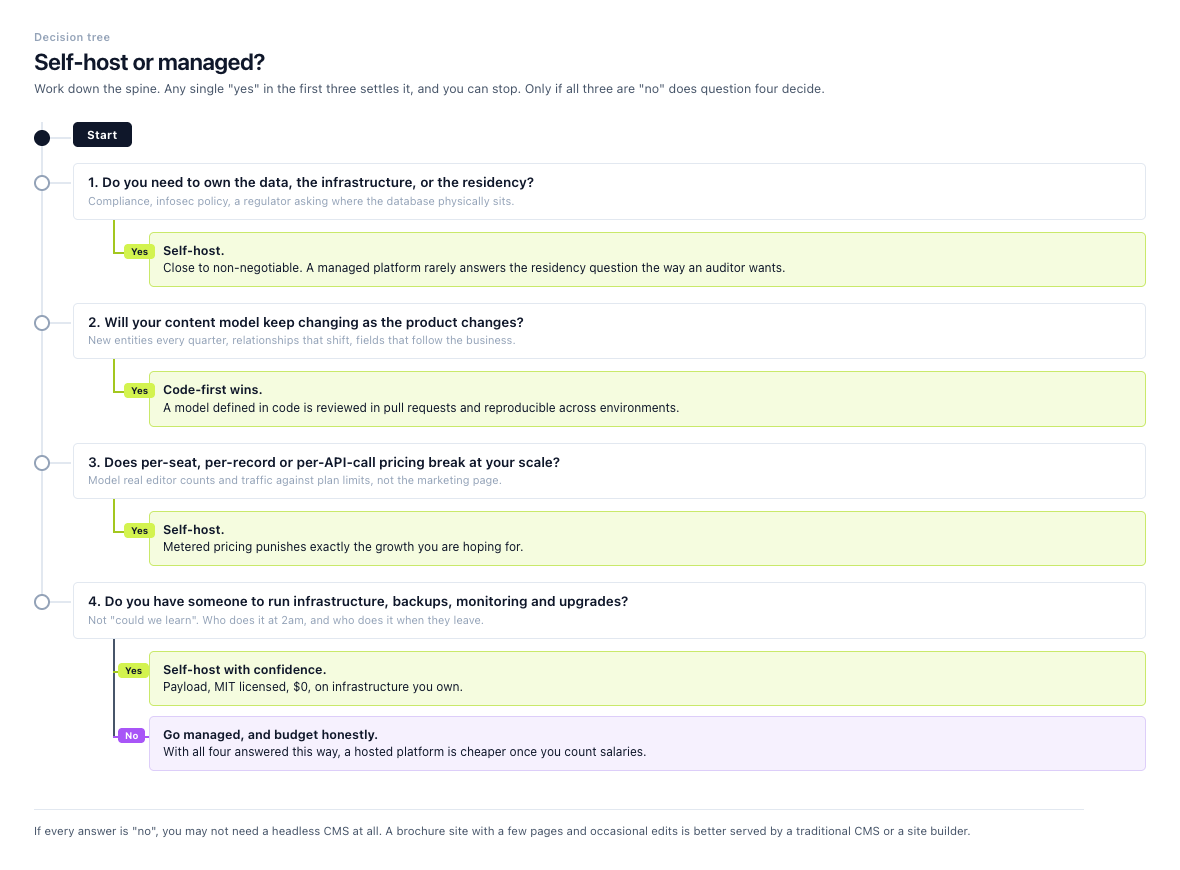
Work down the spine. Any single yes in the first three questions settles it.
Compare total operating cost rather than looking only at the CMS license. A hosted CMS may charge by seats, API usage, environments, or content volume. A self-hosted system may reduce platform fees while requiring more technical ownership.
Payload’s get-started page lists the current deployment routes, and enterprise covers the one paid tier: dedicated engineering support, SSO, publishing workflows, the visual editor, A/B testing, and AI tooling, priced on application rather than published.
When Payload CMS is a strong fit
Payload is worth considering when your project needs several of the following:
- A custom content model
- TypeScript-based development
- Self-hosting or infrastructure control
- A Next.js front end
- Built-in admin tooling
- Custom access rules
- Rich relationships between content types
- Application-specific backend logic
- Multiple content channels
- A code-first development workflow
It may not be the best option for a simple brochure site that needs only a few pages and occasional edits. A hosted website builder or traditional CMS could be faster and less expensive for that use case.
Payload becomes more attractive as the content system starts to resemble part of the product itself.
Payload CMS is a strong option if you need more than a standard website editor. Its TypeScript foundation, code-first configuration, access control, APIs, database options, and integration with modern application frameworks make it suitable for custom websites and content-driven products.
It won’t replace every CMS. WordPress may be the better choice for a conventional publishing site, while Sanity or Contentful may suit teams that prefer a fully managed platform. Payload stands out when you need control over the application, content model, infrastructure, and backend behavior. For the trade-offs and the production settings to get right, see our full Payload CMS review.
If you’re considering Payload, start by mapping your content types, user roles, integrations, and publishing workflow. That map, not the feature comparison, is what tells you whether Payload is the right answer.
If you would rather have that conversation with the people who would do the build, our Payload CMS design and development service starts with the content model for the same reason.
References
- Payload CMS Documentation
- Payload CMS GitHub Repository
- Payload CMS Get Started
- Payload CMS Enterprise
- Payload CMS Case Studies
- Payload is joining Figma (announcement)
- Payload 4.0: Admin UI Redesign, TanStack, MCP, and More
- Payload Database Overview
- Payload Ecommerce Plugin
- Payload Multi-Tenant Plugin
- Payload CMS Plugins Overview
- Payload CMS GitHub Discussions
- Payload CMS Discord
- Vercel Pricing
- Netlify Pricing
- Railway Pricing
- DigitalOcean Droplet Pricing
- Neon Pricing
- MongoDB Atlas Pricing
- Cloudflare R2 Pricing
- Strapi Cloud Pricing
- Sanity Pricing
- Contentful Pricing
- Next.js Documentation
- Strapi Documentation
- Sanity Documentation
- Contentful Developer Documentation
- W3Techs, Usage Statistics and Market Share of WordPress
- Stack Overflow 2025 Developer Survey