
You have four Claude Code sessions running. One is building a feature, one is researching, one is fixing a bug, and one stopped twenty minutes ago to ask whether you want Postgres or SQLite. Its tab is the one you haven’t opened.
As of November 2026, Claude Code 2.1.328 can tell you a session needs you, with a desktop alert in some terminals or a push to your phone. You still answer in the session, in its terminal or in the Claude app. We set ours up so that Claude’s questions, permission prompts and plan approvals arrive as Biscuit notifications we answer where they appear, and the session carries on.
This article shows what that looks like, how it works, and what we learnt building it. It ends with a section you can hand to your own Claude so it sets the whole thing up for you, on macOS or Windows. Biscuit is the local-first workspace app we build in our Labs. This setup is a recipe any Biscuit user can add, and Biscuit doesn’t ship it as a feature.
Short on time? Paste this into Claude Code. It reads the article and offers to set it up for you.
Read https://idealabz.ae/blog/answer-claude-code-from-notifications and summarise it for me. Then ask whether I want this in my own setup. If I say yes, follow the "Hand this to your Claude" section: install both hooks, merge the settings without overwriting anything, show me what you changed, and walk me through the tests.- Why does a waiting Claude Code session cost you time?
- What does Claude Code already do to tell you?
- What does answering from a notification look like?
- How does it work?
- What we learnt building it
- Hand this to your Claude
- How do you make it yours?
- What if nothing appears?
- Frequently asked questions
- What to do next
Why does a waiting Claude Code session cost you time?
A session that needs you stops and waits inside its own terminal tab until you answer. Claude Code stops for three kinds of moment:
- A question. Claude needs you to pick an option, such as “Postgres or SQLite?” for a new project’s database.
- A permission prompt. Claude wants to run a command or change a file that your rules say needs a yes, such as installing a new package.
- A plan approval. Claude has finished planning in plan mode, for example how to add a password reset page, and wants a go-ahead before it changes any files.
With one session, you see the question when it appears. With several, you only find out when you happen to click into the right tab, so you end up flipping between tabs to check who is waiting. We run several sessions at once as part of how we run Claude Code, and the waiting adds up across a day.
What does Claude Code already do to tell you?
Claude Code can alert you that a session needs you. To answer without going back to the session, you need Remote Control on your phone or a hook on your machine.
| Route | When it fires | Can you answer from it? |
|---|---|---|
| Terminal desktop notification | In Ghostty, Kitty and iTerm2, when Claude finishes or pauses for permission and you seem to be away (terminal configuration) | No, you go to the terminal |
A Notification hook | For a permission prompt, once it has waited about six seconds without you typing (hooks reference) | No, it can only alert |
| Remote Control push | When Claude needs a decision, with Push when actions required turned on (Remote Control) | Yes, in the Claude app or on claude.ai/code |
A PreToolUse or PermissionRequest hook | Just before Claude Code shows the question or the permission dialog | Yes, the hook returns the answer |
Hooks are small scripts that Claude Code runs on events. For example, a Notification hook can play a sound when a permission prompt has waited, but you still switch to that tab to answer it. The last row is what this article uses. A hook runs on your machine, so the answer can come from anything that can ask a question and wait, and Biscuit’s notifications can. A name on each tab helps too, because it tells you what a session is working on before you answer it, and we name each session from its first prompt for that reason.
What does answering from a notification look like?
Each of the three moments arrives as a Biscuit notification with the answer built in, and the session continues as soon as you tap. When three sessions need you at once, three notifications stack up, each titled with its project.
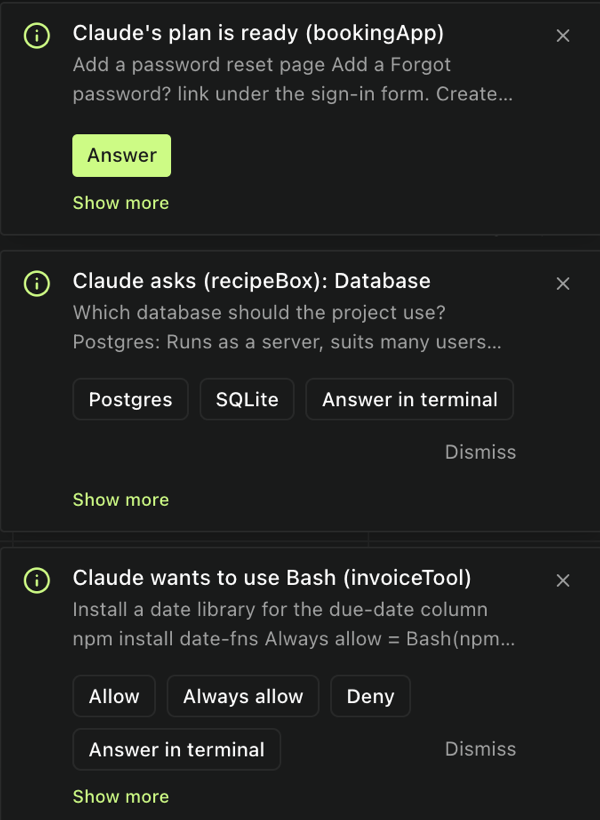
Three sessions waiting at once, each in its own notification.
For example, when Claude asks which database to use, the popup shows Postgres and SQLite as buttons, and one tap answers it.
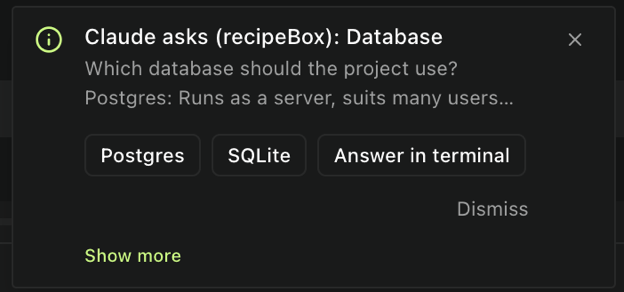
A single-choice question, answered in one tap.
A question with two parts arrives with an Answer button that opens a card in the notifications sidebar. Each part has its own pick list and a box for your own answer, and the green Send answer button sends them together.
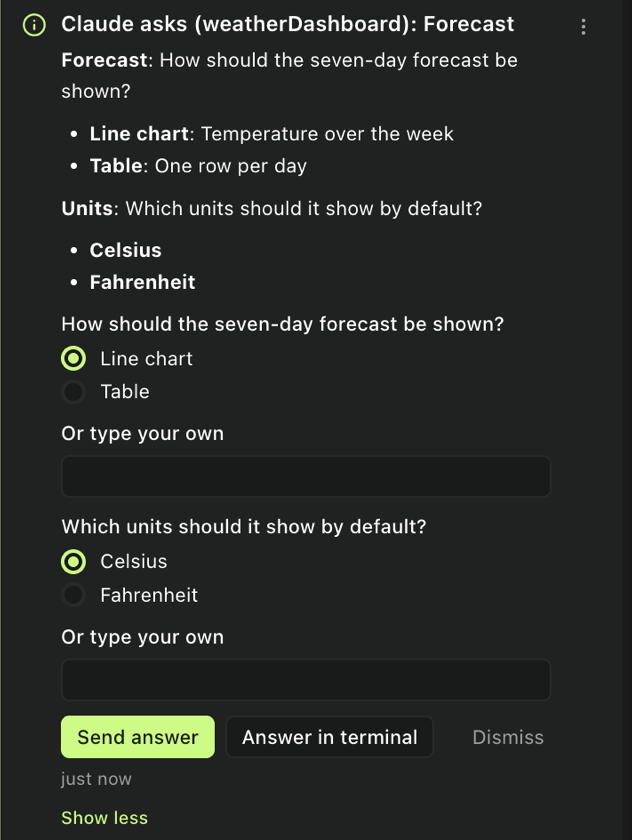
A two-part question as a card in the sidebar.
A permission prompt shows the exact command or file change with Allow, Always allow and Deny. Always allow applies what Claude Code suggests for that request, usually a rule that allows the same call from then on, and the notification spells out what that is.
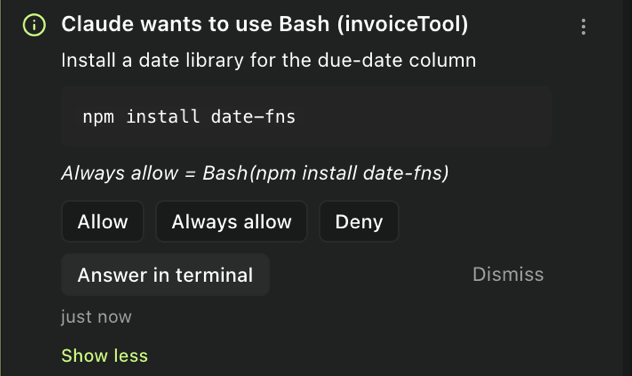
A permission prompt with the command in full.
A plan arrives the same way, and its card holds the whole plan formatted, a box for what should change, and the buttons Approve, Approve, review each edit and Keep planning. Approve names the mode the session continues in, such as auto mode. These match the choices the terminal gives you when a plan is ready.
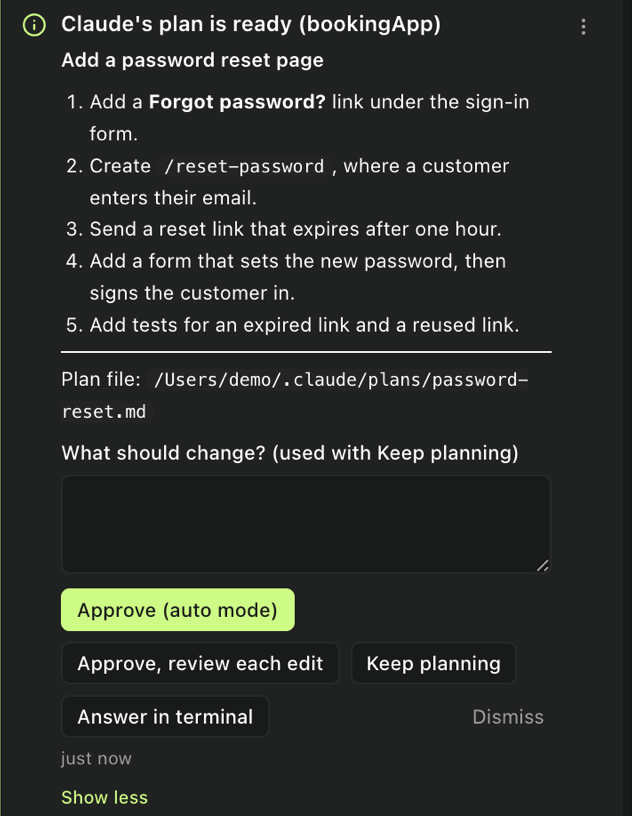
A plan ready for approval.
Every notification also has Answer in terminal, which brings the normal terminal dialog back straight away. Clicking the notification itself opens the right workspace and the terminal tab that asked.
How does it work?
Two Claude Code hooks hand each moment to Biscuit, wait for your answer, and give it back to Claude Code. Neither Biscuit nor Claude Code needed any change for this.
The first hook runs on PreToolUse for the AskUserQuestion tool, which is how Claude asks you a question. It reads the questions and options and sends them to Biscuit. When you answer, it replies with "allow" and the original questions plus an answers object that maps each question to your choice. Claude Code then skips its own picker, and Claude reads your answers (hooks reference). For example, tapping Postgres returns "answers": {"Which database should the project use?": "Postgres"}.
The second hook runs on PermissionRequest, which fires just before Claude Code would show a permission dialog. It replies with a decision, allow or deny. Plan approval comes through the same event as the ExitPlanMode tool, and the reply can also set the permission mode the session continues in (hooks reference).
On the Biscuit side, both hooks call biscuit-notify, the command-line tool every Biscuit terminal can use. With --ask, it shows a notification that asks something and waits for the answer, then prints the answer as one line of JSON. It exits with 0 when you answered, 5 when it’s still waiting, 6 when you dismissed the notification or it expired, and 7 when notifications are switched off. Buttons go on the popup itself (up to six), a card with fields opens in the sidebar (up to 20 fields), and --terminal-session-id makes the notification open the terminal that asked.
While a hook runs, the terminal dialog waits. So the hook can send the question to Biscuit, wait, and hand back the answer. If you don’t answer within two minutes, you dismiss the notification, or Biscuit isn’t running, the hook exits without a reply and Claude Code shows its normal dialog.
What we learnt building it
We built this with AI-powered development and tested it with a person answering real notifications. Five decisions came out of that testing.
- Fallback first. The rule that the terminal dialog always comes back is what made it safe to switch on for every session, including ones nobody is watching. When a hook gets no answer, it exits without a reply, and if it fails outright, Claude Code carries on to its own dialog, so a broken notification can’t leave a session stuck.
- Buttons for quick choices, a card for the rest. A single-choice question goes out as buttons, because buttons answer it on the popup in one tap. Only a question with several parts becomes a card, since a card has to open in the sidebar. On the card, Send answer is marked as the primary button, because with only plain buttons the card looked disabled.
- Plan approval keeps your safety settings. The first version switched the session to accept-edits mode after a plan was approved. For someone who normally runs in auto mode, that was a step down, and every command started asking again. The hook now returns the session to
permissions.defaultModefrom your Claude Code settings, and to auto mode when that isn’t set. Auto is Claude Code’s built-in starting mode for interactive sessions since version 2.1.283, and it’s what the terminal’s own first plan option, “Yes, and use auto mode”, picks (permission modes). If auto mode isn’t available to you, because your organisation has switched it off or your model doesn’t support it, setdefaultModeyourself. - Your deny rules stay in charge. A hook can’t approve what a deny rule refuses (hooks reference). If you block a command in your settings, it stays blocked whatever anyone taps.
- How often you see permission prompts depends on your mode. In auto mode, Claude Code rarely asks. It still asks for tools you’ve given an ask rule, for Claude’s questions, for risky deletes, and for messages between Claude sessions, and it goes back to asking if auto mode blocks an action three times in a row (permission modes). So the permission hook matters most for the prompts that would stall a session while you’re away.
We kept this as a recipe on purpose. Biscuit provides the parts (notifications that ask and wait, cards, buttons, links back to a terminal), and you decide which moments use them. Built into Biscuit, it would decide for everyone how they work with their AI. As two hooks, you can change the wait, the buttons, or which moments go to Biscuit.
Hand this to your Claude
Paste this section, or the whole article, into a Claude Code session and say “set this up for me”. The steps work on macOS, Windows and Linux.
What you need
- Biscuit installed and running.
- Claude Code, 2.1.295 or newer.
- Node.js 18 or newer. Check with
node --version. biscuit-notifyworking in a terminal. Check withbiscuit-notify --help.
1. Save the two hooks
Save both files in the Claude Code hooks folder in your home directory. On macOS and Linux that’s ~/.claude/hooks/, and on Windows it’s %USERPROFILE%\.claude\hooks\.
The first hook, askViaBiscuit.mjs, sends Claude’s questions to Biscuit.
#!/usr/bin/env node
// Claude Code PreToolUse hook for AskUserQuestion.
// Shows Claude's question as a Biscuit notification, waits for the answer and
// hands it back to Claude, so the terminal picker is skipped.
// No answer in time, "Answer in terminal", a dismiss, or any error => the hook
// exits quietly and Claude Code shows its normal terminal picker instead.
//
// Works on macOS, Windows and Linux. Needs Node 18+ and Biscuit's
// `biscuit-notify` CLI. Settings (all optional, as environment variables):
//   BISCUIT_ASK_WAIT     seconds to wait for an answer (default 120)
//   BISCUIT_NOTIFY_BIN   path to biscuit-notify, or to its .js file (run with Node)

import { execFileSync } from 'node:child_process';
import { readFileSync, writeFileSync, mkdtempSync, rmSync } from 'node:fs';
import { tmpdir } from 'node:os';
import { join, basename } from 'node:path';

const WAIT = Number(process.env.BISCUIT_ASK_WAIT || 120);
const quiet = () => process.exit(0);

let input;
try { input = JSON.parse(readFileSync(0, 'utf8')); } catch { quiet(); }

const ti = input?.tool_input || {};
const questions = Array.isArray(ti.questions) ? ti.questions : [];
if (!questions.length) quiet();
if (ti.answers && Object.keys(ti.answers).length) quiet();

// Run biscuit-notify without a shell (safe quoting on every OS). The body goes
// over stdin so long text never hits command-line length limits.
function notify(args, body) {
  const bin = process.env.BISCUIT_NOTIFY_BIN || 'biscuit-notify';
  const full = [...args, '--body-stdin'];
  const [cmd, cmdArgs] = /\.[cm]?js$/i.test(bin) ? [process.execPath, [bin, ...full]] : [bin, full];
  return execFileSync(cmd, cmdArgs, { encoding: 'utf8', input: body, timeout: (WAIT + 15) * 1000 });
}

const describe = (q) => (q.options || [])
  .map((o) => `- **${o.label}**${o.description ? `: ${o.description}` : ''}`
    + (o.preview ? `\n\n\`\`\`\n${o.preview}\n\`\`\`` : ''))
  .join('\n');

const first = questions[0];
const labels = (first.options || []).map((o) => o.label);
const project = basename(input.cwd || process.cwd());
const title = `Claude asks (${project}): ${first.header || first.question}`.slice(0, 200);

// Quick mode: one single-choice question becomes plain buttons, answerable in
// one tap on the popup. Everything else becomes a card in the sidebar.
const quick = questions.length === 1 && !first.multiSelect
  && !(first.options || []).some((o) => o.preview)
  && labels.length >= 1 && labels.length <= 5 && new Set(labels).size === labels.length;

const args = [title, '--ask', '--wait', String(WAIT), '--source', 'claude-code-ask'];
if (input.cwd) args.push('--workspace-path', input.cwd);
if (process.env.BISCUIT_TERMINAL_SESSION_ID) args.push('--terminal-session-id', process.env.BISCUIT_TERMINAL_SESSION_ID);

let body;
const dir = mkdtempSync(join(tmpdir(), 'askViaBiscuit-'));
if (quick) {
  body = `${first.question}\n\n${describe(first)}\n\nWant to type your own answer? Tap **Answer in terminal**.`;
  for (const l of labels) args.push('--button', l);
  args.push('--button', 'Answer in terminal');
} else {
  body = questions.map((q, i) => `**${q.header || `Question ${i + 1}`}**: ${q.question}\n\n${describe(q)}`).join('\n\n');
  const blocks = questions.flatMap((q, i) => [
    { type: q.multiSelect ? 'pickMany' : 'pickOne', id: `q${i}`, label: q.question, options: (q.options || []).map((o) => o.label) },
    { type: 'shortText', id: `q${i}_other`, label: 'Or type your own' },
  ]);
  const cardPath = join(dir, 'card.json');
  writeFileSync(cardPath, JSON.stringify({
    version: 1,
    blocks,
    buttons: [
      { id: 'send', label: 'Send answer', style: 'primary' },
      { id: 'terminal', label: 'Answer in terminal', style: 'normal' },
    ],
  }));
  args.push('--card-file', cardPath);
}

let res;
try {
  const out = notify(args, body);
  res = JSON.parse(out.trim().split('\n').pop());
} catch {
  // exit 5 = still waiting, 6 = dismissed/expired, 7 = notifications switched off
  rmSync(dir, { recursive: true, force: true });
  quiet();
}
rmSync(dir, { recursive: true, force: true });
if (res?.status !== 'answered') quiet();

const answers = {};
if (quick) {
  const idx = Number(String(res.button || '').replace(/^b/, '')) - 1;
  if (!(idx >= 0 && idx < labels.length)) quiet(); // "Answer in terminal" or unknown
  answers[first.question] = labels[idx];
} else {
  if (res.button === 'terminal') quiet();
  const a = res.answers || {};
  questions.forEach((q, i) => {
    const own = typeof a[`q${i}_other`] === 'string' ? a[`q${i}_other`].trim() : '';
    let pick = a[`q${i}`];
    if (Array.isArray(pick)) pick = pick.join(', ');
    const val = own || (pick == null ? '' : String(pick));
    if (val) answers[q.question] = val;
  });
}
if (!Object.keys(answers).length) quiet();

process.stdout.write(JSON.stringify({
  hookSpecificOutput: {
    hookEventName: 'PreToolUse',
    permissionDecision: 'allow',
    permissionDecisionReason: 'Answered in a Biscuit notification',
    updatedInput: { ...ti, answers },
  },
}));
The second hook, permissionViaBiscuit.mjs, sends permission prompts and plan approvals to Biscuit.
#!/usr/bin/env node
// Claude Code PermissionRequest hook.
// Shows permission prompts ("Claude wants to run X") and plan approvals as
// Biscuit notifications and hands the decision back to Claude Code.
// No answer in time, "Answer in terminal", a dismiss, or any error => the hook
// exits quietly and Claude Code shows its normal terminal dialog instead.
// AskUserQuestion is left to askViaBiscuit.mjs.
//
// Works on macOS, Windows and Linux. Needs Node 18+ and Biscuit's
// `biscuit-notify` CLI. Settings (all optional, as environment variables):
//   BISCUIT_PERMISSION_WAIT  seconds to wait for a decision (default 120)
//   BISCUIT_NOTIFY_BIN       path to biscuit-notify, or to its .js file (run with Node)
// Every request and decision is logged to <system temp>/permissionViaBiscuit.log.

import { execFileSync } from 'node:child_process';
import { readFileSync, writeFileSync, appendFileSync, mkdtempSync, rmSync } from 'node:fs';
import { tmpdir, homedir } from 'node:os';
import { join, basename } from 'node:path';

const WAIT = Number(process.env.BISCUIT_PERMISSION_WAIT || 120);
const LOG = join(tmpdir(), 'permissionViaBiscuit.log');
const log = (line) => { try { appendFileSync(LOG, `${new Date().toISOString()} ${line}\n`); } catch { /* best effort */ } };
const quiet = (why) => { if (why) log(`  -> terminal (${why})`); process.exit(0); };

let input;
try { input = JSON.parse(readFileSync(0, 'utf8')); } catch { quiet('bad input'); }

const tool = input.tool_name || '';
const ti = input.tool_input || {};
log(`${tool} ${JSON.stringify(ti).slice(0, 120)}`);
if (!tool || tool === 'AskUserQuestion') quiet('not handled here');

const project = basename(input.cwd || process.cwd());
const clip = (s, n) => (s.length > n ? `${s.slice(0, n)}\n\n_(truncated)_` : s);
const fence = (s) => `\`\`\`\n${String(s).replace(/```/g, "'''")}\n\`\`\``;

// Run biscuit-notify without a shell (safe quoting on every OS); body over stdin.
function ask(title, extraArgs, body, card) {
  const dir = mkdtempSync(join(tmpdir(), 'permissionViaBiscuit-'));
  const args = [title.slice(0, 200), '--ask', '--wait', String(WAIT), '--source', 'claude-code-permission', ...extraArgs, '--body-stdin'];
  if (card) {
    const p = join(dir, 'card.json');
    writeFileSync(p, JSON.stringify(card));
    args.push('--card-file', p);
  }
  if (input.cwd) args.push('--workspace-path', input.cwd);
  if (process.env.BISCUIT_TERMINAL_SESSION_ID) args.push('--terminal-session-id', process.env.BISCUIT_TERMINAL_SESSION_ID);
  const bin = process.env.BISCUIT_NOTIFY_BIN || 'biscuit-notify';
  const [cmd, cmdArgs] = /\.[cm]?js$/i.test(bin) ? [process.execPath, [bin, ...args]] : [bin, args];
  let res;
  try {
    const out = execFileSync(cmd, cmdArgs, { encoding: 'utf8', input: clip(body, 19000), timeout: (WAIT + 15) * 1000 });
    res = JSON.parse(out.trim().split('\n').pop());
  } catch (e) {
    rmSync(dir, { recursive: true, force: true });
    quiet(`no answer (exit ${e.status ?? 'error'})`); // 5 waiting, 6 dismissed/expired, 7 switched off
  }
  rmSync(dir, { recursive: true, force: true });
  if (res?.status !== 'answered') quiet(`status ${res?.status}`);
  return res;
}

function decide(decision) {
  log(`  -> ${decision.behavior}${decision.updatedPermissions ? ` ${JSON.stringify(decision.updatedPermissions).slice(0, 80)}` : ''}`);
  process.stdout.write(JSON.stringify({ hookSpecificOutput: { hookEventName: 'PermissionRequest', decision } }));
  process.exit(0);
}

// After a plan is approved, return to the user's own default mode (from their
// Claude Code settings), never a weaker one. With no defaultMode set, that is
// auto: Claude Code's built-in starting mode for interactive sessions (v2.1.283+).
function defaultMode() {
  try {
    const m = JSON.parse(readFileSync(join(homedir(), '.claude', 'settings.json'), 'utf8'))?.permissions?.defaultMode;
    if (m && m !== 'plan' && m !== 'bypassPermissions') return m;
  } catch { /* fall through */ }
  return 'auto';
}

// ---- Plan approval --------------------------------------------------------
if (tool === 'ExitPlanMode') {
  const plan = String(ti.plan || '').trim();
  const body = (plan || '_No plan text was passed._') + (ti.planFilePath ? `\n\n---\nPlan file: \`${ti.planFilePath}\`` : '');
  const mode = defaultMode();
  const res = ask(`Claude's plan is ready (${project})`, [], body, {
    version: 1,
    blocks: [{ type: 'longText', id: 'feedback', label: 'What should change? (used with Keep planning)' }],
    buttons: [
      { id: 'approve', label: `Approve (${mode} mode)`, style: 'primary' },
      { id: 'manual', label: 'Approve, review each edit', style: 'normal' },
      { id: 'revise', label: 'Keep planning', style: 'normal' },
      { id: 'terminal', label: 'Answer in terminal', style: 'normal' },
    ],
  });
  const feedback = typeof res.answers?.feedback === 'string' ? res.answers.feedback.trim() : '';
  if (res.button === 'approve' || res.button === 'manual') {
    decide({
      behavior: 'allow',
      updatedInput: ti,
      updatedPermissions: [{ type: 'setMode', mode: res.button === 'approve' ? mode : 'default', destination: 'session' }],
    });
  }
  if (res.button === 'revise') {
    decide({
      behavior: 'deny',
      message: feedback
        ? `The user reviewed the plan and wants changes before approving: ${feedback}`
        : 'The user reviewed the plan and chose to keep planning. Ask what they want changed.',
    });
  }
  quiet(`button ${res.button}`);
}

// ---- Regular permission prompt -------------------------------------------
function describe() {
  if (tool === 'Bash' || tool === 'PowerShell') {
    return `${ti.description ? `${ti.description}\n\n` : ''}${fence(clip(String(ti.command || ''), 3000))}`;
  }
  if (tool === 'Edit' || tool === 'MultiEdit') {
    const edits = tool === 'MultiEdit' ? (ti.edits || []) : [ti];
    const parts = edits.slice(0, 3).map((e) => `Replace:\n${fence(clip(String(e.old_string || ''), 600))}\nWith:\n${fence(clip(String(e.new_string || ''), 600))}`);
    return `**${ti.file_path}**\n\n${parts.join('\n')}${edits.length > 3 ? `\n\n...and ${edits.length - 3} more edits` : ''}`;
  }
  if (tool === 'Write') return `**${ti.file_path}**\n\n${fence(clip(String(ti.content || ''), 1500))}`;
  if (tool === 'NotebookEdit') return `**${ti.notebook_path}**`;
  if (tool === 'WebFetch') return String(ti.url);
  return fence(clip(JSON.stringify(ti, null, 2), 3000));
}

const suggestions = Array.isArray(input.permission_suggestions) ? input.permission_suggestions : [];
const always = [
  ...suggestions.filter((s) => s.type === 'addRules' && s.behavior === 'allow')
    .flatMap((s) => (s.rules || []).map((r) => (r.ruleContent ? `${r.toolName}(${r.ruleContent})` : r.toolName))),
  ...suggestions.filter((s) => s.type === 'setMode').map((s) => `switch to ${s.mode} mode`),
].join(', ');

const labels = ['Allow', ...(suggestions.length ? ['Always allow'] : []), 'Deny', 'Answer in terminal'];
const toolLabel = tool.startsWith('mcp__') ? tool.split('__').slice(1).join(' / ') : tool;
const res = ask(`Claude wants to use ${toolLabel} (${project})`, labels.flatMap((l) => ['--button', l]),
  `${describe()}${always ? `\n\n_Always allow = ${always}_` : ''}`);

const picked = labels[Number(String(res.button || '').replace(/^b/, '')) - 1];
if (picked === 'Allow') decide({ behavior: 'allow' });
if (picked === 'Always allow') decide({ behavior: 'allow', updatedPermissions: suggestions });
if (picked === 'Deny') decide({ behavior: 'deny', message: 'The user denied this in Biscuit.' });
quiet(`button ${res.button}`);
2. Add them to your settings
Merge this into ~/.claude/settings.json, or %USERPROFILE%\.claude\settings.json on Windows. Back the file up first. If hooks.PreToolUse or hooks.PermissionRequest already exist, add these entries to the existing arrays and leave everything else as it is.
{
  "hooks": {
    "PreToolUse": [
      {
        "matcher": "AskUserQuestion",
        "hooks": [
          {
            "type": "command",
            "command": "node \"$HOME/.claude/hooks/askViaBiscuit.mjs\"",
            "timeout": 150,
            "onFailure": "continue"
          }
        ]
      }
    ],
    "PermissionRequest": [
      {
        "matcher": "*",
        "hooks": [
          {
            "type": "command",
            "command": "node \"$HOME/.claude/hooks/permissionViaBiscuit.mjs\"",
            "timeout": 150,
            "onFailure": "continue"
          }
        ]
      }
    ]
  }
}
Each entry sets "onFailure": "continue", so if a hook can’t start or crashes, the request goes ahead to the normal terminal dialog. On Windows without Git Bash, Claude Code can otherwise block the call when a hook fails (hooks reference). The field needs Claude Code 2.1.295 or newer.
3. On Windows
- If
$HOMEdoesn’t resolve in the hook commands, replacenode "$HOME/.claude/hooks/..."with the full path, for examplenode "C:/Users/<you>/.claude/hooks/askViaBiscuit.mjs". - If the hooks can’t find
biscuit-notify(it can be a.cmdshim on Windows), set the environment variableBISCUIT_NOTIFY_BINto the full path of Biscuit’sbiscuitNotify.js. Runwhere biscuit-notifyto see where it lives. The hooks run a.jspath with Node directly, which avoids shell quoting problems.
4. Test each moment
Run these in a Claude Code session inside a Biscuit terminal.
- Ask Claude: “Use the AskUserQuestion tool to ask me one question with two options.” A popup with two buttons should appear in Biscuit. Tap one, and Claude should report your choice.
- Ask for a question with two parts. A notification with an Answer button should appear, and it opens a card in the notifications sidebar with a green Send answer button.
- For a permission prompt, add a temporary ask rule to your settings,
"permissions": { "ask": ["Bash(echo biscuit-permission-test*)"] }, then ask Claude to runecho biscuit-permission-test. Tap Allow in Biscuit. Remove the rule afterwards. - For a plan, ask Claude to enter plan mode and make a small plan. A plan notification should appear, and Answer opens the plan card. Tap Approve.
Undo
Remove the two entries from settings.json and delete the two hook files. The only other trace is the permission hook’s log in your temp folder. Rules you saved with Always allow stay in your settings, as they would from the terminal.
How do you make it yours?
You can change how long each hook waits, what the buttons say, and which moments go to Biscuit.
- The wait.
BISCUIT_ASK_WAITandBISCUIT_PERMISSION_WAITset the seconds before the hook falls back to the terminal, 120 by default. Set them in theenvblock of your settings, which Claude Code passes to every process it starts, hooks included (settings reference). Keep each hook’stimeoutin settings about 30 seconds above its wait, so Claude Code doesn’t cancel the hook first. For example, a wait of 600 for long builds needs atimeoutof about 630. - The buttons. The labels live in each script, such as
Allow,DenyandKeep planning, and you can rename or remove them. - Which moments. The
matcherin settings decides which requests reach a hook. For example,"matcher": "ExitPlanMode"on thePermissionRequestentry sends only plan approvals to Biscuit and leaves every other permission prompt in the terminal (matcher patterns).
What if nothing appears?
Most misses come from one of these:
- Nothing appears when Claude asks a question. Check that
biscuit-notify --helpworks in the same terminal, and that notifications aren’t switched off in Biscuit (the hook sees exit code 7). - Nothing appears for permissions. Claude Code probably didn’t need permission, because of auto mode or an allow rule. The permission hook logs every request to
permissionViaBiscuit.login your system’s temp folder, so no line there means no prompt happened. - The terminal dialog appears after two minutes. That’s the fallback working. Answer sooner, or raise the wait.