
You’re building a site or an app on Payload, and it has to work in more than one language. Across the GCC countries, that’s often English and Arabic, with Arabic reading right to left. Payload can hold every language in one project, because its localisation works field by field, in the core, at no cost, as of October 2026 (Payload’s localisation docs).
The docs explain the switches. What they leave to you is the set of decisions around them, such as which fields to translate, what your URLs look like in each language, and how Arabic renders on the front end. This guide covers the setup, those decisions, and one English and Arabic build from start to finish.
- Localisation and i18n in Payload are two different things
- How to turn localisation on
- Decide what to localise, field by field
- Slugs, URLs and hreflang
- Arabic and other right-to-left languages
- Fallbacks, drafts and publishing per language
- Reading localised content from the front end and other systems
- How content gets translated
- Adding localisation to a site that already has content
- A worked build: an English and Arabic site on Payload
- Mistakes to watch for
- Frequently asked questions
- What to do next
Localisation and i18n in Payload are two different things
Localisation translates your content, and i18n translates the admin panel your editors work in. They share a vocabulary, so they’re easy to mix up, and the i18n docs and the localization docs point at each other. A GitHub discussion from June 2025 asks exactly this, whether i18n reaches the Next.js front end or only the admin panel.
Payload’s own data model is where the difference comes from. Content lives in fields, and a field marked localized: true stores one value per language (our guide to Payload’s features and architecture covers that field-based model). The admin panel’s buttons, labels and error messages are a separate layer, translated by the @payloadcms/translations package.
| What gets translated | Example | How Payload handles it |
|---|---|---|
| Your content | A page title, a product description, an SEO description | localization in the config, localized: true on each field |
| The admin panel | “Save”, “Publish”, “Create new”, validation errors | i18n in the config, languages from @payloadcms/translations |
| Your front end’s own strings | “Read more”, a cookie banner, form labels in your React components | Neither. Use a dictionary file per language or a library such as next-intl |
For example, an Arabic-speaking editor can work in an Arabic admin panel while editing English content, or the other way round. The two settings are independent, and a bilingual project usually turns on both.
How to turn localisation on
Turning it on takes five steps:
- Declare your locales
- Decide on fallbacks
- Mark the fields to localise
- Regenerate your types
- Ask for a locale when you read
1. Declare your locales
Add a localization block to your Payload config with locales and a defaultLocale. Both are required. A locale can be a plain code ('en') or an object with a label, a code, an rtl flag and its own fallbackLocale.
import { buildConfig } from 'payload'

export default buildConfig({
  // ...
  localization: {
    locales: [
      { label: 'English', code: 'en' },
      { label: 'العربية', code: 'ar', rtl: true },
    ],
    defaultLocale: 'en',
    fallback: true,
  },
})
The codes are yours to choose. Two-letter ISO 639 language codes (en, ar) work for most sites, and language-plus-country codes (en-US, ar-AE) are there when one language needs regional variants.
If different users or tenants need different languages, filterAvailableLocales decides which locales appear in the admin panel’s selector for each request. The docs’ own example scopes them per tenant, which is how a multi-tenant Payload build gives each tenant its own languages.
2. Decide on fallbacks
fallback is on by default. When a field has no value in the requested locale, Payload returns the value from the fallback locale instead. Each locale can name its own fallbackLocale, or a list of them. Fallbacks have consequences for a public site, covered under fallbacks and publishing per language, so settle them before the first translation goes in.
3. Mark the fields to localise
Localisation works at the field level, never the document level. Add localized: true to each field that should hold one value per locale. Every field type with a name supports it, including arrays, groups and blocks, and a localised container stores a whole set of its child fields per locale.
4. Regenerate your types
Run payload generate:types after adding locales, so your front end’s types know the locale codes (Payload, generating types).
5. Ask for a locale when you read
Every API takes a locale. The REST API reads ?locale=ar, and the Local API and GraphQL take a locale argument. The section on reading localised content covers the options.
Payload also publishes an official localisation example, created with npx create-payload-app --example localization. Its README says it’s built on an old version of the website template and isn’t guaranteed to keep up with it. Use it as a reference for the moving parts.
Decide what to localise, field by field
Localise the words a reader sees, and keep global anything that stays the same in every language, such as prices, URLs, identifiers and references. Each localised field is a field your editors have to fill in once per language, so every extra one adds work forever.
| Field | Localise? | Why |
|---|---|---|
| Title and headings | Yes | The reader sees them |
| Rich text body | Yes | The reader sees it |
| SEO title and description | Yes | Search results show them in the reader’s language |
| Slug | Yes | Readers search in their own language |
| Image upload | Usually no | The same photo works in both languages |
| Image alt text (on the media collection) | Yes | Screen readers read it aloud in the page’s language |
| Images with text in them | Yes, as a localised upload | A banner with English words needs an Arabic version |
| Prices and currencies | No | A currency isn’t a language |
| External URLs and form endpoints | No | They don’t change with the language |
| Relationships (author, category, related posts) | Usually no | The related document is localised itself |
| Select options and enums | No | Translate the labels in the config, not the stored value |
| Dates and numbers | No | Format them per locale on the front end |
A price in AED and a price in USD differ by currency, and an English-speaking customer in Dubai still pays in dirhams. Keep prices global and handle currency on its own, the way the Payload ecommerce plugin handles currencies.
Blocks: localise the layout, or only the words
A blocks field gives you a real choice. Localise the whole blocks field and each language gets its own layout, with its own blocks in its own order. Localise only the text fields inside the blocks and every language shares one layout, with only the words changing.
For example, a marketing site whose Arabic pages mirror the English ones is easier to run with one shared layout. Editors can’t drift the two apart, and a new block added in English appears in Arabic too, waiting for its words. A site whose regional pages carry different campaigns needs the whole field localised. With the whole field localised, the languages start out unrelated, and a community thread asks how to copy a document’s block structure from one localisation to another.
If a container is localised, everything inside it already varies by locale, and Payload ignores a localized flag on its child fields (Payload source, fieldShouldBeLocalized). Pick one level.
Slugs, URLs and hreflang
Localise the slug field, so each language gets a URL in its own words. That’s how a long thread on converting Payload’s website template sets it up.
For example, an Arabic reader searching for a service in Arabic is better served by an Arabic slug, and Google reads it as part of the page’s language.
On the Postgres and SQLite adapters, a unique localised field is unique per locale (Payload source, the SQL schema builder). So an English and an Arabic page can share a slug, while two English pages can’t.
The route
Every language gets its own URL, either as a path (/ar/services) or as a domain (example.ae, example.com). Next.js supports both. In the App Router, a [lang] segment at the top of app/ passes the locale to every layout and page (Next.js internationalisation guide). A proxy.js file, which Next.js called middleware before version 16, can read the browser’s Accept-Language header and redirect a visitor with no locale in the URL to the right one.
The template thread lists what a Payload site needs on top of that, and most of it is easy to forget:
- Set
langon<html>from the route - Pass the locale into every
payload.findand intogenerateMetadata - Build each locale’s pages in
generateStaticParams - Make preview and live preview paths carry the locale
- Localise navigation labels, but keep the link targets global
hreflang
hreflang tells Google which pages are translations of each other. Each version of a page lists every version, itself included, as <link rel="alternate" hreflang="..."> in its <head>, and the set is identical on every version (Google Search Central, localised versions of your pages). An x-default entry names the page for visitors whose language you don’t serve. The same information can go in your sitemap instead, with one entry per locale.
export async function generateMetadata({ params }) {
  const { lang, slug } = await params
  return {
    alternates: {
      canonical: `/${lang}/${slug}`,
      languages: { en: `/en/${slug}`, ar: `/ar/${slug}`, 'x-default': `/en/${slug}` },
    },
  }
}
The example uses one slug for brevity. With localised slugs the English and Arabic slugs differ, so read both from the document (locale: 'all') when you build the alternates.
Arabic and other right-to-left languages
Payload’s rtl: true flag on a locale sets right-to-left text alignment in the admin panel’s inputs, and nothing on your website. The front end is yours to build, and an Arabic page needs more than flipped alignment.
On the admin side, Payload ships an Arabic translation of the admin panel, and its translations package treats Arabic, Persian and Hebrew as right-to-left languages (Payload source, languages.ts). Add it alongside English:
import { ar } from '@payloadcms/translations/languages/ar'
import { en } from '@payloadcms/translations/languages/en'

export default buildConfig({
  // ...
  i18n: { supportedLanguages: { en, ar }, fallbackLanguage: 'en' },
})
Editors then choose their language in their account settings, and Payload also reads the Accept-Language header on requests.
On the front end, an Arabic page needs these:
- Direction on the document. Set
dir="rtl"andlang="ar"on<html>for Arabic routes, so the browser mirrors the layout and screen readers use the right voice. - Logical CSS properties. Write
margin-inline-startinstead ofmargin-leftandtext-align: startinstead ofleft. The same stylesheet then mirrors itself, with no separate Arabic stylesheet to maintain (MDN, CSS logical properties). - Mirrored icons, selectively. Arrows, back buttons and progress indicators flip. Logos, play buttons and clocks don’t.
- An Arabic web font. Many Latin fonts have no Arabic glyphs, so the browser falls back to a system font that may not match your design.
- A choice of numerals. Western digits (123) or Eastern Arabic (١٢٣). Decide which your readers expect, and format numbers once on the front end.
- Mixed-direction text. A brand name, a URL or a price inside an Arabic sentence runs left to right. Wrap it in
<bdi>or setdir="ltr"on the element, so the browser lays it out apart from the Arabic around it.
For example, a product card with an icon at the start, the name and price beside it, and a “View” button with an arrow at the end mirrors itself in Arabic. The icon moves to the right, the text aligns right, and the button moves to the left. With logical properties, all of that comes from the one dir attribute, and only the arrow is swapped by hand.
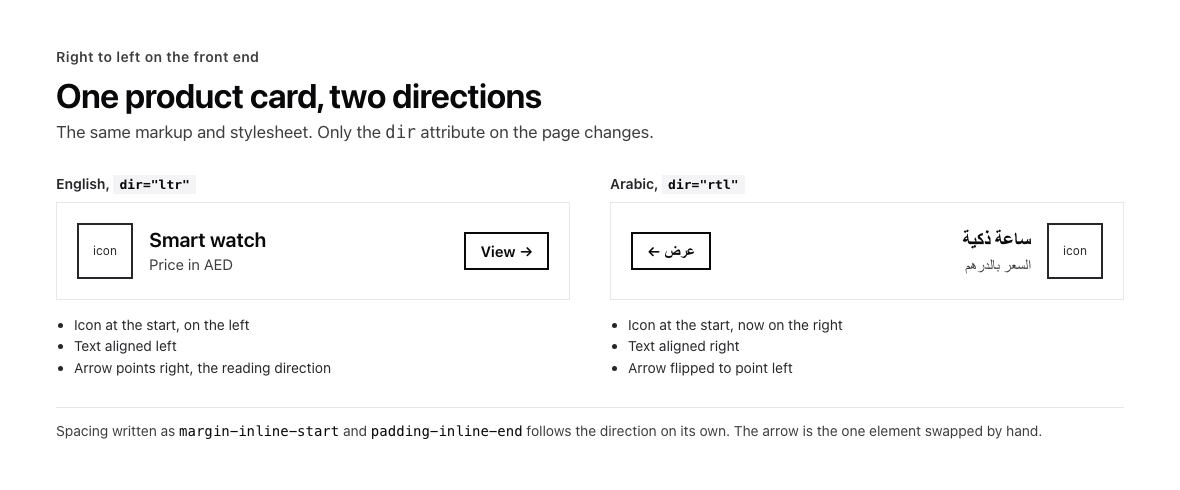
The same card in English and Arabic. Only the page’s direction changes.
Fallbacks, drafts and publishing per language
With fallback on, a field that hasn’t been translated returns the default locale’s value. In the admin panel that’s helpful, because a half-translated page still previews. On a public site it means an Arabic URL can serve English text, which confuses the reader and gives Google an “Arabic” page in English.
So turn fallback off for public reads. Pass fallback-locale=none on REST or fallbackLocale: false on the Local API, and decide what a missing translation does on your front end. Usually the page is left out of that language’s sitemap and navigation until it’s translated.
Publishing per language is newer. Payload can store a draft collection’s status per locale, so the English page can be published while the Arabic one is still a draft. The feature is experimental and in beta as of October 2026, and the docs ask you to test it thoroughly before production. It takes two settings, experimental.localizeStatus: true in the main config and versions.drafts.localizeStatus: true on each collection or global. Without it, a document’s status is one value across every locale.
Reading localised content from the front end and other systems
Every Payload API takes a locale and a fallback locale.
| API | Locale | No fallback | Every locale at once |
|---|---|---|---|
| REST | ?locale=ar | &fallback-locale=none | ?locale=all |
| GraphQL | locale: ar argument | fallbackLocale: none | not available, the argument takes your locale codes only (source) |
| Local API | locale: 'ar' | fallbackLocale: false | locale: 'all' |
locale: 'all' returns each localised field as an object keyed by locale, which is what export scripts, translation tools and hreflang builders need. In GraphQL, a locale set at the top of a query applies to every nested relationship unless you override it.
The same applies when an AI agent reads or writes your content through Payload’s MCP plugin, where every collection and global tool also takes locale and fallbackLocale.
How content gets translated
Content gets into the second language in one of three ways.
- By hand in the admin panel. The locale selector at the top of the editor switches every localised field to the chosen language. This suits sites with a small number of pages and editors who write both languages.
- AI translation. Payload Enterprise lists translations among its AI features, sold under an Enterprise licence. Third-party plugins do the same on the free core, such as the AI Localization Plugin and the others listed under i18n plugins on payload.market. Check how a plugin handles rich text and blocks before you rely on it.
- A translator or agency. Export with
locale: 'all', translate outside Payload, and write each locale back through the Local API or REST.
For example, a company site might have its editors write the service pages in both languages by hand, and send blog posts through an AI plugin for a first Arabic draft that an Arabic-speaking editor corrects before it goes live.
Whichever route you take, keep a review step before a machine translation is published. With localizeStatus on, the reviewed language can stay a draft while the other is live.
Adding localisation to a site that already has content
Turning on localized for a field that already holds data changes how that field is stored, and the docs warn that the existing values for that field will be lost. So a site with content needs a data migration alongside the config change.
- Back up the database. Take a full backup, and run the change on a copy first.
- Add the
localizationblock, with your current language asdefaultLocale. - Flip
localized: trueon the fields you’re localising. - Create a migration with
payload migrate:create, and add a step that copies each field’s current value into the default locale before anything is dropped (Payload migrations docs). Run it on the copy. - Check every document in the default locale against the backup.
- Open the second language to editors once the default locale matches.
Then work through the front-end list under the route, because the routes, metadata, previews and navigation all need the locale too. The thread on converting the website template also reports trouble with localised redirects through @payloadcms/plugin-redirects, so test redirects in each language.
A worked build: an English and Arabic site on Payload
We built a bilingual site on Payload in English and Arabic, with both the front end and the admin panel available in both languages. The steps are the path for a build of that shape, with the decisions from this guide applied.
- Declare the locales.
enas the default andarwithrtl: true, andfallback: trueso editors can preview a page before it’s fully translated. - Translate the admin panel.
supportedLanguages: { en, ar }from@payloadcms/translations, so Arabic-speaking editors work in Arabic. - Localise the fields readers see. Titles, body, SEO fields, navigation labels and media alt text. Prices, URLs, relationships and select values stay global.
- Choose the blocks level. Text inside the blocks is localised and the layout is shared, so every language keeps the same block order.
- Localise the slugs. Each page gets an Arabic slug alongside its English one.
- Build the routes. A
[lang]segment, a proxy redirect to the visitor’s language, andlanganddiron<html>from the route. - Add hreflang. Alternates for
en,arandx-defaulton every page, built from the localised slugs. - Style for right to left. Logical CSS properties throughout, an Arabic web font, mirrored directional icons and one rule for numerals.
- Turn fallback off on public reads. An untranslated page is left out of the Arabic sitemap and menus for now.
- Give editors a workflow. Write in one language, translate, review, then publish. With
localizeStatus, each language publishes on its own.
| Collection | Localised | Global |
|---|---|---|
| Pages | title, slug, blocks’ text, SEO title and description | layout order, hero image, related pages |
| Media | alt text, caption | the file |
| Navigation (global) | link labels | link targets |
| Products | name, description | price, SKU, currency, stock |
If you’re planning a multilingual build, we plan the languages into a Payload build from the start, when changing the content model is still cheap.
Mistakes to watch for
Flipping localized on a field with data
Its current values are lost. Write the migration that copies them into the default locale first.
Fallback leaking English onto Arabic pages
The page renders, so nobody notices until Google indexes an Arabic URL full of English. Read public pages with fallback off.
Treating the admin rtl flag as front-end support
It only aligns the admin inputs. The front end needs dir, lang and logical CSS of its own.
A locale missing from static generation or the sitemap
If generateStaticParams or the sitemap only builds the default locale, the other language exists in Payload but not on your site.
Expecting fallback to work in a slug lookup
A query for an Arabic slug won’t find a page that only has an English slug, even with fallback on. Fallback fills in the values Payload returns, and it isn’t applied to the where clause (community answer on Payload’s help forum). If untranslated pages must resolve, look the slug up in the default locale as a second query.