
You’re deciding whether a store, yours or a client’s, should run on Payload instead of a hosted platform. You’ve seen that Payload has an ecommerce plugin and a template, and you want to know how far they go before you commit to them.
As of October 2026, Payload’s official ecommerce plugin is in beta, and Payload says it may have breaking changes in future releases. It also powers an official ecommerce template. This page covers what the plugin gives you, what you still build yourself, how subscriptions work, how to choose between the three ways to build a store on Payload, and the first steps of a build.
- Can you build an ecommerce store on Payload CMS?
- What the official ecommerce plugin gives you
- What you still build yourself
- What a store you own lets you build
- Subscriptions on Payload: the ecommerce plugin plus the Stripe plugin
- Plugin, your own collections, or a commerce engine: how to choose
- Running a Payload store day to day
- How to start a Payload ecommerce build
- Payload CMS ecommerce: common questions
- What to do next
Can you build an ecommerce store on Payload CMS?
Yes. Payload is a TypeScript backend with a generated admin panel, so a store is a set of collections, hooks and endpoints like any other app you build on it. There are three ways to put one together, and they differ in how much of the commerce logic lives in Payload.
| Approach | What Payload holds | What you or the engine hold | Fits when |
|---|---|---|---|
| The official plugin | Products, variants, carts, orders, transactions, addresses, Stripe payments | Shipping, tax, subscriptions, any second payment provider | The catalogue has variants, Stripe is the payment provider, and you want one codebase |
| Your own collections | Whatever you model, optionally reusing some of the plugin’s collections | Everything, including checkout logic | The store’s rules don’t fit the plugin’s shape |
| Payload beside a commerce engine | Content, pages, merchandising, and accounts if you choose | Catalogue, checkout, tax and shipping, in Shopify, Medusa or Vendure | Tax and shipping rules span many regions, or the team would rather install apps than build features |
The template is the fastest start on the first route. It’s a Next.js storefront served alongside Payload, with accounts, guest checkout, orders and Stripe already wired.
Ecommerce is one of several things the same backend can run, and what you can build with Payload walks through the rest. If you’re still deciding whether a headless setup suits a store at all, start with how a headless CMS changes ecommerce.
What the official ecommerce plugin gives you
The plugin gives you the data model and the purchase flow of a store, from product to paid order, and leaves delivery, tax and subscriptions to you. It’s one package, @payloadcms/plugin-ecommerce, that adds collections, endpoints and React hooks to your Payload config.
For example, take a coffee roaster selling 250 g and 1 kg bags, each as whole beans or ground. In the plugin, Size and Grind are variant types, each size and grind is a variant option, and every purchasable combination is a variant with its own price and stock. The plugin docs cover each piece in detail:
| Piece | What it does | What it leaves to you |
|---|---|---|
| Products and variants | Variant types and options, with each variant priced and stocked | Catalogue rules beyond price and stock |
| Carts | Stored in the database, with guest carts on by default; calling onLogin() merges a guest’s cart into the customer’s | Follow-ups on carts left behind |
| Transactions and orders | A transaction is created when payment starts, and the order only once it succeeds | Order emails and fulfilment |
| Addresses | Linked to customers and reused across orders, limited to the countries you allow | Delivery zones and fees |
| Currencies | Each currency you add gets its own price field on products and variants | Setting each price; there’s no currency conversion |
| Inventory | A stock field on variants that goes down when an order is placed | Reservations, warehouses, sync with a stock system |
| Payments | An adapter pattern, with Stripe as the only adapter today | Any other provider, through your own adapter |
| Front end | A React provider and hooks such as useCart, usePayments and useCurrency | The storefront itself |
The plugin also asks you to supply its access functions (isAdmin, isCustomer, isDocumentOwner and the rest), so role-based access control (RBAC) for admins, customers and guests lives in your own code. Before it creates a payment, it checks that a currency is set, that the product or variant has a price in that currency, and that there’s enough stock for the quantity. You can replace that check with your own.
What you still build yourself
You build shipping, tax and subscriptions yourself, because Payload’s docs state that the plugin doesn’t handle them natively. None of them is a hard limit, because each one is built on the plugin’s collections and hooks. A few other pieces work the same way:
- Shipping and delivery. For example, the coffee roaster adds a delivery zones collection, a rates collection, and a hook on the carts collection that adds the right fee to the cart’s subtotal, because the subtotal is the amount the Stripe adapter charges.
- Tax. You keep tax rates per region and calculate tax on the server before the payment is created, or you hand the calculation to a tax service.
- Subscriptions. These need Payload’s Stripe plugin as well, which the subscriptions section covers.
- Inventory beyond a count. The plugin’s stock tracking is basic by Payload’s own description, with no third-party integrations. Holding stock during checkout, several warehouses and sync with a stock system are yours.
- A second payment provider. Stripe is the only adapter today, so a regional gateway means writing an adapter against the plugin’s
PaymentAdapterinterface. - Order emails. Confirmation, shipping and renewal emails are hooks on your orders that send through Payload’s email adapter, with slow work moved to the jobs queue.
- Coupons. As of October 2026, the stable release has no coupon or discount code built in, and a coupon model is a collection and a cart hook you add yourself.
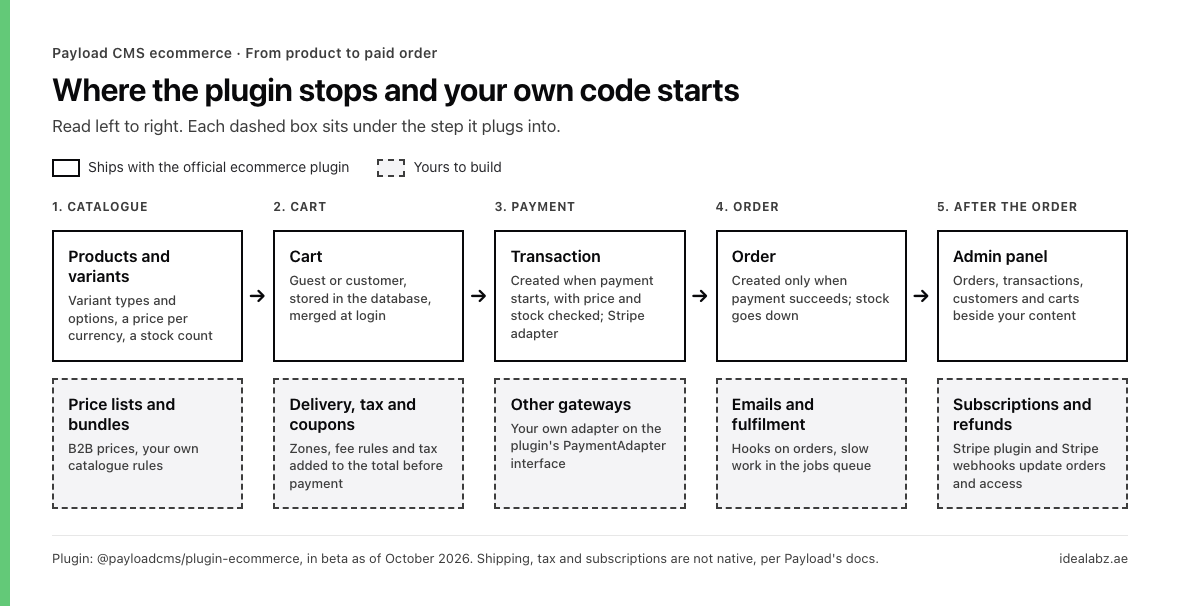
What the plugin runs at each step of an order, and the code you add beneath it.
If your catalogue already lives in another store, moving it onto Payload comes before any of them.
What a store you own lets you build
Because the backend is your code, a new store feature is a collection, a hook and a component that you add yourself. On a hosted platform, the same feature would be an installed app or a request to the vendor. Owning it means there’s no limit to the growth experiments a team can run, including ones a hosted platform doesn’t offer.
For example, Little Sprouties is a UAE children’s nutrition brand we build and run. On its store, we built a small CRM. Every order placed starts a workflow of personalised emails. How a pipeline like that decides each customer’s next email, and where a person approves it, is in our guide to AI agents.
We’re also setting up a cart progress bar on the store as a growth experiment. Milestones sit along the bar, and as the cart value grows, the shopper sees their progress and the rewards they’ve unlocked.
Neither feature comes with the plugin. The same holds for a loyalty tier, a bundle builder or a delivery slot picker. Each one is a feature you can ship to part of your customers, read the results of, and keep or take out.
Subscriptions on Payload: the ecommerce plugin plus the Stripe plugin
You run subscriptions by adding Payload’s Stripe plugin next to the ecommerce plugin, because the ecommerce plugin doesn’t handle subscriptions. The ecommerce plugin owns the cart and the one-off order, and the Stripe plugin leaves billing to Stripe while keeping Payload in step with it.
The Stripe plugin syncs data between Payload and Stripe, receives Stripe’s webhooks, and can proxy Stripe’s API behind Payload’s access control. The proxy is off by default and only allows the Stripe methods you list. Customers pay through Stripe Checkout or a custom form built with Stripe Elements, and you can send them to Stripe’s customer portal to change or cancel a plan.
For example, the coffee roaster sells a bag every two weeks. Each plan is a Stripe price with a recurring interval. A webhook handler you write creates an order in Payload at each renewal, and another one changes the customer’s access when a subscription is cancelled or a payment fails.
On one subscription store, the subscription showed at every step. The cart opened with each product added and showed the delivery interval, a switch to a one-time purchase was prominent, the checkout repeated it, Stripe showed it, and the confirmation email gave the renewal date. Some customers still came back to say they hadn’t known they were signing up for a subscription. So make cancelling as easy to find as subscribing, and send a reminder before each renewal.
Plugin, your own collections, or a commerce engine: how to choose
The shape of the store decides the route, mostly the payment providers it needs, how complicated its tax and shipping are, and how much of its behaviour is its own. This table matches common shapes to a starting point:
| If your store | Start with |
|---|---|
| Sells a catalogue with variants, paid through Stripe | The plugin, close to the template |
| Sells subscriptions, delivers by zone, or keeps B2B price lists | The plugin, plus your own collections and the Stripe plugin |
| Sells across many tax regions with carrier rates, or the team wants to install apps | A commerce engine beside Payload |
| Runs several stores or distributors from one backend | The plugin with multi-tenancy |
| Has rules the plugin’s shape works against | Your own collections, or the plugin’s collections used one by one |
For example, a wholesaler that gives each trade customer its own prices doesn’t need a commerce engine. The price lists become your own collection related to customers, and your own carts hook recomputes the subtotal from them before payment. The plugin works out the subtotal from each product’s list price, and that subtotal is what the Stripe adapter charges. Several stores on one backend is a multi-tenancy job, where each order belongs to the store that owns its products, guest checkouts included. Our guide to Payload multi-tenancy covers how to scope the plugin’s collections by tenant.
For the engine route, Medusa’s documentation has a guide to integrating Payload. Medusa keeps products, prices and checkout, and syncs each product into a Payload collection when it’s created or changed. The storefront then shows the title, description and images from Payload beside Medusa’s product data. Medusa’s integrations list also includes Avalara for tax and ShipStation for fulfilment, two of the jobs the Payload plugin leaves to you.
A simple store can still start faster on a hosted platform. In May 2023, a developer who had built a store on Payload recommended headless Shopify for the majority of simple ecommerce sites on Payload’s community forum. That was before the plugin, which now covers the variants and the data structure tied to Stripe that they described building by hand.
If you’d rather have the build scoped with you, our Payload development team builds ecommerce from the model to the storefront.
Running a Payload store day to day
Running the store happens in the same admin panel as your content, so orders, customers, carts and products sit next to pages and posts. Transactions are visible to admins only. The template also gives guests a find-order page, where they enter their email and order ID and receive an access link by email.
If a payment fails partway through on a database with transaction support, the whole settlement rolls back. On a database without it, a crash can leave a transaction marked “processing”, and Payload doesn’t reset it, because it can’t tell which side effects finished. The payments docs ask you to monitor for these and reconcile them by hand.
Stripe’s webhooks and Payload’s jobs also need a host that runs them. The template’s scheduled publishing runs on a cron schedule, and on Vercel some plan tiers allow a daily cron only. Our guide to where to host Payload explains which features change between serverless and long-running hosts.
Store admins can also work through an AI assistant, reading orders or updating products over Payload’s MCP plugin with keys limited to what each task needs. The Payload MCP guide covers how to set that up safely.
How to start a Payload ecommerce build
A build goes smoothest in this order:
- Pick the route
- Scaffold the store
- Write the access functions
- Set currencies and countries
- Connect Stripe
- Model delivery, tax and subscriptions
- Get one checkout working end to end
- Run migrations when the plugin changes
1. Pick the route
Match your store’s shape to one of the three routes, the plugin, your own collections, or an engine beside Payload. Then price the running costs, since hosting, database and storage are yours. Our Payload pricing breakdown lists them.
2. Scaffold the store
Start a new project from the template with pnpx create-payload-app my-project -t ecommerce. For an existing Payload project, install @payloadcms/plugin-ecommerce and add it to the plugins array in your config.
3. Write the access functions
The plugin won’t run without them, and they decide who sees which orders, carts and addresses. Write them before any storefront work, so every later feature inherits the rules.
4. Set currencies and countries
Each currency takes a code, its number of decimals, a label and a symbol. For example, UAE dirhams (AED) use two decimals. Then limit addresses to the countries you deliver to, and if delivery fees depend on the emirate or region, model that before checkout.
5. Connect Stripe
The Stripe adapter needs your secret key, publishable key and webhook signing secret. Create payments on the server, check webhook signatures, and take every price from your database, never from the browser.
6. Model delivery, tax and subscriptions
Add the collections and hooks for whatever the plugin leaves out, before the storefront is designed. Fees and taxes change the cart total, and every page that shows a total depends on them.
7. Get one checkout working end to end
Put a test product through cart, payment, webhook and order early. The template ships integration tests with Vitest and end-to-end tests with Playwright, so keep them running as you change it.
8. Run migrations when the plugin changes
On Postgres, some plugin releases change the schema. For example, the release that made Stripe confirmation safe to retry added a “processing” status, which needs a migration on Postgres but none on MongoDB or SQLite.