
You've probably filed Payload CMS under a familiar label. It's a TypeScript-first, open-source headless CMS, and it competes with the usual names in that category. The label is accurate, and it undersells the platform by a wide margin.
Strip away the CMS framing and you find a full application backend. Authentication, role-based access control, background jobs, custom API endpoints, file storage, localization, and a React admin panel you can extend with your own components. Your content model is code, so every one of those pieces is typed, versioned, and reviewable like the rest of your stack.
In this post, we'll walk through 10 practical Payload CMS use cases, from content APIs to multi-tenant platforms. For each one, we'll define the scenario, explain the technical shape of the build, and name the official plugins and features that carry it. We'll also flag the pieces that are still in beta or reserved for the enterprise tier, because those statuses change what you should plan for. Every version number and feature status here is current as of September 2026.
Here's what we'll cover:
- What is Payload CMS, really?
- The 10 best Payload CMS use cases
- Payload CMS use cases at a glance
- Is Payload CMS the right fit for your use case?
- Frequently asked questions
What is Payload CMS, really?
Payload is an open-source backend you describe in a TypeScript config file. The project is MIT licensed, so you can read the source, self-host it, and ship it commercially without seat fees or content limits.
One config defines collections and globals (your data), fields (your schema), access control functions (who can do what), and hooks (what happens around every operation). From that single source of truth you get a React admin panel for editors, REST and GraphQL APIs, a Local API for server-side queries with no HTTP round trip, and generated TypeScript types for every collection.
Since version 3, Payload runs natively inside Next.js, so the CMS and your front end live in one application and deploy together. You can also run it beside any other frontend, with MongoDB, Postgres, or SQLite behind it. The current release is v3.90.1, published on September 18, 2026, which follows v3.90.0, a security-focused release that landed the same day.
The practical reframe goes one step further. Payload is a backend framework that ships with a polished CMS attached. That's why the use cases below stretch so far beyond content editing. There is more to the architecture than this short section. Our practical guide to Payload CMS covers collections, globals, fields, access control, and hooks, and shows how they fit in a Next.js app.
The 10 best Payload CMS use cases
1. Headless CMS and content APIs
This is the baseline use case, and it's where most teams start. You define collections for the content you publish, editors manage it in the admin panel, and any frontend consumes it through the API of your choice.
The technical shape is straightforward. Collections, globals, and fields live in payload.config.ts. Create, read, update, and delete operations are available through REST, GraphQL, and the Local API, and every query supports filtering, sorting, pagination, relationship depth, and field selection.
The editorial layer is where Payload earns its keep. Enable drafts and versions and documents gain a _status field, autosave, and a full version history. Scheduled publish runs on the jobs queue, so posts can go live while you sleep. Access control keeps unpublished drafts invisible to the public, and the draft parameter lets previews read the newest version.
For example, a collection with drafts enabled and a read rule that hides unpublished documents looks like this.
export const Posts: CollectionConfig = {
  slug: 'posts',
  versions: { drafts: true },
  access: {
    read: ({ req }) =>
      req.user ? true : { _status: { equals: 'published' } },
  },
}
Multilingual sites use field-level localization. Mark a field localized: true and it stores one value per locale, with ?locale= on REST, a locale argument on GraphQL and Local API calls, and fallback handling when a translation is missing. Which fields to localize, and how to route each language, is in our Payload localization guide. Rich text runs on Lexical, Payload's editor, with custom blocks available inline.
Ideal for: teams that need one content source serving a website, a mobile app, or any API client, with editors working safely in the background.
2. Marketing and corporate websites
Marketing sites need two things at once. Editors want to compose pages without filing a ticket, and developers want guardrails so every page stays on brand.
Payload covers both with the Blocks field, a layout builder that stores an ordered mix of block types. You define blocks like Hero, Feature Grid, Quote, or Call to Action as separate configs, and editors assemble pages from them. Blocks can be shared across collections, copied and pasted between documents, and filtered conditionally so the wrong module never appears in the wrong place.
Live Preview renders your real frontend inside the admin panel through an iframe, and changes update as you type, no save required. You can configure device breakpoints and even dynamic preview URLs per locale or tenant. Keep in mind that click-to-edit visual editing is a separate capability that sits on the enterprise tier.
Then come the official plugins, and this is where a marketing build gets quick.
- The SEO plugin adds a
metagroup with title, description, and image fields, auto-generation functions, a live search preview, and character counters. - The Redirects plugin manages a
redirectscollection withfromandtofields and 301 or 302 types, so URL changes don't cost you rankings. - The Form Builder plugin lets editors build forms in the admin panel. Submissions land in your own database, and you can send dynamic, personalized emails without a third-party form service.
- The Nested Docs plugin adds parent and breadcrumb fields for hierarchical pages.
- The Search plugin maintains an indexed search collection that stays in sync as documents change, a first-party alternative to a hosted search service for many sites.
Ideal for: marketing teams that want to ship pages at their own pace while developers keep the design system and the data model under control.
3. Headless e-commerce
Payload ships an official E-commerce plugin, and the status matters here. It is currently in Beta and may see breaking changes in future releases, so plan for that if you adopt it today.
What it gives you is a real commerce foundation. Products with variants are supported by default, using variant types and options (Size, Color) mapped to actual purchasable variants. Carts are tracked in the database, guest carts are allowed by default, and cart endpoints handle adding, updating, and removing items. Orders and transactions track the purchase lifecycle, addresses link to customers and get reused across orders, and multiple currencies each create their own price fields. Basic inventory tracking decrements stock when an order is placed.
Payments use an adapter pattern. The plugin creates endpoints for each payment method, and the Stripe adapter is supported out of the box for one-off purchases, including webhook handlers for events like payment_intent.succeeded. You can write your own adapter by implementing the PaymentAdapter interface.
Two statuses worth knowing before you commit. Shipping, taxes, and subscriptions are not handled natively by the e-commerce plugin, though you can build them on the provided collections and hooks. For subscriptions and broader billing, Payload also ships a separate official Stripe plugin that offloads billing to Stripe, syncs data both ways, and exposes subscription webhooks to your application. The two plugins cover different jobs, so most subscription stores end up using both. For what you build on top of the plugin, and how to choose a route, see building a store on Payload.
Ideal for: brands that want their storefront, content, and customer accounts in one codebase they own, with payments flowing through a processor they already trust.
4. Custom web apps and SaaS backends
Here is where the "not just a CMS" story becomes concrete. The admin panel can act as an operations console for an application, and every framework primitive you expect from a backend is present.
Custom endpoints attach to your config, collections, or globals, and each one defines a path, an HTTP method, and a handler with access to the request, the authenticated user, and the Local API. Keep in mind that custom endpoints are not authenticated by default, so securing them is your responsibility.
export const Orders: CollectionConfig = {
  slug: 'orders',
  fields: [/* ... */],
  endpoints: [
    {
      path: '/:id/tracking',
      method: 'get',
      handler: async (req) => {
        const tracking = await getTrackingInfo(req.routeParams.id)
        return Response.json(tracking)
      },
    },
  ],
}
The jobs queue handles everything that shouldn't block a response. Tasks are typed functions with input and output schemas and automatic retries. Workflows chain tasks in order and can resume from a point of failure. Queues segment work by cadence, and cron schedules queue jobs on a timer. You can run jobs via a bin script on a dedicated server, via autoRun inside the app process, or through an API endpoint triggered by an external cron on serverless platforms. Offloading is a first-class pattern, which means embedding generation, third-party syncs, PDF rendering, and emails never slow down your API.
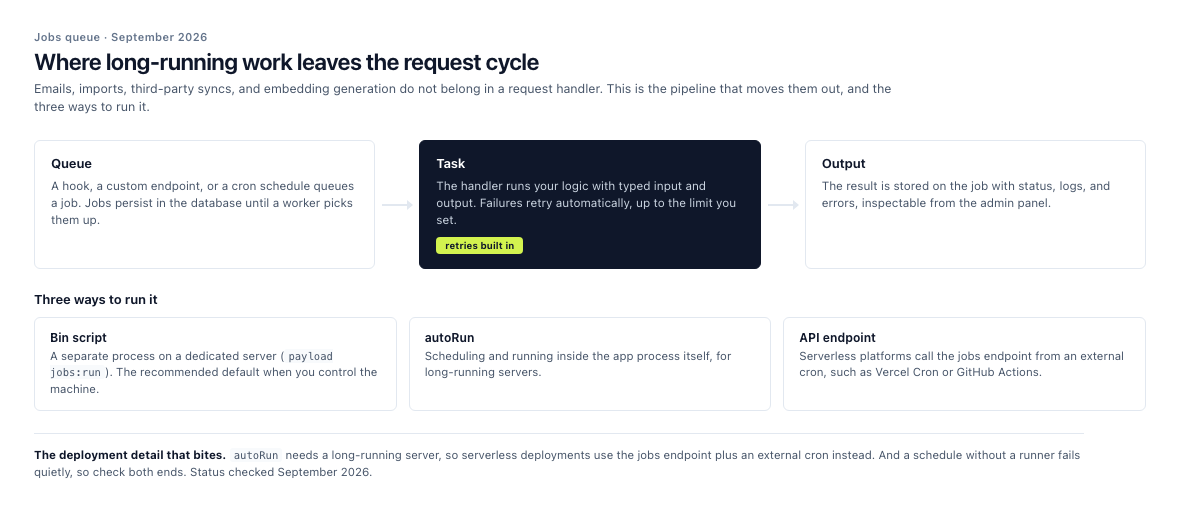
The queue is the easy part. Matching the runner to your hosting is the step people miss.
Because it all lives in code, the pieces share types. Generate them once and your front end, jobs, and access rules all speak the same language about the same data. For example, a SaaS dashboard can read and write through the Local API in server components while the same collections power the admin panel your support team uses.
Ideal for: product teams that need a backend, an admin UI, and background processing without assembling four separate services.
5. Membership and creator community platforms
Any collection can become a user collection. Set auth: true and Payload injects the full account lifecycle, including account creation, login and logout, password reset, and optional email verification, along with the admin UI to manage it all. You can run multiple auth collections side by side, so administrators, customers, and members stay separate.
Authentication ships with three strategies that work together or independently. HTTP-only cookies keep sessions secure and unreadable by browser JavaScript, JWTs suit API clients, and API keys authenticate third-party services. Custom strategies cover anything else. You also get practical controls like token expiration, maximum login attempts with automatic lockouts, and username-based login.
Gated content is an access control problem, and Payload treats it that way. Access functions can return query constraints, not just booleans, so a member can be restricted to their own orders while an admin sees everything. Field-level rules hide sensitive data, and the same read rules run on uploaded files, which is how gated downloads and member-only assets stay protected.
For recurring revenue, the official Stripe plugin handles subscription billing and fires webhooks for events like subscription updates, so your app can flip a member's tier the moment a payment state changes. Since access control can guard Stripe resources through Payload, customers can manage billing without ever leaving your site. Lifecycle emails and renewals run on the jobs queue.
Ideal for: creators, communities, and membership businesses that want to own the platform, the member data, and the experience instead of renting them.
6. Multi-tenant and white-label builds
The Multi-Tenant plugin is official, and it does the scaffolding work that makes multi-tenancy tedious to roll by hand. It adds a tenant field to every collection you list, a tenant selector to the admin panel, list views filtered by tenant, and relationship fields scoped the same way. New documents are assigned to the selected tenant automatically.
The plugin also lets you create global-like collections that behave as one document per tenant, so each site can have its own header, footer, or settings. A userHasAccessToAllTenants function marks super-admins who can cross tenant lines, and cleanupAfterTenantDelete removes a tenant's documents when the tenant goes away.
multiTenantPlugin({
  collections: {
    pages: {},
    posts: {},
    media: {},
  },
  userHasAccessToAllTenants: (user) =>
    Boolean(user?.roles?.includes('admin')),
})
On the frontend, tenant scoping is just a query. Filter by tenant.slug, and let Next.js rewrites route per-domain traffic to the right tenant. Tenancy layers on top of your access control rules rather than replacing them, so the security model stays the one you already understand.
Ideal for: agencies running many client sites on one codebase, and platforms that white-label their product per customer.
7. Internal tools and enterprise admin panels
The admin panel is a React application, and every part of it can be swapped or extended. Custom components cover root views, list views, edit views, dashboards, and field inputs. Components are React Server Components by default, which means they can query the Local API directly, and you can use Payload's UI library and styling so custom screens feel native.
Access control is granular enough for real enterprise structure. Rules exist at the collection, global, and field level, and they run before queries execute, so a support agent can update shipping status without ever seeing payment details. The admin panel adapts to those rules, hiding collections and fields a user can't use instead of showing errors.
Versions give you autosave, draft states, and rollback on every document, which covers audit questions for most internal workflows. The official Import/Export plugin moves data in and out as CSV or JSON from the admin panel, and large imports run on the jobs queue, so an operator can load ten thousand rows without writing a script.
SSO and publishing workflows sit on the enterprise tier. Everything above runs on the open-source core.
Ideal for: enterprises consolidating internal apps, and operations teams replacing spreadsheet sprawl with one interface.
8. AI-powered content experiences
AI features split into two paths in Payload, and the open-source path comes first.
You can build the entire pipeline with the core framework. The jobs queue is built for exactly this kind of work, and generating vector embeddings from your documents and keeping them in sync as content changes is the backbone of retrieval-augmented generation. Tasks retry automatically, which matters even more for AI workloads, since model responses are non-deterministic and sometimes need a second attempt. Embedding models with large dependencies can live in separate handler files, keeping your main Next.js bundle lean.
{
  slug: 'syncEmbeddings',
  retries: 2,
  handler: async ({ input, req }) => {
    const doc = await req.payload.findByID({
      collection: 'posts',
      id: input.id,
      req,
    })
    await embedAndStore(doc)
    return { output: { synced: true } }
  },
}
From there you can reach for whatever AI SDK or model provider you already use inside tasks, hooks, and custom endpoints, and serve chat or search features from your own API. The Local API handles retrieval server-side with no network hop, and access control applies to AI surfaces the same way it applies everywhere else.
The second path is the official MCP plugin, which exposes your collections and globals to AI clients through the Model Context Protocol. Access is managed per API key, with granular toggles for find, create, update, and delete on each collection, and every request still runs through Payload's access control using the key owner's identity. You can also trim responses with field selection to keep token usage down. Our step-by-step guide to the Payload MCP plugin covers the setup, the keys and what to leave switched off.
Beyond that, Payload's enterprise tier packages AI tools of its own. AI translations are live today, and AI image generation and a writing assistant are expected to arrive soon. You do not need the enterprise tier to bring AI to your content. The core framework plus an SDK of your choice covers the build, and the enterprise tools are convenience when you'd rather buy than assemble.
Ideal for: teams building search, chat, recommendations, or automation over content they already own.
9. Campaign sites and interactive brand experiences
Campaign work rewards speed, and Payload is quick to stand up. One codebase can carry the microsite, its forms, its data, and its admin panel, and it deploys anywhere Node runs.
The Form Builder plugin is the workhorse here. Editors build the form schema themselves, including multi-step lead generation flows, confirmation emails personalized from submission data, and file upload fields. There's even a payment field with price conditions for donations, registrations, or ticket sales, and a handlePayment hook to connect your processor of choice. For example, a donation form can add ten dollars to the total when a supporter checks a matching-gift box.
Interactive logic lives in custom endpoints, live preview keeps stakeholders reviewing the real thing instead of screenshots, and field-level localization covers regional variants of the same campaign. A/B variant testing is available as an enterprise feature, so budget for that tier if experiments are central to the plan rather than occasional.
Ideal for: marketing teams and agencies shipping time-boxed campaigns that still need real data handling behind them.
10. Media libraries and asset-heavy sites
Turn on upload for any collection and Payload transforms it into a file management system. Filenames, MIME types, and file sizes become automatic fields, and adding imageSizes generates the resized variants your front end needs. Editors get a crop tool and a focal point selector so art direction survives every breakpoint.
Access control runs on files too. The same read rule on an upload collection gates the file itself, which makes premium downloads, partner resources, and member-only media a configuration task rather than a custom build.
Organization got easier with folders, which group documents across collections and support nesting. The feature is in beta, so expect some movement, but browse-by-folder already makes large media libraries manageable.
Where files physically live is up to you. Official storage adapters cover AWS S3, Azure, Google Cloud Storage, Uploadthing, Vercel Blob, and Cloudflare R2. For R2 on Node environments, the S3 adapter connects through R2's S3-compatible API; the dedicated R2 adapter targets Cloudflare Workers. Large files can skip the server entirely with client uploads, and signed downloads keep big assets performant while still respecting access rules.
Ideal for: publishers, catalogs, and any site where media is the product rather than a garnish.
These are not hypotheticals. We build these, and which use case you are in is what decides the content model before a single screen is designed.
Payload CMS use cases at a glance
| Use case | What you get | Reach for |
|---|---|---|
| Headless CMS and content APIs | A typed content model with three APIs and full versioning | Collections, globals, drafts, Local API, generated types |
| Marketing and corporate websites | Page building for editors, previews, and SEO plumbing | Blocks, Live Preview, and the SEO, Redirects, Form Builder, Nested Docs, and Search plugins |
| Headless e-commerce | Products, carts, orders, and payments in one stack | E-commerce plugin (Beta) with the Stripe adapter, plus the Stripe plugin for subscriptions |
| Custom web apps and SaaS backends | A backend, an operations console, and background processing | Custom endpoints, jobs queue, access control, custom components |
| Membership and community platforms | Accounts, gated content, and recurring billing | Authentication, access control, API keys, Stripe plugin |
| Multi-tenant and white-label builds | One codebase serving many tenants | Multi-Tenant plugin with tenant-scoped access control |
| Internal tools and admin panels | Custom admin applications with data operations | Custom components, field-level access, versions, Import/Export plugin |
| AI-powered experiences | Retrieval, agents, and automation over your content | Jobs queue, MCP plugin, custom endpoints, enterprise AI tools |
| Campaign and interactive sites | Fast builds with real forms and data behind them | Form Builder, Live Preview, custom endpoints, A/B testing on enterprise |
| Media libraries and asset-heavy sites | Managed assets with access control and flexible storage | Uploads, folders (Beta), storage adapters |
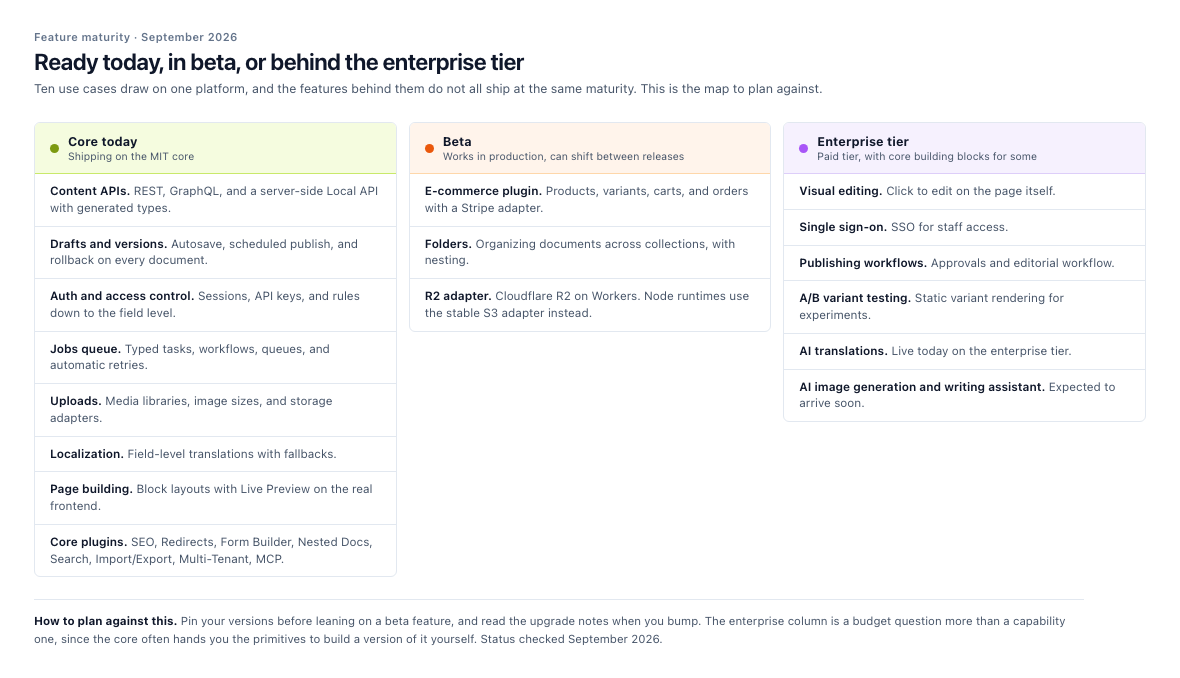
The left column is what you can ship this week. The other two are decisions to make deliberately.
Is Payload CMS the right fit for your use case?
Work through these questions in order. They'll tell you more than any feature list.
- Does your team write TypeScript? The content model, access rules, and custom logic are code. If nobody on the team owns that, a configuration-first platform will be smoother, or you'll want an agency alongside.
- Do you want content and application in one backend? If your site is pages and posts, Payload works, but a hosted CMS may be simpler. If you also need accounts, custom data, or background jobs, Payload's range starts paying for itself.
- Do you need to own the data and the code? Payload is MIT licensed and self-hosted by default. You keep the schema, the database, and the deployment.
- Who runs the infrastructure? Payload runs anywhere Node runs, from a VPS to a serverless platform. If you have no ops appetite, price managed hosting or support before you commit.
- Do you have work that shouldn't block a request? Emails, syncs, imports, embeddings, and scheduled publishing all belong on the jobs queue, and they're core features rather than add-ons.
- What does your budget actually look like? There are no seat fees or content limits. The real costs are hosting and engineering time, which is a different shape from subscription pricing.
Pro Tip: Take one real requirement from your project, whether that's a product catalog, a member area, or a tenant switcher, and build it as a two-day spike with npx create-payload-app. The use case that maps cleanly to your requirements in that spike is usually the right one to commit to.