
A CMS can have a $0 license fee and still create a sizable project budget. Hosting, database services, backups, development time, maintenance, and support all shape the final cost.
Payload CMS pricing works this way. The core software is open source and permanently $0, and the managed hosting option that used to sit on top of it is currently closed to new projects, which leaves self-hosting as the route and the operating cost as the whole question.
This guide explains the main Payload CMS pricing models, the costs people often overlook, how Payload compares with other CMS platforms, and how Idea Labz can help you plan a realistic budget before development begins.
Is Payload CMS free?
Yes. Payload CMS is available under the MIT License, which allows developers to use, modify, and distribute the software under the license terms.
That means you don’t pay a recurring license fee simply to install Payload on your own infrastructure. This article stays on what it costs; the companion guide covers what the platform actually is, its features, how collections and hooks work, and where it fits.
As of 16 September 2026 the current release is v3.89.0, shipped on 10 September 2026, from a repository carrying 44,767 stars and 4,155 forks. The page Payload’s own navigation labels Pricing states the license position plainly. Payload is “open source and MIT licensed”, you can deploy it “anywhere you can run a Node.js app”, and it is “free, forever”. The requirements listed are a JavaScript package manager, Node.js 20.9.0 or newer, and any one of MongoDB, Postgres or SQLite.
However, “free CMS” doesn’t mean “free website.” A self-hosted Payload project still needs resources such as:
- Application hosting
- A database
- File storage
- Backups
- Monitoring
- Deployment tooling
- Security updates
- Developer or DevOps support
The software cost can be $0. The operating cost won’t necessarily be.
Payload supports three primary database options documented by the project (MongoDB, PostgreSQL, and SQLite). Your choice affects hosting requirements, scalability, backup processes, and developer preferences. A small internal tool may work well with SQLite, while a high-traffic commerce platform may call for a managed PostgreSQL or MongoDB service.
Payload CMS pricing at a glance
Payload costs generally fall into two categories:
| Cost area | Typical pricing model | Who manages it? |
|---|---|---|
| Payload software | $0 license fee for self-hosted use | Your team |
| Payload Cloud | Paused. No new projects; existing ones continue unchanged | Payload |
| Hosting | Monthly infrastructure bill | Your team or hosting provider |
| Database | Free tier, usage-based, or fixed monthly plan | Your team or hosting provider |
| Storage and bandwidth | Usage-based or plan-based | Your team or hosting provider |
| Development | Project-based or hourly | Your team or agency |
| Maintenance | Ongoing internal or external cost | Your team, agency, or provider |
| Enterprise support | Custom pricing, depending on requirements | Payload or partner |
Payload’s own site now lists four deployment routes (self-hosted, a Vercel template, a Cloudflare template, and Enterprise) and carries a price on none of them. As of 16 September 2026 the only published Payload price is $0 for the license itself, and everything above it is quoted on application.
The key question isn’t only, “How much does Payload cost?” It’s also, “Which parts of the platform do we want to operate ourselves?”
Self-hosted Payload CMS costs
Self-hosting gives you more control over infrastructure, deployment, and data. It can also produce a lower monthly bill for teams that already have engineering and DevOps capacity.
1. Application hosting
You’ll need a service to run the Payload application. Between them, Vercel, DigitalOcean, Railway and Cloudflare cover almost every project at this size, and their list prices are in the table below. Our hosting guide covers which host fits your Payload project and why.
The price then depends on compute, traffic, redundancy, and deployment setup.
A small content site might run on a low-cost application instance. A larger platform may need separate environments for development, staging, and production, along with autoscaling or container orchestration.
Budget for:
- Production hosting
- Staging and preview environments
- Continuous deployment
- Logs and monitoring
- Additional capacity during traffic spikes
Here are the list prices behind that list, all fetched from each vendor’s own pricing page on 16 September 2026.
| Provider | Entry paid tier | What it includes | Metered overage |
|---|---|---|---|
| Vercel | Pro $20 per developer seat per month | $20 of included usage credit, 1M edge requests, 100 GB fast data transfer, 1M function invocations, 4 hours of Fluid active CPU | Function invocations $0.60 per 1M, Fluid active CPU $0.128 per hour, build minutes $0.014 to $0.105 each by machine class |
| DigitalOcean | Droplet $4 per month | 512 MiB RAM, 1 vCPU, 10 GiB SSD, 500 GiB transfer. The $6 tier doubles RAM and disk | Snapshots $0.06 per GB-month; backups 20% (weekly) or 30% (daily) of droplet cost |
| Railway | Hobby $5 minimum usage | $5 of monthly usage credits, up to 48 vCPU per service | Memory about $10 per GB-month, CPU about $20 per vCPU-month, egress $0.05 per GB |
| Cloudflare | Workers paid plan, plus the templates below | Payload ships an official Cloudflare template using R2 for images and D1 for data | Storage rates in the next table |
The shape of this market is that the entry price is almost meaningless and the metered rate is the bill. Vercel’s entry tier is a seat price with a credit against it, not a capacity price. DigitalOcean’s is a real fixed monthly cost for a small instance that does not move.
DigitalOcean also moved Droplets to per-second billing with a 60-second minimum on 1 January 2026, which matters for anyone running short-lived environments rather than a permanent instance.
There is a cheaper route than any of them. Cloudflare runs Workers on a $5 per month account plan that includes 10 million requests and 30 million CPU milliseconds with no egress charge, and its D1 SQLite database is free up to 5 million rows read and 100,000 rows written a day against 5 GB of storage. Payload ships an official template built for exactly that stack. A quarter of the Vercel seat, and a database with a genuine free tier, is the cheapest documented way to run a Payload site that we have found.
It does not currently work as shipped. Payload’s own pull request #17397 records the template’s Worker bundle at 3,364 KiB against Cloudflare’s 3 MiB free-tier ceiling, which causes it to fail to deploy on the free tier.
The cheapest hosting option isn’t always the least expensive choice overall. If it creates deployment problems or requires frequent manual intervention, engineering time can outweigh the monthly infrastructure savings.
2. Database hosting
Payload stores structured content in a database, so database costs form a major part of the operating budget.
A managed database typically includes automated backups, monitoring, access controls, and maintenance options. A self-managed database may reduce the infrastructure bill, but your team takes on more operational responsibility.
Ask these questions before choosing an option:
- How much storage will the project need during its first year?
- How often should backups run?
- How long should backups remain available?
- Does the project require high availability?
- Who will restore the database after an incident?
- Will the database need a separate staging environment?
The last of those questions is worth answering from our own record rather than in the abstract, because the real number is bigger than most teams expect. We currently hold twenty-six Postgres projects. They were created over a few months, they are all Postgres 17 or 18, and every one of them sits in one of two regions rather than being spread across many.
That is not a setup we would defend as tidy. It is what a database-per-project, per-environment and per-preview workflow produces. The number of databases you end up with grows with your deployment habits, not with your content. Neon’s own pricing model is built for exactly that. Its pricing page says the design goal is to make many small and intermittent databases practical for “development, demos, previews, or experiments”.
Decide your environment and preview strategy before you decide your database provider, because on this stack that is what sets the bill, and changing your mind later means migrating more databases than you think you have.
A database plan that costs a few dollars per month may suit a small project. A high-availability production database can cost substantially more once backups, replicas, storage, and support are included.
The numbers behind “a few dollars”, fetched 16 September 2026:
| Provider | Entry | Metered rate | Free allowance |
|---|---|---|---|
| Neon (Postgres) | Free $0, then Launch, usage-based | $0.106 per CU-hour, $0.35 per GB-month on Launch; $0.222 per CU-hour on Scale | 100 projects, 100 CU-hours per project per month, 0.5 GB storage per project |
| MongoDB Atlas | Free M0, then Flex | Flex $8 to $30 per month for about 5 GB; dedicated M10 from $56.94 per month | 512 MB on M0 |
The line that decides most small projects is a compute floor, not a storage price. Neon’s databases scale to zero when idle, and it publishes the alternative plainly: with scale-to-zero switched off, “the minimum CU-hours a database can use in a month is 187.5 (750 hours in a month × 0.25 minimum CU size).” At Launch rates that is $19.88 a month before the database serves a single query.
So the cost question is not “how big is my database”. It is “is my database allowed to sleep”, and the difference between yes and no is often larger than the difference between two providers.
3. Media storage
Images, videos, documents, and downloads can increase costs faster than text content. Payload can manage media fields, but the final storage architecture depends on your deployment approach and project requirements.
A media-heavy website may need:
- Object storage
- A content delivery network
- Image optimization
- Video hosting
- File scanning
- Retention and archival rules
Object storage prices are low enough that storage is rarely the bill. The operations are:
| Cloudflare R2 | Standard | Infrequent Access |
|---|---|---|
| Storage | $0.015 per GB-month | $0.01 per GB-month |
| Class A operations (writes, lists) | $4.50 per million | $9.00 per million |
| Class B operations (reads) | $0.36 per million | $0.90 per million |
| Data retrieval | none | $0.01 per GB |
| Egress | free | free |
Free tier: 10 GB-month of storage, 1 million Class A and 10 million Class B operations a month, on Standard storage only.
Cloudflare’s own worked example is the shape most projects are in. 100,000 files at an average of 100 KB, read 10 million times a day, costs $104.40 a month, of which the storage line is zero, because the files fit inside the free allowance, and all of it is read operations. A video-heavy site inverts that. Large files, fewer reads, and the storage line becomes real while operations stay small.
Which of those two you are is a design decision, not a hosting decision, and it is usually settled by whether the front end caches. Settle that before you choose a storage tier, because the two profiles bill in opposite directions.
4. Maintenance and security
Self-hosting means your team controls updates and infrastructure. That flexibility comes with ongoing work.
Maintenance may include:
- Updating Payload and its dependencies
- Applying operating system patches
- Reviewing database health
- Testing backups
- Managing environment variables
- Monitoring errors and uptime
- Responding to security advisories
- Checking integrations after upgrades
This cost doesn’t appear on an infrastructure invoice. It appears in developer hours, project planning, and support retainers.
Payload Cloud pricing
Payload Cloud is the managed option for teams that prefer to avoid operating the application infrastructure themselves.
It is not currently available to new projects, and that is the single most important fact in this section. Following Figma’s June 2025 acquisition of Payload, Payload’s own notice states: “Although deployment of new projects is currently paused, existing Cloud projects will continue running as normal.” Its FAQ answers the obvious follow-up. “Will I need to migrate my project? Yes, eventually. There is no rush, but we are planning to build something better that you will be able to migrate to once it’s available.” No date is given, and Payload adds that “no pricing changes are currently planned for Cloud customers”.
So for anyone starting today, Payload Cloud is not a line item to budget. Self-hosting is the route, and the rest of this section is here because the comparison still gets made. If you are evaluating Payload against a SaaS CMS, the honest version is that Payload currently has no managed tier to compare against.
If Payload Cloud does return, plans may differ by factors such as:
- Number of projects
- Usage limits
- Database capacity
- Media storage
- Bandwidth
- Build or deployment limits
- Environment availability
- Support level
- Enterprise requirements
Managed hosting can make budgeting easier because many infrastructure responsibilities sit inside one subscription. It may also reduce the amount of time your team spends configuring deployments, backups, and production services.
Managed hosting is convenient for exactly the reason it costs more. Someone else carries the deployment, the backups and the production services. If Cloud returns, that trade is the one to weigh, and it should include labor and operational risk rather than just the monthly subscription price.
When Payload Cloud may make sense
Payload Cloud may be a strong fit when:
- Your team wants a faster path to launch.
- You don’t have dedicated DevOps capacity.
- The project needs managed infrastructure.
- You want one vendor for the application environment.
- Predictable operational ownership matters more than the lowest possible bill.
When self-hosting may make sense
Self-hosting may be a better fit when:
- Your organization already operates cloud infrastructure.
- You need control over the deployment environment.
- Your team has database and DevOps experience.
- Compliance requirements shape where data can run.
- You need custom infrastructure that a managed plan doesn’t provide.
Two things belong in that decision, and we only learned both by reading our own bill.
The first is that self-hosting is not one cost, it is four. Across our eight projects the same platform charged us for traffic on one, for image processing on another, for build minutes on a third, and for idle memory on two more. Anyone choosing between self-hosting and a managed plan should work out which of those four they are, because a managed plan folds all of them into one number and self-hosting does not.
The second is that on a quiet site, deployments are the bill. The project in that table whose cost was almost entirely build minutes has next to no traffic. If your team deploys several times a day to a site nobody visits yet, you are not paying for hosting; you are paying for CI, on the same invoice, where it is very easy to misread as hosting cost.
Neither option is automatically cheaper. The right choice depends on your team, project complexity, and tolerance for operational work.
A realistic Payload CMS budget example
Consider a small company launching a content-led marketing website. The project includes a blog, landing pages, team profiles, case studies, and a contact form.
A realistic budget should include:
- Payload development and configuration
- Frontend development
- Hosting
- Database services
- Media storage
- DNS and transactional email
- Analytics
- Backup and monitoring setup
- Ongoing content support
Using the list prices above, the fixed monthly floor for that project looks like this:
| Line | Monthly |
|---|---|
| Application hosting (Vercel Pro, one developer seat) | $20 |
| Database (Neon Launch, small idle-friendly database) | $0 to ~$12 |
| Object storage and egress (Cloudflare R2, under 10 GB) | $0 |
| CMS license | $0 |
| Fixed infrastructure floor | $20 to $32 |
That is the whole of the predictable part. It excludes the two lines that actually decide the budget (development and ongoing support), and it assumes one developer seat and low traffic. It is a floor, not an estimate, and it is deliberately not summed to a project total, because a total would need real usage inputs and inventing them would break the rule this article runs on.
The Payload license may cost $0 under a self-hosted model, but the project still requires development time and monthly services. If the team chooses managed cloud hosting, the monthly bill may be easier to understand, but it still needs to be reviewed alongside development and content migration costs.
Now consider a second example. A retailer with multiple product lines, localized content, structured product data, and several internal users. That project may require more complex permissions, search, integrations, preview environments, and deployment processes.
The CMS license remains only one line item. Architecture, integrations, and support will likely drive much more of the total budget.
What one of our own Payload projects actually costs to run
The rest of this article prices other people’s list prices. This part is one real bill.
Neon Postgres, Postgres 17, eu-west-2. The database holds 54 MB. Its compute runs between 0.25 and 2 CU and scale-to-zero is enabled. Over the project’s first twelve days it was active for 173 hours of roughly 288 elapsed, and consumed 45.7 CU-hours.
At Neon’s Launch rates that is:
| CU-hours | Compute | Storage | Total | |
|---|---|---|---|---|
| First 12 days, actual | 45.7 | $4.84 | $0.02 | $4.86 |
| Same rate, 30 days | ~114 | $12.11 | $0.02 | ~$12.13 |
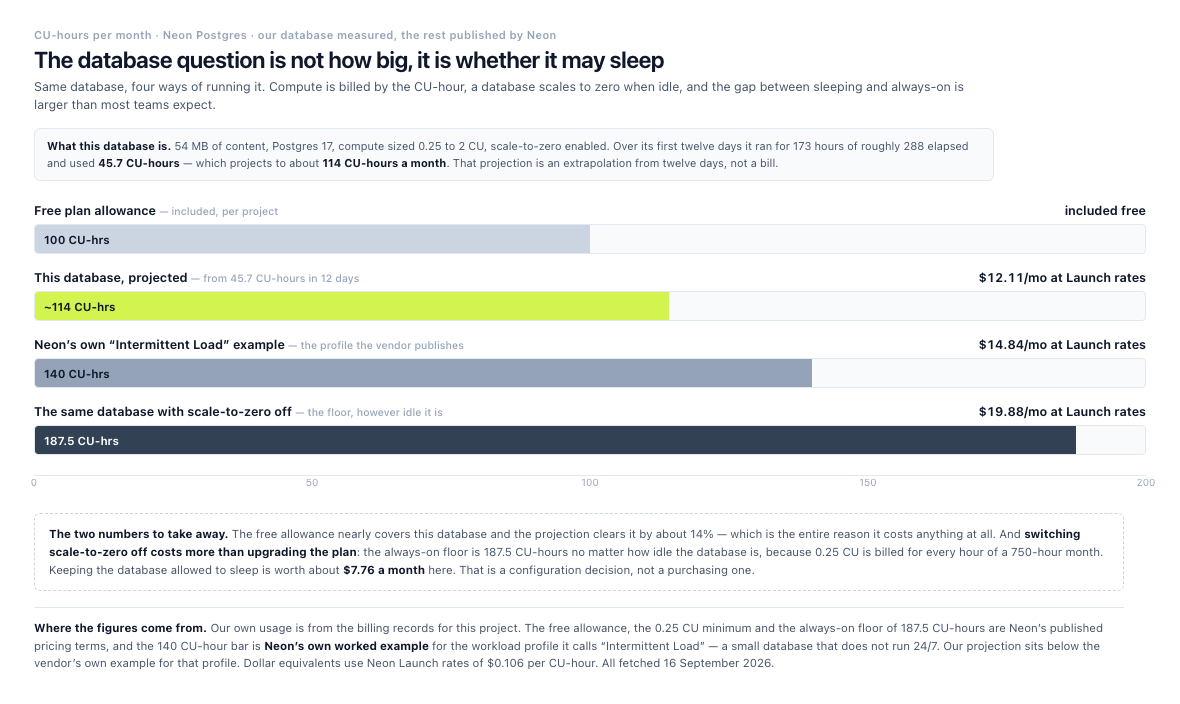
Same database, four ways of running it. The free tier very nearly covers it, and switching scale-to-zero off costs more than the plan does.
Those are two different numbers and both are true. $4.86 is what the twelve days cost. $12.13 is what a month costs if that rate holds, which is an extrapolation, not a bill. Anyone quoting the second as money already spent is rounding a projection up into a fact.
The projected ~114 CU-hours sits below the 140 CU-hours Neon itself uses to define its “Intermittent Load” workload, a small database that does not run 24/7, minimum size 0.25 CU, scaling to 2 CU when needed. It is the profile we designed for, and it is the profile Neon’s own pricing page says it expects.
What it would have cost with scale-to-zero off is the number to remember. Neon’s floor works out to $19.88 a month, so keeping the database allowed to sleep is worth roughly $7.76 a month at this workload. And the Free plan’s 100 CU-hours per project would have been missed by about 14%, which is the entire reason this database costs anything at all.
A 54 MB database costing twelve dollars a month is not a storage bill. It is a compute and configuration bill, and on a small site those are the two lines nobody budgets for.
The application half of the same bill, from Vercel. Over a full calendar month (August 2026), this project’s Vercel usage came to $11.85.
| Vercel line | Month |
|---|---|
| Fast Origin Transfer | $3.63 |
| Fluid Active CPU | $3.47 |
| Function Invocations | $3.12 |
| Fluid Provisioned Memory | $1.49 |
| Everything else (image optimization, builds, edge CPU, ISR) | $0.14 |
| Total usage | $11.85 |
Two things in that table matter more than the total.
The first is that none of it is storage. There is no capacity line and no request line. The bill is transfer, CPU and function invocations, the cost of serving the site rather than holding it. That is the same shape as the database above, and it is the opposite of what a hosting budget usually looks like.
The second is that this project was not billed for any of it. Vercel Pro is $20 per developer seat per month and includes $20 of usage credit. We carry one seat, and the whole account’s usage last month came to $15.16, comfortably inside the credit. This project’s own line on the invoice is $0.
So the honest answer to “what does a Payload site cost to run” is not the one a pricing article usually gives. On this stack, at this size, the bill is a seat, not a site. The marginal cost of the second and third project is close to nothing until the team’s combined usage passes the credit. Cost arrives with traffic and with how often you deploy, not with how many projects you add.
Set the two halves side by side and the shape of a small Payload deployment is as clear as it gets. The database projects to roughly twelve dollars a month, and the application’s usage over a real month was a shade under twelve. One of those we were charged nothing for, and the other we will be charged for every month the site is alive.
That is one project. Here is the whole portfolio, and it is nothing like it.
An account we manage holds ten sites in total, so the $15.16 above is two projects wider than the table below, which counts the Payload eight only. Their metered hosting usage for August 2026, taken from the billing API rather than from a dashboard estimate:
| What the project is | Usage for the month | What drove it |
|---|---|---|
| Subscription commerce | $11.85 | Traffic (transfer, CPU, function invocations) |
| Software product marketing site | $1.25 | Idle compute (provisioned memory and CPU) |
| Unlaunched template deploy | $0.86 | Images (optimization cache writes and transformations) |
| This agency’s own site | $0.59 | An even mix of CPU, transfer, memory and builds |
| Client site | $0.13 | Deployment (build minutes) |
| Client site | $0.08 | Idle compute |
| Internal monorepo | $0.05 | Builds, almost entirely |
| Client site | $0.01 | Negligible |
| All eight | $14.81 |
Read that column again. Eight projects, and the cheapest four together cost less than one of the expensive ones. The spread is not between “big site” and “small site”. It is between four completely different things that all show up on the same invoice:
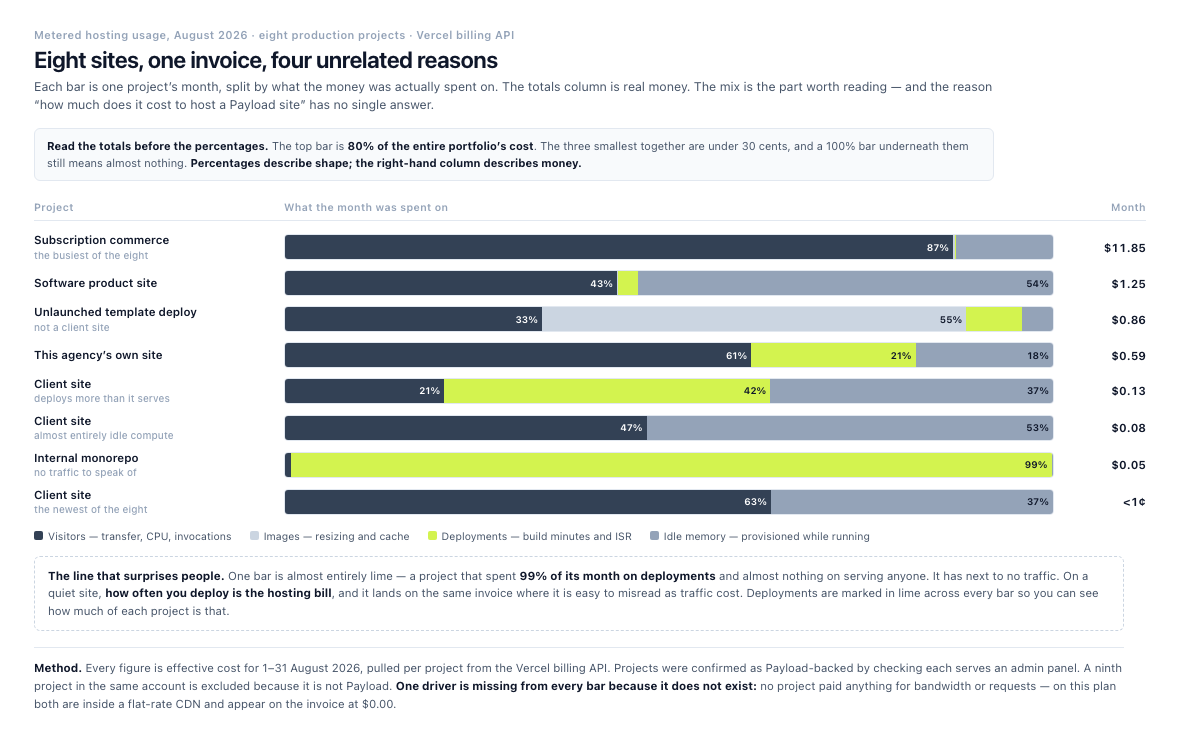
The column on the right is real money. The shapes on the left are why there is no single answer to what hosting a Payload site costs.
- Traffic. One project is 31% origin transfer and 29% CPU, and it is 80% of the portfolio’s entire cost. This is the shape everyone expects and the only one that scales with visitors.
- Images. One project’s bill is over half image optimization, meaning cache writes and transformations rather than storage. A media-heavy site pays to resize pictures, not to keep them.
- Deployment. One project’s bill is almost entirely build minutes, the lime bar with nothing else in it. Its entire hosting cost is how often we push to it.
- Idle compute. Two projects are dominated by provisioned memory rather than by serving anyone. Both are cheap in absolute terms, under $1.25 for the month, but it is the memory line that sets their bill, not traffic. This is the line a small site still pays, because a serverless function that wakes up holds memory while it runs.
The last two are the ones nobody budgets for, and they are the reason a $0-usage project is not a $0 project. A site with no visitors still costs money every time you deploy it, and it still costs money every time something calls it.
The aggregate is the number that matters at scale. Eight production projects cost a shade under fifteen dollars a month in usage, and one $20 seat covered all of it. The article’s opening premise, that the license is free and the operating cost is not, is true.
It is not just us
That is one managed account, and it would be fair to discount it as such. So here is a second data point, from a business with nothing to do with us.
Payload’s case study of Viking Yoga describes a community yoga studio in Phoenix, Arizona (wearevikingyoga.com) that needed a website and a class booking system on what the case study calls “little in the way of budget”. Payload’s own write-up gives the running cost as “a mere $3 a month” on a Google Cloud Run instance.
Two things about that are worth more than the figure. The first is that it is a vendor’s own published number for a third party, which is a rarer and more checkable thing than a logo wall. The second is that a yoga studio needed a unified platform for a site and a booking app, and got it without paying separately for each, which is the recurring pattern in every real deployment on this page. The money is not saved on hosting. It is saved on not buying four systems.
Payload CMS versus other CMS pricing models
Payload competes with both open-source and SaaS CMS platforms. Pricing varies widely because each platform includes a different mix of software, hosting, support, and operational services.
The entry points, fetched from each vendor’s own pricing page on 16 September 2026, with the Contentful and Directus rows re-checked on 24 September 2026:
| Platform | License | First paid tier | What that tier is |
|---|---|---|---|
| Payload | MIT, $0 | none published | Self-host; Enterprise quoted on application |
| WordPress (self-hosted) | GPL, $0 | n/a | Software is free, hosting and plugins are not |
| WordPress.com | n/a, hosted | Free tier, then paid plans | Managed hosting; plugins unlock on paid plans |
| Strapi | MIT core | Strapi Cloud Starter $35 per project per month | 100k API requests, 50 GB asset storage, 50 GB bandwidth. Sleeps when idle |
| Sanity | n/a, hosted | Free, then Growth $15 per seat per month | Up to 50 seats, 5 roles, 25k documents |
| Contentful | n/a, hosted | Free, then Lite $300 per month | 20 users, 3 roles, 3 locales, 1M API calls, 100 GB CDN bandwidth |
| Directus | MSCL-1.0 core | Core $0, then Team $499 per month | 3 seats then 10 SSO seats; 25 then 50 collections. Directus Cloud is a $99 per month add-on |
Two rows stand out. Strapi’s entry tier sleeps when idle and the tier above it does not, the same wake-or-pay decision Neon exposes, priced differently. And the gap between Directus Core and Directus Team is $499 a month with nothing in between, which Directus addresses with a grant program rather than a tier; the vendor’s own FAQ asks and answers why the gap exists. Our guide to which alternative fits which project treats price as one of five questions, next to where the backend runs and which licence you can live with.
One more number belongs here, because it is the part of Payload’s ecosystem that the obvious comparisons leave out. Beyond the official plugins, GitHub carries 284 repositories tagged payload-plugin, community work, free to use, discoverable through the topic tag Payload’s own documentation points at. The best-subscribed cover AI integration, authentication, a visual editor and better field types.
That is not a marketplace and should not be read as one. It is a count of repositories carrying a tag on one day, and it includes experiments and abandoned work alongside maintained packages. But the comparison it completes is the one this whole section keeps circling. Payload’s ecosystem is small, mostly unofficial and entirely free, and the platform it typically replaces charges per plugin. Both of those things are true and most comparisons only print one.
Payload versus WordPress
WordPress has no software license fee for self-hosted installations, although hosting, themes, plugins, development, and maintenance add to the total cost. The full WordPress comparison covers the platform differences; the cost of the two stacks is in the table above. WordPress.com offers separate hosted plans with different features and pricing.
Payload may appeal to teams that want a developer-focused, API-driven platform with a modern JavaScript and TypeScript workflow. WordPress may be more familiar to content teams that rely on its large plugin and theme ecosystem.
The better comparison isn’t “free versus paid.” It’s the cost of building and maintaining the specific project.
Payload versus Strapi
Strapi offers open-source and paid cloud options. Its plans separate self-hosted usage from managed hosting and enterprise services, and the entry point is in the table above.
Both platforms can support structured content and API-based projects. The decision may come down to framework preferences, database requirements, admin experience, hosting preferences, and the amount of customization your developers expect. Our Payload and Strapi plans compared feature by feature sets out each of those, from databases and roles to what each plan charges for.
Payload versus Sanity
Sanity uses a hosted content platform with pricing based on plan features and usage, and its structure is priced by seat.
Sanity can suit teams that want a managed content backend and collaborative editorial features. Payload may suit teams that want more control over the application code and hosting model.
Payload versus Contentful
Contentful uses subscription tiers and usage-based considerations, with enterprise terms quoted on application.
Contentful can be a practical choice for organizations that want a commercial SaaS CMS with vendor-managed infrastructure. Payload may offer a different cost profile for teams that prefer open-source software and greater control over the deployment environment.
Payload versus Directus
Directus provides a source-available core alongside cloud and enterprise offerings, and treats cloud hosting as an add-on rather than a plan tier.
Directus and Payload can both support structured content projects, but their technical approaches differ. Your team should compare data modeling, access control, frontend integration, hosting, and long-term maintenance before choosing one. Our comparison of how Payload and Directus differ beyond price starts from where each keeps the schema, in TypeScript config or in the database.
The hidden cost of “free”
A $0 license price can make a CMS look inexpensive at first glance. That figure doesn’t include the cost of deciding how the platform should work, building the project, connecting external systems, or supporting it after launch.
Here are the costs you are most likely to miss:
Content migration
Moving content from an existing CMS can take longer than expected. Old pages may use inconsistent formatting, missing metadata, duplicate assets, or custom fields that don’t map cleanly to the new structure.
Editorial workflow design
Editors may need roles, approval steps, drafts, previews, scheduled publishing, and localized content. These requirements affect both configuration and development time.
Integrations
A project may connect Payload to:
- Commerce systems
- Customer relationship management platforms
- Search tools
- Email providers
- Authentication services
- Analytics systems
- Product information management tools
That list is abstract, so here are two of those categories with real projects behind them.
Commerce, and specifically the awkward kind. The hardest commerce work is not a product grid, it is a product that has to be configured before it can be priced. 2/90 Signs built exactly that on Payload. Payload’s case study describes highly configurable design specs, a schema intricate enough that the vendor treats it as the headline challenge, access control “down to the order and invoice level” so each customer sees only their own visibility, and Stripe handling both standard and custom orders. If your requirement is “the customer configures it, then we quote it”, that is a shipped example rather than a maybe.
Authentication and access control, in a product rather than a brochure. QuikPlow, which the case study calls the “Uber for snow plows”, needed secure auth, CRUD, an admin back office for support and provider onboarding, and per-user permissions that held up. Payload’s write-up says the whole app, “spanning authentication, location-based search, ecommerce functionalities, and more”, went from concept to launch in under 120 days, and attributes that to not building auth and CRUD from scratch.
That second one is the cost argument, and it is the one no license comparison captures. You are not buying an admin panel. You are buying the six to ten weeks you would otherwise spend building authentication, permissions and CRUD before you start on the thing you are actually selling.
Each integration creates build, testing, monitoring, and maintenance work.
Training and documentation
A flexible CMS still needs a clear editorial model. Without documentation and training, editors may struggle with fields, relationships, reusable blocks, and publishing workflows.
Exit and migration planning
Most of the attention goes on launching a CMS, and very little on what happens to it afterwards. Before committing, ask how easily you can export content, move media, change hosting, or replace a connected service.
This is one area where a pricing review should go beyond the first invoice. The long-term cost of a CMS includes how easily your organization can maintain and adapt it.
How Idea Labz approaches Payload CMS pricing
Idea Labz treats Payload CMS pricing as a planning and comparison exercise, not a software-license question alone. We look at the full project picture, including infrastructure, implementation, integrations, editorial workflows, and ongoing support.
That perspective creates a clearer comparison between self-hosting and the SaaS platforms in the table above. Instead of choosing the lowest visible price, you can compare the operational responsibilities attached to each model.
Idea Labz can also help structure the decision around practical questions:
- What does the project need at launch?
- Which requirements can wait?
- Which infrastructure costs are fixed?
- Which costs grow with traffic or storage?
- Who will manage updates and incidents?
- What should the team own internally?
- Where would managed hosting reduce risk?
The competitive advantage of this approach is clarity. A CMS quote becomes more useful when it connects technical choices to business requirements and future operating costs.
A Payload CMS pricing checklist
Before selecting a plan or approving development, review these items:
Platform and infrastructure
- Will you self-host, and if not, what does the managed alternative cost?
- Which database will the project use?
- Where will uploaded media live?
- Do you need separate staging and production environments?
- How will backups work?
Development
- How many content types are required?
- Do editors need custom workflows?
- Will the project include localization?
- Which integrations are in scope?
- Does the frontend need preview functionality?
Operations
- Who will handle updates?
- Who monitors uptime and errors?
- How will security issues be reviewed?
- How quickly must the team respond to incidents?
- What support is available after launch?
Growth
- How much content will the project store?
- How many editors will use the CMS?
- Could traffic increase sharply?
- Will the project add commerce, search, or personalization?
- Can the chosen hosting model grow with the business?
A short checklist can prevent a low initial estimate from becoming an expensive rebuild later.