
WordPress powers a large share of the web, but that doesn’t make it the right choice for every project. Payload CMS offers a different approach. It is a TypeScript-based, developer-focused platform designed for custom content models, modern frontends, and tightly controlled digital experiences.
The choice between Payload CMS and WordPress usually comes down to more than features. You have to weigh editorial workflows, hosting, security, integrations, developer experience, long-term maintenance, and the type of website you plan to build.
This guide compares Payload CMS and WordPress across those areas, with current prices on both sides, the market-share and vulnerability data as it actually reads, and a WordPress-to-Payload migration we ran, including the parts of it that did not go to plan.
Payload CMS vs WordPress at a glance
WordPress is a mature content management system with a large ecosystem of themes, plugins, agencies, and hosting providers. Payload CMS is a newer, code-first platform built around JavaScript, TypeScript, React, and structured content.
Here’s a high-level comparison:
| Category | Payload CMS | WordPress |
|---|---|---|
| Core approach | Code-first, headless-capable CMS | Traditional publishing CMS with headless capabilities |
| Primary technology | TypeScript, Node.js, React | PHP, MySQL, JavaScript |
| Content modeling | Defined in code with flexible collections and fields | Built-in post types, custom fields, plugins, or custom development |
| Frontend flexibility | Strong support for Next.js and other frameworks | Strongest with themes, page builders, or custom frontend work |
| Admin experience | Customizable React-based admin panel | Familiar dashboard with a broad plugin ecosystem |
| Extensions | Code-based configuration and integrations | Plugins, themes, custom code, and APIs |
| Hosting | Node.js-compatible hosting | WordPress hosting, PHP hosting, or managed platforms |
| Best fit | Custom platforms, structured content, multi-channel publishing | Blogs, marketing sites, publishing platforms, and fast launches |
| Main trade-off | Requires more developer involvement | Plugin and maintenance complexity can grow over time |
Neither CMS wins every project. WordPress has reach and familiarity. Payload has a strong case when you need to shape the architecture and content behavior yourself.
What is Payload CMS?
Payload CMS is an open-source content management system built with TypeScript and React. It is both a CMS and an application framework, supporting REST, GraphQL, and Local APIs, along with authentication, access control, media management, and customizable admin interfaces.
As of 15 September 2026 the current release is v3.89.0, shipped on 10 September 2026, from a repository carrying 44.7k stars and 4.1k forks. It is MIT licensed and you self-host it. Payload Cloud, the managed option stopped taking new projects after Figma acquired Payload in June 2025.
Payload uses collections and globals to define content. A collection might represent blog posts, products, authors, locations, or customer accounts. A global might hold site-wide settings such as navigation, footer content, or brand configuration.
Developers define these structures in code. For example, a product collection could include:
- Product name and description
- Price and inventory status
- Product images
- Related categories
- Search metadata
- Customer-specific fields
- Access rules for different user roles
That code-first approach creates a direct connection between the content model and the application. You review schema changes, manage them through version control, and build custom validation into the CMS.
Payload can also support a headless architecture. In that setup, the CMS manages content while a separate frontend, such as a Next.js application, handles the visitor experience. Payload serves content over REST, GraphQL and a Local API for server-side operations.
That is the theory. In practice, the organizations running it look like this. Hope Network, a non-profit, runs eight distinct service lines from one install, each with its own content, navigation and design, using multi-tenant access control so that a central marketing team keeps oversight while each service line edits its own material. That is exactly the shape a WordPress team would reach for multisite to solve. Surveillance Watch is an investigative project mapping the surveillance industry, which is a data-visualization problem wearing a website. Mythical Society is a membership community platform. All three are Payload case studies, and all three were live when this was written.
The pattern across them is worth more than the names. None is a brochure site. Each is an application where the content model is the product, which is the line this comparison keeps returning to. If you want the architecture underneath that rather than the comparison, our practical guide to Payload's features, architecture and costs covers collections, globals, hooks and access control in detail.
How Payload differs from a typical WordPress build
A typical WordPress website combines the WordPress core with a theme, plugins, custom fields, and sometimes a page builder. That approach can work well, particularly when you want to launch quickly without extensive custom development.
Payload starts with a different assumption. The content model, permissions, relationships, and behavior are usually designed for the specific application rather than assembled from pre-existing plugins.
That distinction matters when content is more complex than articles and landing pages. A membership portal, product catalog, internal publishing system, or multi-brand platform may need rules that don’t fit neatly into a standard WordPress setup.
What is WordPress?
WordPress is an open-source publishing platform originally created for blogging. It now supports websites, online publications, stores, portfolios, membership sites, and many other use cases through themes, plugins, custom development, and third-party services. The current release is WordPress 7.1, and the stack it asks for is a modern one. WordPress recommends PHP 8.3 or greater against MariaDB 10.11 or MySQL 8.0, with HTTPS on every install. It will still run on PHP 7.4 and MySQL 5.5.5, both long past end of life, and says so with a warning attached. That combination, a current recommended baseline and a floor two decades deep, is the reason the ecosystem is the size it is, and the reason the platform carries what it carries.
According to W3Techs, as of 15 September 2026 WordPress runs 40.3% of all websites, and 58.8% of every site whose CMS can be identified. Nothing else is close. Among sites with an identifiable CMS, Shopify holds 7.8%, Wix 6.2%, Squarespace 3.5%, Joomla 1.6%, and Drupal 0.9%.
That dominance is real and it is also slipping. W3Techs records WordPress down in every one of the last twelve months, from 60.8% in September 2025 to 58.8% in September 2026. The yearly series peaks at 65.2% in 2022. So WordPress has given up roughly six points of CMS share in four years while remaining, by a factor of seven, the most used CMS on the web.
Both of those facts matter, and most comparisons only print the one that suits them. A platform losing half a point of share a quarter is not a platform in trouble. It is a platform whose share of new projects is no longer automatic.
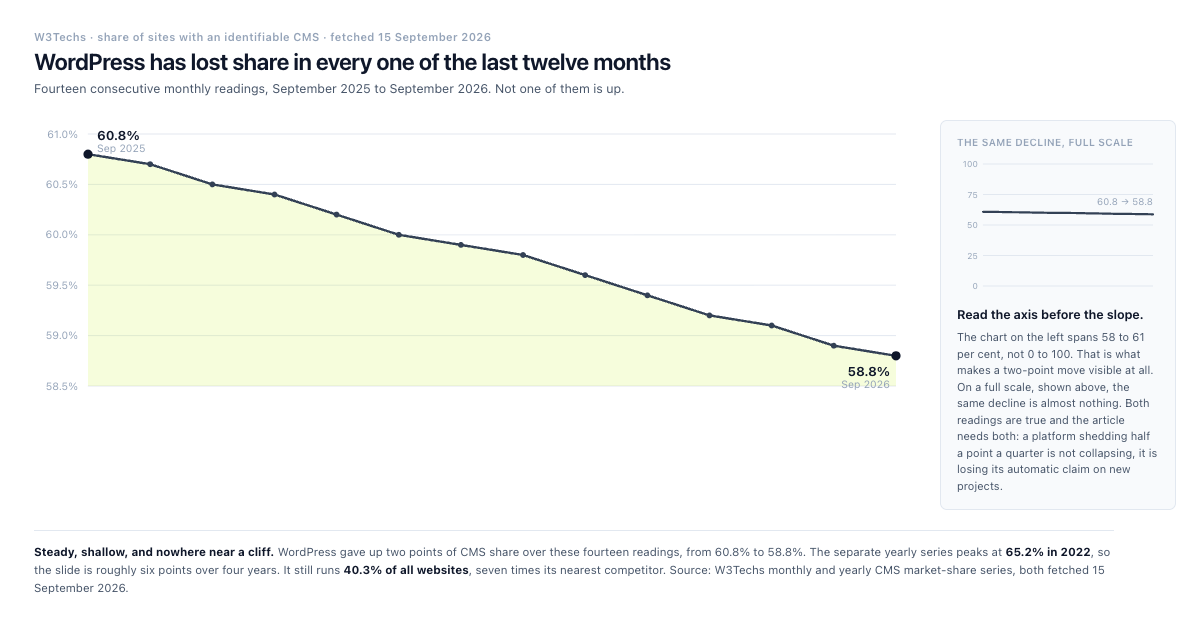
Fourteen readings, not one of them up. The inset is the same data on a full scale, because a two-point move needs a zoomed axis to be visible at all.
There is a catch in that second percentage worth naming, because it cuts against the argument this article is making. "Sites whose CMS can be identified" is doing real work in that sentence. W3Techs finds a technology by finding evidence of it on the page, and 31.5% of the sites it surveys run none of the content management systems it tracks at all.
WordPress is unusually easy to spot. It announces itself. A default install emits a generator meta tag naming its own version number, and serves its assets from a /wp-content/ path. We checked four large WordPress sites on 15 September 2026 and every one of them was identifiable in seconds from the HTML alone. A headless CMS need not leave any of that. We then checked six sites built on Payload, including one we could confirm against the vendor's own case study, and not one exposed a single identifier naming the CMS behind it. They look like Next.js applications, because that is what they are.
So the honest reading of the market-share numbers is that they measure detectable CMS installs rather than CMS installs. That does not rescue Payload's share, which is genuinely tiny against WordPress's by any measure. It does mean the gap between "WordPress" and "everyone else" is somewhat narrower than a table of percentages implies, and that the fastest-growing part of the market is the part that is hardest to count.
That adoption has a cause, and the ecosystem is most of it. The official plugin directory invites you to "browse over 72,000 free plugins", with roughly 68,000 returned by its own query API and "over 60,000" advertised on WordPress.com's marketplace. Take the most conservative of WordPress's own three numbers and it is still more free extensions than any competing CMS has paid and free combined, alongside over 15,000 free themes. What that buys you, and what it costs you, is further down.
The platform's reputation as a blogging tool undersells what runs on it. TechCrunch, Variety and Rolling Stone all publish on WordPress today, as does whitehouse.gov. These are high-traffic publications with real editorial operations, and they are on the same core you would be. Anyone telling you WordPress cannot handle scale is arguing with the evidence.
WordPress also offers a familiar editorial workflow. Your marketing team can create pages, publish posts, upload media and manage menus without asking a developer to change the application, and that familiarity has real value.
The challenge appears when a site depends on many plugins, heavily customized templates, page-builder components, or complex relationships between content types. The more parts you add, the more carefully you have to manage compatibility, updates, permissions, and performance.
Why are people moving away from WordPress?
Most of them are not. The teams that do leave are usually leaving the way they had to build on it rather than the platform itself. What drives them out is the maintenance surface of a large plugin set, a content model that resists being shaped around a product, and a front end that is difficult to modernize without fighting the theme layer. The share figures above show the effect, and it is a drift rather than an exodus. That is two points of CMS share over twelve months, against a platform that still runs four in ten of all websites.
The security data further down this page is the sharpest version of the argument. WordPress core is not where the risk concentrates. What you installed on top of it is.
Is WordPress outdated in 2026?
No. It runs 40.3% of the web, ships current releases, and has an ecosystem no competitor approaches. "Outdated" is the wrong question, and the comparisons that lead with it are usually selling something.
The useful question is narrower. Is WordPress the right fit for this project? For a marketing site, a blog, a publication, or anything an editor needs to change without waiting for a deploy, it remains an excellent answer and often the fastest one. For a product where the content model is part of the application, the honest answer changes, and the rest of this article is about why.
Payload CMS vs WordPress for content modeling
Content modeling is one of the clearest differences between the two platforms.
WordPress includes posts, pages, taxonomies, media, users, and comments as core concepts. You add custom post types, custom taxonomies, metadata, and fields through code or plugins. Custom post types are the supported way to create different kinds of content.
This setup works well for many websites. You might use:
- Pages for service descriptions
- Posts for articles
- A custom post type for case studies
- Taxonomies for industries and services
- Custom fields for client information and results
Payload takes a more direct approach. Developers create collections and fields in the application configuration. Relationships, validation, access control, uploads, and hooks can live alongside the schema.
Consider a property marketplace. Each listing might need:
- Multiple property types
- Location data
- Availability dates
- Pricing rules
- Agent relationships
- Image galleries
- Approval states
- Public and private fields
- Different permissions for agents, editors, and administrators
Both platforms can support that model. WordPress may use custom post types, custom fields, plugins, and custom code. Payload can represent the model directly in its configuration and application logic.
Payload has plugins too, and the number is the point. There are eleven official ones. Form Builder, SEO, Redirects, Search, Nested Docs, Import/Export, Stripe, Sentry, Multi-Tenant, Ecommerce, and an MCP plugin that exposes your collections to AI agents. Set eleven against seventy-two thousand and you have the trade stated in one line.
The difference is not only quantity. A Payload plugin is a package you write, install and configure in a file, versioned with your code and reviewed in a pull request. There is no marketplace, no plugin admin screen, and no auto-update that changes production behavior overnight. That is a much smaller ecosystem in exchange for a much smaller surprise surface, and which of those you want depends entirely on whether you were planning to solve your problem by installing something.
Be honest with yourself about that question before you choose. "There's a plugin for it" is the single best reason to stay on WordPress, and it is true far more often than it is not.
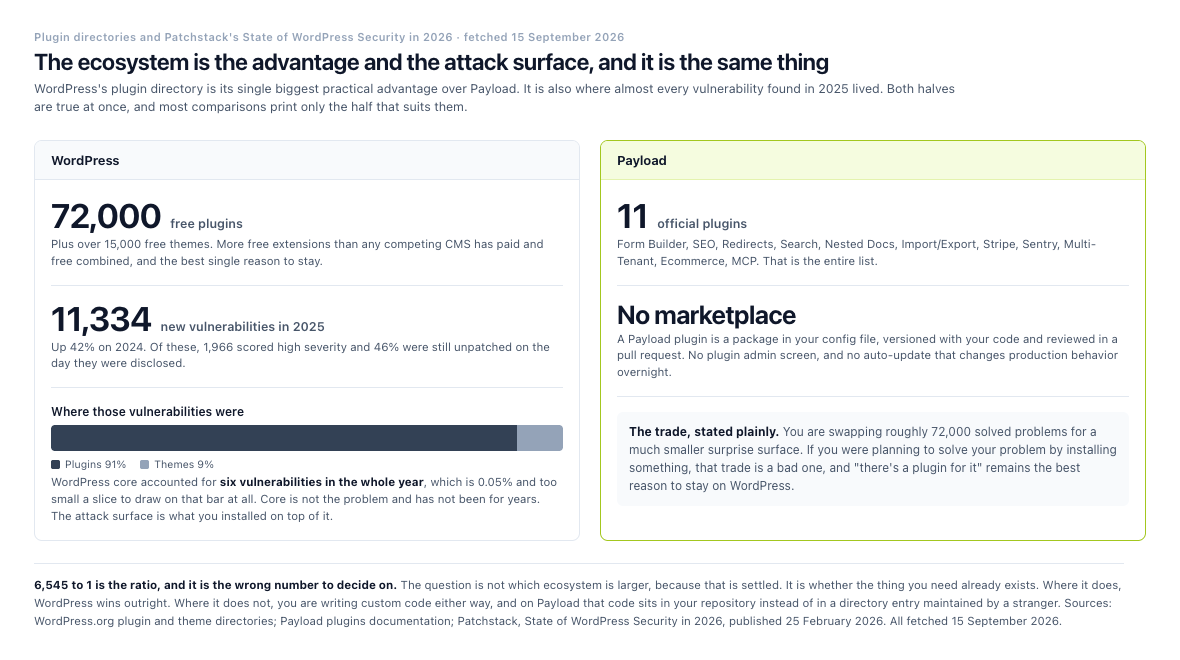
The same fact twice. The directory that makes WordPress fast to build on is also where 91% of last year's vulnerabilities lived.
Which is better depends on who you have. If your editors need a familiar publishing environment and the model is relatively straightforward, WordPress may be the faster route. If the content model is central to the product, Payload can reduce the distance between application requirements and CMS structure.
Editorial experience and content operations
WordPress has a strong advantage in editorial familiarity. Its dashboard has been used by publishers and marketing teams for years, and many editors already understand its basic workflow. The block editor also gives authors a visual way to assemble pages and posts.
Payload's admin panel is built with React, and you customize views, fields, components and any other part of the administrative experience.
That flexibility can produce a more focused interface. Editors might see only the fields and actions relevant to their role. A publishing team could use a review workflow tailored to its content process rather than adapting to a generic setup.
There’s a trade-off. A highly customized Payload admin experience requires design and development work. WordPress often provides more out-of-the-box options for common publishing needs.
Example: a marketing team with strict publishing rules
The textbook version of this is a financial services company with four content roles:
- Writers draft articles.
- Subject-matter reviewers approve technical content.
- Legal reviewers approve regulated claims.
- Editors publish approved pages.
WordPress can support this workflow through editorial plugins and custom configuration. Payload can model the states and permissions directly in the application, with custom fields and access rules that reflect the company’s process.
A smaller version of this shipped on a marketplace migration, and it is worth describing because it is the honest scale most teams actually need. Listings submitted by kitchen owners move through draft, pending and published, with approval required before anything is publicly visible, and the import carried 155 pending and 40 draft listings across as drafts specifically so their approval history survived the move. That is three states and one gate, not four roles and a legal review, and it covers the large majority of real editorial workflows.
The trap in the bigger version is not building the states. It is discovering, usually late, that approval is a property of the work rather than of the account submitting it. The same client can send in two kinds of job that need two different reviewers, and a workflow keyed to the account cannot express that.
The right decision isn’t based on which dashboard looks better. It’s based on how much the workflow needs to match the organization’s actual publishing process.
Developer experience and technical flexibility
Payload is designed for teams working in the JavaScript and TypeScript ecosystem, covering TypeScript configuration, React components, Node.js deployment, API access, and custom server-side logic.
That can be a strong fit for teams already building applications with Next.js, React, or other modern web technologies. The CMS and frontend can share types, development tools, deployment processes, and code review practices.
WordPress uses PHP on the server and JavaScript for parts of the admin and frontend experience. Its REST API allows external applications to retrieve and manage content, while WordPress also supports custom APIs and integrations through its REST API.
WordPress remains a practical option for PHP teams and agencies with deep experience in its ecosystem. It also has a well-established development model for themes, plugins, hooks, filters, and custom templates.
The difference is architectural preference:
- Payload fits teams that want the CMS inside a TypeScript application stack.
- WordPress fits teams that want a mature publishing system with extensive PHP-based customization.
- Both can support decoupled frontends, but the development workflow will differ.
At Idea Labz, we favor Payload when the website behaves more like a product than a collection of pages. We can define the content model, permissions, frontend behavior, and integrations as parts of one considered system rather than layering functionality onto a generic site structure.
That preference comes from running it. This site is a Payload build, and so is the marketplace migration described below. Both sit on the same four-layer monorepo template we maintain. One Payload backend serves a CMS admin on the Local API, a Next.js site over GraphQL, a second Next.js app over REST, and an Expo mobile layer sharing that REST client. One content model, three API styles, four consumers.
Performance and architecture
A radius search across several hundred records returns in 18 milliseconds on a spatial index and in whole seconds on a filtered list. Same data, same CMS, same server. That gap is the whole subject of this section, and the CMS is not in it.
Performance depends on the full implementation, not just the CMS. Hosting, caching, image delivery, database queries, frontend code, third-party scripts, and content volume all affect the result.
A conventional WordPress site can perform well with suitable hosting, caching, image optimization, and a carefully managed plugin set. WordPress's Site Health screen reports on performance and configuration problems from inside the admin.
A headless Payload setup can separate content management from the public frontend. A Next.js frontend, for example, can use server rendering, static generation, image optimization, and route-level strategies where appropriate. Next.js gives you each of those.
That separation buys you decisions you would otherwise never make, and then makes you make them. You define how content gets fetched, how previews work, how drafts appear, how revalidation happens, and how frontend and CMS deployments coordinate.
A practical performance scenario
The textbook version of this is a publisher with 100,000 articles, a large media library, and traffic spikes around major events. We have not run that, and anyone claiming the CMS decides the outcome at that scale is guessing. A traditional WordPress implementation may require careful database optimization, caching, content delivery, and plugin review.
A Payload and Next.js implementation may offer a different route, with structured content delivered through an API and pages rendered through a modern frontend architecture. It still requires sound engineering. Headless does not automatically make a website fast.
At a more ordinary scale, here is what the engineering actually looks like. On a marketplace migration we ran, the expensive query was not the article archive, it was a geographic search, finding every kitchen within a few kilometers of a visitor. That runs in 18 milliseconds against a spatial index over the listings that carry coordinates, and the blog archive query returns in under a millisecond. Neither number came from the CMS being fast. They came from deciding which columns get indexed, and from the fact that a radius search against a spatial index is a different question from a radius search against a filtered list.
The general point holds at any size. The CMS rarely decides performance. Your query plans, your caching strategy and your image pipeline decide it, and all three are things you own on a self-hosted stack and rent on a managed one. On a managed platform such as Sanity, the database and its delivery run on the vendor’s side, and our page on how Payload compares with Sanity covers that trade.
Security, updates, and maintenance
No CMS removes the need for maintenance. Every website needs updates, access controls, backups, monitoring, dependency management, and a plan for responding to vulnerabilities.
WordPress has a broad ecosystem, which also means you have to review themes and plugins carefully. WordPress publishes security practices covering data validation, sanitization and escaping output, with user roles and capabilities documented separately.
The scale of that review is the part worth quantifying. Patchstack's State of WordPress Security in 2026, published 25 February 2026, recorded 11,334 new vulnerabilities across the WordPress ecosystem during 2025, up 42% on the previous year. 1,966 of them, 17%, scored as high severity, itself a 113% year-on-year rise. 46% were still unpatched on the day they were disclosed publicly, and for the vulnerabilities attackers cared about, the weighted median time to first exploit was five hours.
Read the split before drawing the obvious conclusion, because it does not say what the hit pieces say. 91% of those vulnerabilities were in plugins and 9% in themes. WordPress core accounted for six. Core is not the problem and has not been for years. The attack surface is the thing you assembled on top of it, and it grows every time you solve a requirement by installing something.
Payload projects typically involve fewer third-party plugins because many capabilities are implemented through application code and configuration. That can reduce dependence on unrelated extensions, but it does not remove responsibility. Node.js dependencies, application code, database configuration, authentication, hosting, and deployment pipelines still need regular attention.
For either platform, a maintenance plan should cover:
- Core and dependency updates
- Plugin or package review
- Automated backups
- Role and permission audits
- Staging environments
- Error monitoring
- Security testing
- Recovery procedures
This is an area where project governance matters more than the CMS label. A neglected Payload project can create problems just as a neglected WordPress project can.
SEO, accessibility, and integrations
Neither Payload nor WordPress automatically produces strong search rankings or accessible websites. Those outcomes depend on the content, frontend implementation, technical setup, and editorial process.
WordPress offers a large selection of SEO and accessibility plugins, while Payload puts the content model and the frontend output in your hands. In a headless build, you implement metadata, canonical URLs, structured data, redirects, sitemaps, social previews, and preview workflows deliberately.
The same applies to accessibility. Semantic HTML, keyboard navigation, focus states, contrast, form labels, and screen reader behavior belong primarily to the frontend implementation. The Web Content Accessibility Guidelines from W3C provide the relevant standards.
For integrations, Payload’s APIs and application structure suit custom systems such as:
- Product information management
- Customer relationship management
- Search platforms
- Subscription systems
- Internal dashboards
- Mobile applications
- Event platforms
- Personalization services
WordPress also integrates with these systems through plugins, REST APIs, webhooks, custom code, and third-party connectors. Its large ecosystem may shorten the path for common integrations.
The deciding factor is usually how standard the integration is. A common newsletter form may be quick in WordPress. A complex customer-specific publishing workflow may be easier to control in Payload.
Total cost of ownership
Initial build cost is only one part of the decision.
WordPress can be economical for a small business website because many themes, plugins, hosting plans, and contractors are available.
Payload may require more custom development at the beginning. The team typically spends more time designing the schema, admin experience, permissions, APIs, and frontend architecture.
Over time, the cost comparison depends on the project:
| Cost factor | Payload CMS | WordPress |
|---|---|---|
| Initial setup | Often higher for custom builds | Often lower for conventional sites |
| Custom content models | Usually direct application development | Plugins, fields, post types, and custom code |
| Editorial changes | May require developer changes for new behavior | Editors may handle more changes through plugins or page builders |
| Maintenance | Application and package maintenance | Core, plugin, theme, and hosting maintenance |
| Scaling complexity | Strong fit for custom architectures | Can scale, but implementation quality matters greatly |
Those are the shapes. Here are the list prices behind them, all fetched from each vendor's own page on 15 September 2026.
| Line item | WordPress route | Payload route |
|---|---|---|
| CMS license | $0 (GPL) | $0 (MIT) |
| Entry managed hosting | WordPress.com Personal $9 per month, renewing at $6 on annual billing | not offered; Payload Cloud closed to new projects |
| Typical managed hosting | WP Engine from $28 per month; Kinsta Business from $30 per month | Vercel Pro $20 per seat per month, including a $20 usage credit |
| Budget self-hosting | shared PHP hosting, widely available | DigitalOcean droplet $4 to $6 per month (512 MiB to 1 GiB) |
| Database | bundled with hosting | Neon Postgres from $0, then $0.35 per GB-month |
| Custom fields | Advanced Custom Fields PRO $49 per year, 1 site | in the schema, $0 |
| SEO | Yoast SEO Premium $118.80 per year, 1 site | official SEO plugin, $0 |
| Forms | Gravity Forms $59 per year, 1 site | official Form Builder plugin, $0 |
| Performance | WP Rocket $59.95 per year, 1 site | rendering strategy, $0 |
| Page building | Elementor Pro $60 per year, 1 site | blocks you define, $0 |
Managed WordPress hosting prices are per capacity tier, not flat. Kinsta's entry plan covers one install, 20 GB of bandwidth and 10 GB of storage, with each additional site at $30 per month and each extra 20 GB of disk at $20 per month.
The arithmetic that decides most small projects is on the right-hand column being mostly zeroes and the left-hand column being mostly annual renewals. Five common premium plugins on one WordPress site come to $346.75 a year before hosting, and they renew whether or not the site changed. The Payload equivalents are configuration in a repository you already pay a developer to maintain.
That is not a free lunch, and the table is only half the picture. Everything in the Payload column that costs $0 costs engineering time instead, and engineering time is the most expensive line item either platform has. The honest version of this comparison is that WordPress converts developer hours into license fees, and Payload converts license fees into developer hours. Which of those you would rather pay is a question about your team, not about the software.
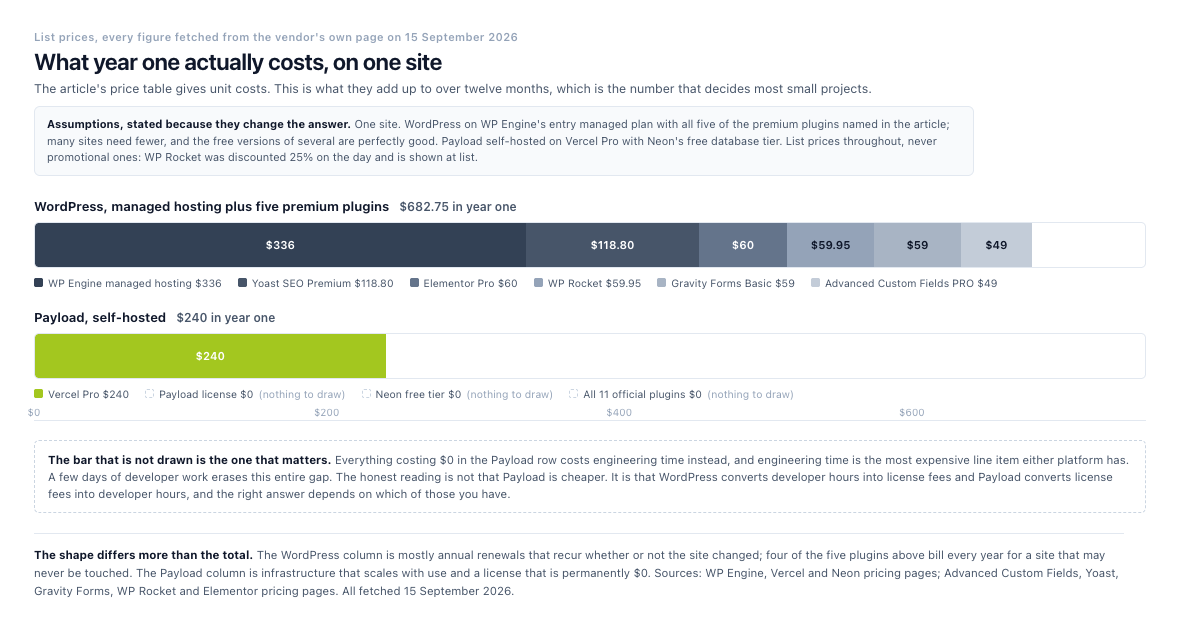
Twelve months, one site, list prices. The totals matter less than the shapes: annual renewals against infrastructure you can turn off.
The full cost breakdown for a self-hosted Payload stack, including hosting, database, storage and the metered rates that actually drive the bill, sits in our Payload guide.
Idea Labz evaluates this trade-off before recommending Payload. If a project needs only a brochure site and a blog, WordPress may be the more sensible choice. If the team expects complex content relationships, multiple frontends, or custom user workflows, Payload can provide a cleaner foundation for future work.
Migrating from WordPress to Payload CMS
Everything above compares two platforms you might choose. This section is about the move between them, because it is the part that decides whether the comparison is academic, and because we did one recently enough to still have the scars.
The site was a home-food marketplace with eleven years of content, running WordPress with the Voxel theme as a multisite of three blogs. A root site, plus an India site under /in/ and a UAE site under /ae/, where the regional copies had been cloned from the root years earlier and then quietly drifted apart. The database restored to 333 tables. The public content came to 341 published posts, 513 published listings with menus, opening hours, delivery options and galleries, 131 programmatic landing pages, and 1,680 registered accounts.
The number that actually set the constraints was none of those. Eleven years of ranking history was the asset, and the job was to move the site without damaging it.
What a WordPress migration actually consists of
Almost none of the work is moving the content. The content is a database export and a script.
Although you will be writing that script. This is the part of leaving WordPress that nobody puts in the brochure. You are also leaving its migration ecosystem. WordPress has a mature industry of import, export and transfer plugins, and moving between WordPress hosts is close to a solved problem. Moving off it is not.
Roboto Studio, Build with Simon and Beease have all published their approaches. Read them before you start. But understand what you are signing up for. It is a migration you largely build yourself, against a content model only you know, with the correctness burden on you. That is the honest cost, and it is the reason the section below is about proving the result rather than trusting it. For the whole move in order, from any system and on any database, our checklist for migrating to Payload runs from the schema export to the handover.
The work is in four places WordPress does not label as content at all. The first is the page builder. Elementor in this case stores its layouts as a JSON blob per page, and turning those into real content blocks is a component-by-component conversion. That conversion is the bulk of the effort on any Elementor site, and what drives it is the number of distinct section types the old site used rather than the number of pages. A 200-page site built from twelve repeated sections is a smaller job than a 30-page site where every page was art-directed separately.
The second is SEO metadata. Yoast's titles, descriptions and focus keywords are post meta, and they have to land in real fields on the other side or you lose the rankings you were trying to protect. The third is URL structure. Every pattern the old site served has to keep resolving, which on this site meant /{post}/, /{page}/, /cluster/{slug}/, /category/{slug}/, /tag/{slug}/ and /author/{slug}/ all preserved exactly, plus redirect rules for the two regional prefixes that were collapsing into the root.
The fourth is the part nobody scopes, which is deciding what not to bring. Three blogs holding near-duplicate copies of the same articles is not three sites' worth of content, it is one site's worth with a resolution problem. Every post carried a region flag, but thirteen posts on the root blog carried regional flags while living at root URLs. We resolved those by URL rather than by metadata, because the URL is what Google indexed and the metadata was what somebody set in 2019. Where the same slug existed on two blogs, the regional copy was dropped and reported rather than silently merged.
For scale, a like-for-like port of a site that size, done systematically, is five to seven working days of work. That figure carries a condition it should never be quoted without. Like-for-like means nothing gets re-art-directed, and a redesign is a different project with a different number.
Payload's own case studies carry exactly one migration at scale. bizee replatformed 2,500 pages onto Payload while rebranding, over three months. Set that against the five-to-seven-day figure above and the difference is the entire point. Ours was a like-for-like port of a much smaller site with no redesign; theirs was thirty times the page count with a rebrand on top. The number that matters is never the days, it is what was in scope.
How you know it worked
You do not know a migration worked because it looks right. Fourteen hundred URLs cannot be eyeballed, and the ones that break are never the ones you check.
So the check was mechanical. A crawler read the old site's sitemap index, fetched every URL on both hosts, followed redirect chains, decoded HTML entities and compared titles. The final run accounted for 1,407 of 1,407 URLs with zero mismatches. 695 matched exactly, 25 resolved through intended redirects, and 687 came back better than the original.
That last number needs explaining, because it was the surprise. 687 URLs improved because the old site was serving empty <title> tags on its tag archives and a 500 error on one live post. The first crawl reported 746 mismatches and every single one was a flaw in the crawler rather than the migration. It was not following 308 redirects, it was comparing raw HTML entities, and it could not classify an archive page that served no title at all.
The lesson there generalizes past this project. The old site is not automatically the ground truth. When your comparison tool disagrees with the source, the source is a suspect too.
52 images that were already gone
The importer was built to refuse to write a broken reference. If a post's inline image could not be resolved to a real file, the import would not invent one. It dropped the node and logged it.
That rule turned up something nobody was looking for. 52 images referenced by posts published between 2018 and early 2023 did not exist. Not in the uploads archive, not on the live server, nowhere. And when we went and looked at those posts on the live WordPress site, they were broken there too. Most of them had a source URL ending in a bare -600x400. with no file extension at all, which is the signature of a resize that failed years ago and was never noticed.
Those posts had been serving broken images to real visitors for years. Nothing in WordPress had ever said so. No dashboard warning, no site health check, no error. The files had simply gone, and the pages kept rendering around the holes.
The only reason anyone found out is that a migration tool was strict enough to complain. A CMS that lets content rot quietly is not a WordPress problem or a Payload problem, it is what happens to any system nobody audits for eleven years. The difference is that the model in Payload is code, so the audit is a script you can run again, and we run it every time.
A migration like that one is a project in its own right, with a redirect plan and a content model settled before anything moves. If yours is at that stage, our Payload migration service starts there.
When WordPress is the better choice
WordPress is often the right choice when:
- The project needs a blog or marketing website quickly.
- Editors want a familiar publishing dashboard.
- The content model is relatively simple.
- The team already has strong WordPress skills.
- A required integration exists as a reliable WordPress plugin.
- You want a large pool of WordPress developers and agencies.
- The frontend can use a theme or a conventional custom template.
You do not have to take that list from us. Roboto Studio, an agency listed among Payload's own partners, publishes a Payload to WordPress migration page alongside the one pointing the other way. Their summary of why teams leave Payload is franker than anything a vendor would write. They name infrastructure fatigue from owning databases, hosting, auth and scaling; gaps in the ecosystem that turn into custom development; less predictable platform direction since the Figma acquisition; and visual editing and live preview that still take real engineering to deliver.
They also cannot resist noting that they struggled to think of a good reason to move to WordPress. Read both halves.
Example: a local professional services firm
A five-person consultancy needs a site with service pages, staff profiles, a blog, contact forms, and basic search engine optimization. The team has no dedicated developer and wants staff to update pages independently.
WordPress may be the most practical choice. A standard theme, a small set of trusted plugins, managed hosting, and a clear update process can meet the requirements without introducing unnecessary application complexity.
When Payload CMS is the better choice
Payload is often a stronger fit when:
- The content model is highly structured or unique.
- The website is part of a wider digital product.
- The project needs a custom React or Next.js frontend.
- You want multiple channels to consume the same content.
- Permissions and workflows need detailed control.
- The team works primarily with TypeScript.
- The CMS needs to connect closely with custom application logic.
- The site may grow into a platform, portal, or multi-product system.
Example: a multi-brand content platform
A company manages several brands, each with different navigation, content rules, approval stages, and localized pages. It also wants to reuse product and editorial content across websites, a mobile application, and internal tools.
WordPress can support this architecture, but it may require multisite configuration, custom plugins, external services, and careful governance. Payload can model the content and access rules within a custom application, with APIs serving each channel.
We met the other end of that arrangement on the migration above, which arrived as a WordPress multisite of three blogs and left as one. The three regional sites had been cloned from each other and then drifted, so most content existed three times over with small differences nobody could account for. The question on the way in was whether to rebuild that as three tenants or as one.
We made it one, with region as an indexed field on posts, listings and landing pages. The regions were never separate businesses. Same pages, same articles, same accounts, different audience. Modeling them as tenants would have tripled every content row to express a difference that one column expresses exactly.
The rule that came out of it outlasts the decision: a field is a filter, a tenant is a fork. If the two things genuinely share content and differ by audience, you want a field. If they have separate editors, separate approval and content that must never leak between them, you want a tenant. Multisite is often reached for when a column would have done, and undoing that later is the expensive direction to get wrong.
If you’re undecided, map the project’s content types, roles, integrations, and frontend requirements before reviewing templates or plugins. Architecture becomes much clearer once the actual content and workflows are visible.
A question teams often miss: who will own the system?
Many CMS comparisons focus on features and overlook ownership.
Before choosing a platform, ask:
- Who will maintain the code?
- Who approves schema changes?
- Who manages deployments?
- Who handles security updates?
- Who supports editors?
- Who owns integrations?
- What happens if the original development partner is unavailable?
- How will the system be documented?
This question can change the recommendation. A highly customized Payload application needs an engineering owner or a reliable development partner. A WordPress site needs someone responsible for plugin selection, updates, backups, and performance.
At Idea Labz, we include ownership and handoff in the architecture discussion. A CMS should fit the organization’s capabilities, not just the project’s technical wish list. Clear documentation, sensible conventions, and a maintainable codebase matter as much as the initial feature set.
In practice that means the handover document is written during the build rather than after it. On the migration described above, the project carries a single status file recording what is done, what is deliberately not done and why, what the next owner should pick up first, and where every decision was made and on what date. The entry on it that matters most is the one describing unfinished work, because anyone inheriting the project finds out about it in the first thirty seconds rather than the first incident.
That is the real ownership test, and it applies equally to a WordPress site. Not whether the system is documented, but whether the documentation tells you what is broken.
Final verdict
WordPress remains a strong choice for conventional websites, publishing operations, and teams that value familiarity, speed, and a large ecosystem. Its market presence and extensive plugin directory make it practical for many organizations, provided the team manages extensions and maintenance carefully.
Payload CMS is a better fit when content sits inside a custom application, when the frontend needs modern JavaScript tooling, or when permissions, schemas, and integrations require more control. It involves more development work, but that investment can produce a cleaner system for complex digital products.
There’s no universal winner. The right CMS depends on your content model, team, roadmap, and ownership plan.
If you’re comparing Payload CMS and WordPress for a new project, start by documenting your content types, editorial workflow, integrations, and frontend requirements. If more than two options are still on your shortlist, our guide to other alternatives to Payload gives each one a verdict and five questions that settle the choice.
If what you actually have is an existing WordPress site and a suspicion you have outgrown it, that is a different exercise, and it is one we do. We will take your site, restore your database, and tell you what is actually in it. That means how many distinct page-builder sections you really use, which URLs carry your organic traffic, what your metadata looks like, and what has quietly broken since you last looked. That inventory is most of the decision, and you can have it whether or not you then move.
A word on what we will not tell you. We will not quote you a timeline from someone else's migration. A like-for-like port with no redesign is a different project from a rebuild, and the work scales with how many distinct section types your old site uses rather than how many pages it has, so two sites of identical size can differ by a factor of three. Anyone who quotes you days before seeing your database is guessing.
And if the answer is that WordPress is serving you perfectly well, we will tell you that too. It is the right answer more often than this article's title suggests.