
Choosing between Payload CMS and Sanity often comes down to one question: do you want to own the application and data layer, or would you rather use a managed content platform?
Both tools support structured content, APIs, custom editorial experiences, and modern JavaScript applications. They’re also aimed at teams building websites, ecommerce experiences, digital products, and omnichannel content systems. The difference appears in how they handle hosting, data ownership, customization, collaboration, and ongoing maintenance.
This guide compares Payload CMS vs Sanity across those areas. It also explains where each platform fits best and what trade-offs to expect.
Payload CMS vs Sanity at a glance
| Category | Payload CMS | Sanity |
|---|---|---|
| Product model | Open-source, code-first CMS | Hosted, API-first content platform |
| Primary development model | TypeScript and React | JavaScript or TypeScript with Sanity Studio |
| Hosting | Self-hosted or deployed through supported hosting providers | Managed Sanity infrastructure |
| Data model | Defined in application code | Defined through Sanity schemas |
| Database approach | Uses supported database adapters | Stores content in Sanity’s Content Lake |
| Query language | REST, GraphQL, and local APIs | GROQ, GraphQL, and REST |
| Admin experience | Customizable React-based admin panel | Customizable React-based Sanity Studio |
| Best fit | Teams that want ownership and deep application control | Teams that want managed infrastructure and collaborative content workflows |
| Main trade-off | Your team manages deployment, infrastructure, and upgrades | Your team works within a hosted platform and its pricing model |
Payload is a full-stack, TypeScript-first CMS that can be self-hosted and customized in code. Its documentation covers collections, globals, authentication, access control, localization, uploads, REST, GraphQL, and local APIs. Payload documentation
Sanity takes a different approach. It combines Sanity Studio, a customizable editing environment, with the Content Lake, a managed cloud datastore designed for structured content. Sanity’s documentation covers Studio customization, GROQ, GraphQL, real-time collaboration, localization, assets, and webhooks. Sanity documentation
Neither platform is automatically better. The right choice depends on your technical priorities and how much control you want over the system behind your content.
One thing to know before you weigh anything that follows. Payload runs here in production and Sanity does not. Everything below about Sanity is its documented architecture and its published prices, read on the dates given in the text. Everything about Payload is measured on systems that are operated daily. Those are two different grades of evidence, and where they meet you should know which one you are reading.
What is Payload CMS?
Payload is an open-source headless CMS built with TypeScript and React. The CMS runs as part of your application rather than sitting entirely outside it, which gives developers direct access to configuration, authentication, authorization, database connections, APIs, and admin customizations. The full guide to Payload CMS covers its architecture and use cases in more depth than a comparison can.
Payload’s core configuration lives in code. Developers define collections, fields, access rules, hooks, uploads, and other CMS behavior in TypeScript. The official repository is licensed under the MIT License, which permits use, modification, and distribution under that license. Payload GitHub repository
That code-first model can suit teams that want the CMS to reflect their application architecture. For example, a product team building a membership platform might define users, plans, invoices, and subscriptions alongside the rest of the application. Access rules can be written close to the data and business logic instead of split between separate systems.
Payload also supports multiple API styles. Its documentation covers REST and GraphQL APIs, as well as local API access for server-side operations without making an HTTP request. Payload API documentation
Where Payload stands out
Payload tends to be a strong candidate when you need:
- Full control over hosting and deployment
- A TypeScript-first development workflow
- Custom authentication and authorization logic
- Database ownership and direct access
- A CMS that lives within a broader application
- Custom admin components built with React
- A self-hosted option for compliance or procurement requirements
- A clear path to modify the CMS at the code level
Payload isn’t just a content repository. It can function as the content and data layer inside a larger product.
What is Sanity?
Sanity is a hosted content platform built around structured content. Developers use Sanity Studio to create editorial interfaces and schemas, while content is stored in Sanity’s Content Lake and accessed through APIs.
Sanity schemas define the structure of documents, fields, references, arrays, objects, and other content types. Editors work in Studio, which developers can customize with React components and plugins. Sanity’s official documentation also describes real-time collaboration, where multiple users can work with content in the same environment. Sanity Studio documentation
Sanity uses GROQ as its primary query language. GROQ is designed to query structured content and can return content in shapes that match the needs of websites and applications. Sanity also provides GraphQL support, although GROQ is central to the platform’s content querying model. Sanity GROQ syntax reference
A typical Sanity setup might include a hosted Studio, a Next.js frontend, Sanity’s APIs, and a deployment pipeline for the frontend. Sanity manages the content infrastructure, while the development team focuses on schemas, queries, presentation, and editorial workflows.
Where Sanity stands out
Sanity can be a good fit when you want:
- Managed content infrastructure
- A polished collaborative editing experience
- Structured content for multiple channels
- Real-time content collaboration
- GROQ for flexible content queries
- A quick start without managing a database
- A central content repository shared across sites or applications
For example, a global marketing team might manage product pages, campaign content, press releases, and localized copy in Sanity while publishing that content to a website, mobile app, and digital display system.
Payload CMS vs Sanity: the main differences
1. Self-hosting and infrastructure
The biggest difference is operational ownership.
With Payload, your organization controls where the CMS runs. You can deploy it with your application or operate it as a separate service, depending on your architecture. That control also means your team is responsible for infrastructure, backups, monitoring, upgrades, and security configuration.
Sanity manages the underlying content infrastructure as a hosted service. Your developers still maintain the Studio code and frontend application, but they don’t operate the database or Content Lake infrastructure themselves.
The choice usually depends on your team’s operating model:
- Choose Payload when hosting control is a core requirement.
- Choose Sanity when you want to reduce infrastructure work.
- Evaluate both carefully if data residency, vendor review, or internal security policies affect the project.
A self-hosted system can provide more control, but it isn’t maintenance-free. A managed system can reduce operational work, but it introduces a dependency on the provider’s platform, account structure, pricing, and service policies.
2. Data ownership and portability
Payload stores content in the database connected to your application. Its documentation covers database adapters and database configuration as part of the deployment setup. Payload database documentation
Sanity stores content in its Content Lake. Teams access that content through Sanity’s APIs and tooling, including exports and migration utilities documented by Sanity. Sanity migration documentation
This difference affects more than technical preference. It shapes your exit strategy.
The exit itself is documented, and it is better than the reputation headless platforms carry. sanity datasets export is available on every plan, including the free one, and it writes a gzipped tarball containing your documents and your assets. No Enterprise contract, no support ticket, no export fee.
There is one behavior to plan around, and Sanity documents it in the command’s own reference: "Assets returning 401, 403, or 404 are excluded from the export." The same command offers a --no-strict-asset-verification flag, described as "Do not abort the export when an asset fails hash or content-length verification." Sanity datasets CLI reference
Read those two together and the shape of the risk appears. An asset the platform cannot serve does not stop the export, and by default a verification failure does. Turn off the strictness to get the job finished, and the assets that failed leave the tarball without announcing themselves. The count of what you exported will look right. The count of what you can still serve will not.
That is not a Sanity-specific flaw so much as the general condition of content you do not hold.
The question to carry into a vendor conversation is therefore not whether an export exists. It is what the export does with the things that are already broken.
Searching Sanity’s own issue tracker for reports about exports and missing assets returns almost nothing: one closed request from 2021 asking for original filenames, and one closed 2024 issue about an unclear error message. This is a documented design decision rather than a bug people keep tripping over.
What leaving actually involves
Both vendors describe your ownership of Sanity content in flat contradiction of each other, which is a good reason to trust neither and check instead.
Sanity’s comparison page says that "while Sanity hosts the infrastructure, you still maintain complete control of your data and schema definitions." Sanity vs Payload Payload’s comparison page says that "though Sanity’s editor is open source, its cloud-based infrastructure does not permit true ownership of data." Payload vs Sanity
Neither company is a neutral party, and the export behavior and the pricing table settle it more usefully than either sentence. The export is real and free on every plan, so the crude version of lock-in does not apply and Payload overstates it. Equally, backups, the full audit trail and the History API are Enterprise-only lines on Sanity’s own pricing table, and the Content Lake is infrastructure you do not operate, so "complete control" is carrying weight it has not earned.
The most useful account comes from someone who is neither vendor. Matija Žiberna, who has moved two client projects off Sanity, sets the migration out in five steps: export the dataset as NDJSON, map the schemas, replace GROQ queries with Payload queries, convert Portable Text to Lexical, and download and reimport the media.
The step that costs the most is the one nobody prices. He calls the Portable Text to Lexical conversion "the most technically involved step in the migration, and the one with the least existing tooling", and the difficulty is structural rather than clerical: Portable Text marks up text with an array of marks, while Lexical stores formatting as a bitmask on the text node. Two rich-text models that both know what bold means still have to be translated rather than copied.
His conclusion is the part a nervous reader needs, and it points the other way. Neither migration "was particularly painful once I understood the structural differences", with the shift from GROQ to Payload’s query API named as the biggest adjustment. The exit is work. It is not a trap.
Before choosing a CMS, ask:
- Where will the canonical content live?
- Can you preserve references between documents?
- Who owns the cost and effort of a future migration?
- Does the platform fit your data retention policies?
Migration planning belongs in the initial CMS decision rather than in the problem pile for later. Payload often gives teams a straightforward ownership model because the CMS and database can sit within infrastructure they control. Sanity can still work well, but you should document export procedures, content references, and vendor dependencies before production launch. When the time comes to move onto Payload, our Payload migration checklist covers the rich text, the references and the redirects in order.
3. Content modeling and development workflow
Payload uses configuration files written in TypeScript. Developers define fields, collections, access rules, hooks, and other behavior in code. This approach works naturally with pull requests, code review, automated testing, and shared development standards.
Sanity schemas are also code-based, but they operate within Sanity Studio and the Content Lake model. Developers define document types and field structures for use inside Studio, then query those documents through Sanity’s APIs.
Underneath that similarity sits the sharpest difference between the two platforms, and Sanity documents it plainly rather than hiding it. Validation rules you write in a Sanity schema "run in Sanity Studio. They do not run on the server." The Content Lake is, in Sanity’s words, "intentionally schemaless, and that flexibility is what makes several important features possible." Schema validation and the Content Lake
The features that flexibility buys are real ones. A schemaless store "means you can evolve your schema without running database migrations. You can add, rename, or remove fields and the existing data stays intact." Two Studios with different schemas can read the same dataset. Nothing breaks on Monday because a field was renamed on Friday.
The cost arrives in the same documentation: "schema constraints, including validation rules, are the responsibility of the client application making the write." Studio enforces them. The HTTP API does not, @sanity/client does not, and neither do content migrations or data imports. A script can put a document into your content store that your own schema would have rejected, and the way you find out is to run sanity documents validate afterwards and read the report.
Payload takes the other branch, and the cost lands in a different place. The content model is the database schema, so a field is a column and a change is a migration.
A migration here is not an abstraction. It is a committed TypeScript file containing lines like CREATE TYPE "public"."enum_users_roles" AS ENUM('admin', 'editor', 'user');, reviewed in a pull request alongside the code that depends on it.
So the trade is symmetrical, and neither side is a defect:
- On Sanity, a bad write can land and you detect it afterwards. Schema changes are close to free.
- On Payload, a bad write cannot land, because Postgres refuses it whatever wrote it. Schema changes cost you a migration every time.
If your content is edited almost entirely by people in a content tool, the first trade is the better one. If content is written by systems as well as people, and the shape of it matters to something other than a template, the second starts earning its cost.
Here’s a simplified example of how the workflows differ:
Payload scenario
A developer creates a products collection, adds role-based access, connects it to an existing user system, and defines a custom admin component in the same application repository.
Sanity scenario
A developer creates a product document schema in Studio, adds references to related documents, configures preview behavior, and writes GROQ queries for the frontend.
4. Editorial experience
Sanity is known for a flexible Studio experience that can be shaped around editorial workflows. Its official documentation covers custom inputs, custom document actions, structure builder features, and plugins. Sanity Studio documentation
Payload also provides an admin panel you can extend with React components. Its documentation covers custom admin components, fields, views, and live preview features. Payload admin documentation
The better editor experience depends on the project rather than the CMS label. A small content team may prefer a focused interface with only the fields it needs. A large organization may require approval stages, localization, scheduling, previews, permissions, and custom editorial tools.
Consider a publishing company managing thousands of articles. Sanity’s collaborative editing and content-focused workflow may be a strong match. Now consider a B2B application where content permissions depend on account ownership, subscription tier, and application roles. Payload’s code-level access control may provide a more direct way to model those rules.
That second case is common enough to be a default rather than an edge. Of the 27 Payload codebases we manage, 13 enable multi-tenancy, which is the mechanism that keeps one account’s content, users and permissions separated from another’s. It is a plugin and a configuration block rather than a project’s worth of bespoke work, which is the practical reason it ends up switched on in nearly half of them.
5. APIs and frontend integration
Both platforms support modern frontend architectures, including Next.js and other JavaScript frameworks.
Payload provides REST, GraphQL, and local APIs. The local API is useful when server-side application code needs to interact with Payload without sending a network request. Payload local API documentation
Sanity provides GROQ, GraphQL, and HTTP APIs. GROQ is particularly useful when developers need to query references, projections, filters, and nested content from the Content Lake. Sanity GROQ introduction
The practical difference is often less about whether an API exists and more about which query model your team prefers. Teams comfortable with SQL-like filtering and a tightly integrated backend may favor Payload. Teams that want a dedicated content query language and managed API layer may prefer Sanity.
6. Authentication and access control
Payload includes authentication capabilities as part of its application framework. Its documentation covers authentication collections, login, token management, password reset flows, and access control. Payload authentication documentation
Sanity provides authentication for Studio users and supports roles and permissions within its platform. Applications consuming Sanity content typically use the relevant API access configuration, tokens, and frontend application rules. Sanity authentication documentation
Payload may be the more natural choice when authentication is part of the product itself. For example, an application that needs customer accounts, organization-level permissions, and custom business rules can keep those concerns inside one codebase.
Sanity can be a better fit when the CMS has a separate group of editors and the frontend application only needs to retrieve published content.
7. Pricing and total cost of ownership
Pricing deserves more attention than a simple subscription comparison.
Sanity publishes three plans. Free is $0 forever and includes up to 20 user seats, 2 permission roles and 2 public datasets. Growth is $15 per seat per month and raises that to 50 seats, 5 roles and 2 datasets that may be private. Enterprise is custom pricing on application. Sanity pricing, read 17 September 2026.
Read the quota rows underneath those headline prices and something unexpected appears.
| Included per month | Free | Growth, $15 per seat |
|---|---|---|
| API CDN requests | 1M | 1M |
| API requests | 250K | 250K |
| Assets | 100GB | 100GB |
| Bandwidth | 100GB | 100GB |
| Datasets | 2, public only | 2, private or public |
| Documents | 10K | 25K |
| User seats | 20 | 50 |
| Permission roles | 2 | 5 |
Four of those capacity lines do not move when you start paying. Requests, assets and bandwidth are identical on the free plan and the paid one. What $15 a seat buys is seats, roles, private datasets, collaboration features, longer history, and the ability to exceed a quota at all, because Free has no overage path. Capacity itself is a separate add-on at $299 per month, which lifts the same lines to 50k documents, 5M CDN requests, 1M API requests, 500GB bandwidth and 500GB assets.
Once you are on Growth, the overage rates are $1 per 250K CDN requests, $1 per 25K API requests, $0.30 per GB of bandwidth and $0.50 per GB of assets.
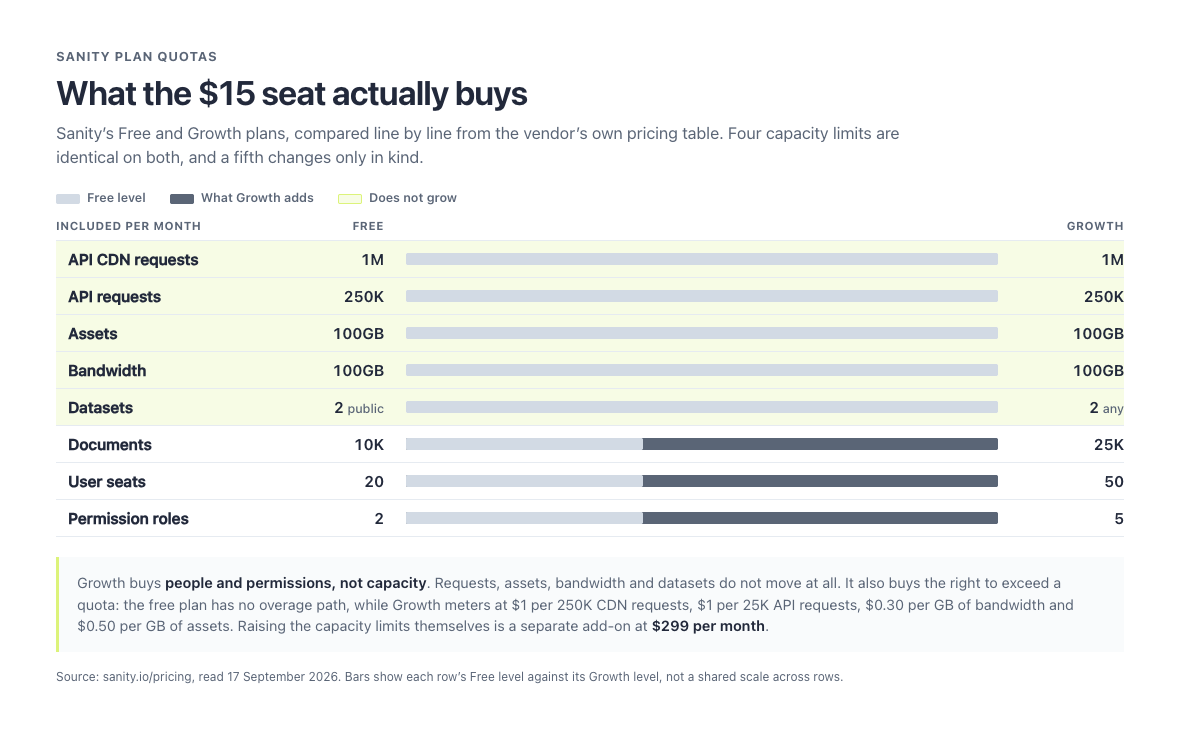
The rows with no dark extension are the ones a paid plan does not change. It is an unusually honest pricing table, in that the answer is sitting in it.
There is one place where Sanity’s own two pages pull against each other, and it is worth checking rather than taking either on trust. The comparison page says that "enterprise features like versioning, collaboration, and role-based permissions aren’t locked behind unpredictable pricing tiers", and describes data integrity as including "complete document histories, and access to every revision for a full year and beyond."
Set that beside the pricing table on the same site, read the same day:
| On the comparison page | On the pricing table |
|---|---|
| Versioning is not tier-locked | Draft history is 3 days on Free, 90 days on Growth, 365 days on Enterprise. Complete history is Enterprise, custom |
| Collaboration is not tier-locked | Comments, Tasks and Scheduled drafts start at Growth |
| Role-based permissions are not tier-locked | 2 roles on Free, 5 on Growth, and custom roles are Enterprise only |
| "every revision for a full year and beyond" | That is the Enterprise row |
The claim is not false so much as generous to itself. Versioning and collaboration of some kind do exist below Enterprise, and "unpredictable" is plainly aimed at competitors who meter by API call. What is genuinely tiered is custom roles, complete document history and the audit trail, and the year of revisions being advertised belongs to the tier most readers of this article will not be buying. A comparison page is a sales document at every vendor. The pricing table is where each of them is obliged to be precise.
Payload’s core is MIT licensed and costs $0, with v3.89.0 the current release. Self-hosting still creates costs: cloud hosting, database hosting, file storage, email delivery, monitoring, backups, engineering time, and ongoing maintenance. What it no longer creates is a hosted option to compare against. Deployment of new projects to Payload Cloud is paused following Figma’s acquisition of Payload, existing projects continue to run, and payloadcms.com/cloud-pricing now redirects to that notice. The page Payload’s own footer labels "Pricing" lists four routes to getting started and puts a dollar figure on none of them. Payload get started, read 17 September 2026.
So the license comparison is $0 against $0 until your twenty-first seat, and the real comparison is somewhere else entirely. What self-hosting actually costs, taken from real hosting bills rather than list prices, is set out in what Payload CMS costs to run.
A useful comparison looks at the full operating model:
| Cost area | Payload, self-hosted | Sanity |
|---|---|---|
| CMS license | $0, MIT | $0 to 20 seats, then $15 per seat per month |
| Hosting | Yours to choose and pay for, from roughly $0 to $20 a month for the application tier | Included, and not separable |
| Database | Yours, metered by the provider. Neon Launch bills $0.106 per CU-hour and $0.35 per GB-month | Content Lake, included within the plan quotas above |
| Second environment | 10 database branches included, then $0.002 per branch-hour | 2 datasets included, then $999 per dataset per month |
| Backups | Your provider’s line item. Neon scheduled backups are $0.09 per GB-month | Enterprise plans only |
| Maintenance | Your team manages upgrades and infrastructure | Sanity manages platform infrastructure |
| Engineering effort | Higher infrastructure responsibility, potentially greater customization | Lower infrastructure responsibility, platform-specific development |
| Migration planning | Database and application control can simplify ownership | Export and migration planning should be documented early |
The cheapest plan at launch may not remain the cheapest option as traffic, users, content volume, and operational requirements grow.
What a second environment costs
Every team eventually wants a staging copy, a client preview, or a safe place to rehearse a content migration. Both platforms have a unit for that, and they are not the same construct: Sanity isolates content in a dataset, while a self-hosted Payload isolates it in a database branch. What they share is that this is the thing you reach for when you need a second environment.
| Sanity | Payload on Neon | |
|---|---|---|
| Isolation unit | Dataset | Branch |
| Included | 2, on Free and Growth alike | 10 per project, on Free and Launch alike |
| Cost of one more | $999 per dataset per month | $0.002 per branch-hour, roughly $1.46 if it runs continuously |
Both sets of figures were read from the vendors’ own pricing pages on 17 September 2026. The gap is three orders of magnitude.
Before that number decides anything, measure your own usage, because ours says the gap matters less than it looks and in a more interesting way.
Across the 26 Postgres Payload CMS projects we operate, there are 45 branches. Ten projects run a single branch. Thirteen run two. Three run more than two. No project has ever passed the ten branches Neon includes, so every additional environment we have created has cost nothing at all.
Sanity’s two included datasets would have covered 23 of those 26 projects as well. For most of a portfolio, both models are free.
Backups, history, and what you can recover
This is where the fork stops being philosophical.
| Sanity | Payload on Neon | |
|---|---|---|
| Backups | Enterprise plans only | $0.09 per GB-month for scheduled backups on Launch |
| Point-in-time restore | Enterprise, with custom retention | Instant restore at $0.20 per GB-month, history window up to 7 days on Launch |
| Draft history | 3 days on Free, 90 days on Growth, 365 days on Enterprise | A property of the database you operate |
| Full audit trail and History API | Enterprise only | A property of the database you operate |
Sanity’s own CLI reference states it directly. The sanity backups command carries the banner "This is a paid feature" and "This feature is available on certain Enterprise plans." Sanity backups CLI reference
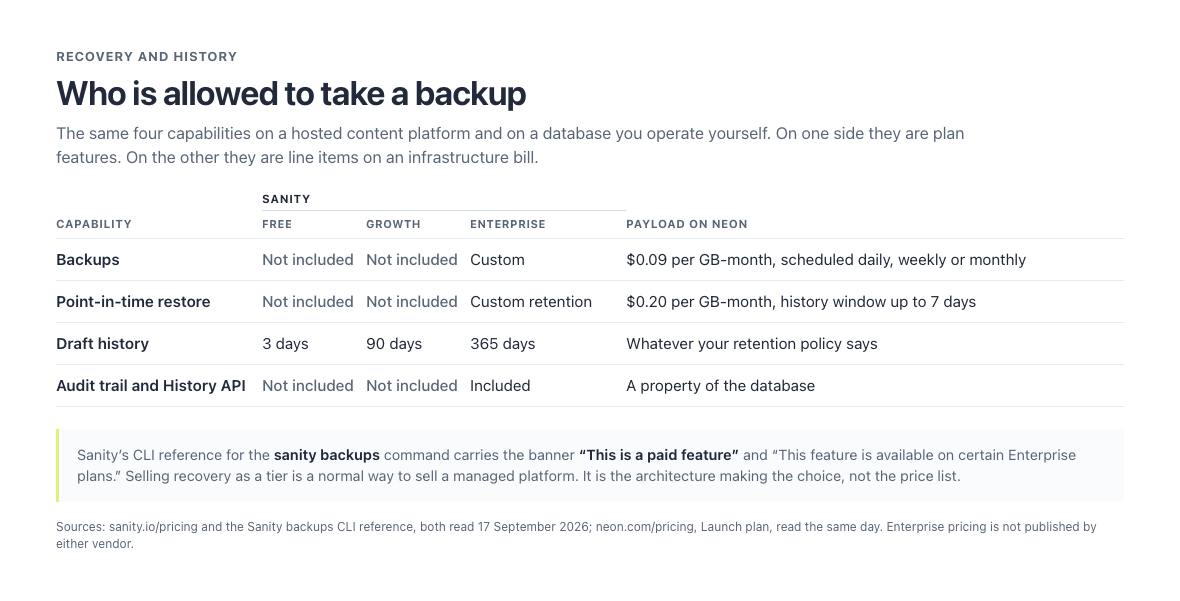
Four rows, and the only column where recovery is not a purchasing decision is the one where you already own the database.
On a self-hosted Payload the same capability is a line on a database bill, or a pg_dump and a cron entry, because the database is one you already own. That is not a criticism of Sanity’s pricing, which is a reasonable way to sell a managed platform. It is the point the architecture decides for you.
Payload CMS vs Sanity for common project types
Marketing website
For a standard marketing website, either platform can work.
Sanity may suit a marketing team that needs shared content, structured page sections, editorial collaboration, and a managed platform. Payload may suit a team that wants the CMS hosted alongside a Next.js application and customized around its existing backend.
The decision should focus on editorial complexity and operational preferences, not just the number of pages. WordPress is also on the table for a conventional marketing site run by a non-technical team, and our Payload vs WordPress comparison covers when it wins.
Ecommerce website
Payload can be a strong option when content, products, customers, orders, and access rules need to connect closely. Its application-oriented model may reduce the separation between the CMS and the rest of the commerce system.
Sanity can work well as the content layer for product descriptions, campaign pages, buying guides, and merchandising content. The commerce engine would typically remain a separate system, with Sanity supplying structured content to the storefront.
SaaS product
Payload is often worth considering when the CMS needs to share users, roles, permissions, and business logic with the SaaS product.
For example, imagine a learning platform where administrators create courses, instructors manage lessons, and students access content based on enrollment. A CMS integrated into the main application can make those permissions easier to represent in one system.
Sanity may fit better when the product has a distinct editorial team and the CMS only manages supporting content such as help articles, landing pages, and announcements.
Multi-brand or multilingual platform
Sanity’s structured content model can work well for organizations managing shared content across brands, regions, or channels. Its documentation includes localization patterns and internationalized content workflows. Sanity internationalization documentation
Payload also supports localization and can combine it with application-specific access rules. Payload localization documentation
Two published examples show what the Sanity version of this looks like at scale. Tata Digital used it to bring more than 20 brands into the Tata Neu SuperApp inside four months, and its Chief Software Architect, Pavan Podila, gives the reason: "Each brand in our multi-brand portfolio has unique content requirements. We required code-driven schemas", ruling out any one-size-fits-all approach. PUMA describes it as "the connective tissue for all of our digital properties, syncing content for all of PUMA’s global markets."
Both accounts are published by Sanity, which makes them good evidence that very large multi-brand organizations run it in production, and no evidence at all about what it cost them or what the alternative would have cost. They are worth reading for the first thing only.
The Tata quote is the instructive one, because "we required code-driven schemas" is also the sentence Payload’s own marketing uses. Code-driven schemas do not separate these two platforms. Where the schema is enforced does, which is the difference the content modeling section sets out.
The key question is whether localization is mainly an editorial concern or part of a larger application workflow. If regional content interacts with users, pricing, entitlements, or custom business logic, Payload may offer a closer fit. If the main goal is centralized multilingual content management, Sanity deserves serious consideration.
A decision framework for teams
Use these questions to narrow the choice:
- Do we need to self-host the CMS or database?
If yes, Payload is usually the more natural starting point.
- Do we want the CMS inside our application codebase?
Payload fits this model closely.
- Do editors need a managed, collaborative content workspace?
Sanity may be the stronger candidate.
- Will authentication and permissions follow complex product rules?
Payload may offer a simpler architectural path.
- Do we need to publish content to multiple channels?
Both can support this, but Sanity’s Content Lake model may align well with a centralized content strategy.
- How much infrastructure can our team operate?
Sanity reduces platform operations. Payload provides more control but requires more ownership.
- What happens if we migrate later?
Review export, references, assets, schemas, and the effort required to recreate editorial workflows.
These questions are worth settling before anyone discusses implementation details. A CMS decision should support the product architecture, editorial process, and long-term ownership model at the same time. Choosing based only on an initial demo can create expensive constraints later. If Payload and Sanity aren’t the only two on your list, our guide to how Payload compares with the other options gives WordPress, Strapi, Directus and three more a verdict each.
When Payload is the better choice
Payload is often the better choice when control, customization, and application integration matter more than managed infrastructure.
It’s particularly compelling for teams that:
- Prefer TypeScript across the stack
- Want to control deployment and data storage
- Need custom access control
- Plan to integrate CMS features with application logic
- Want an open-source foundation
- Need custom admin interfaces
- Are comfortable operating their own infrastructure
Sanity may be the better choice when the organization values a managed platform, collaborative editing, and a dedicated content operations environment above database ownership or backend integration.
There’s no universal winner. The right CMS is the one that matches how your team builds, publishes, operates, and eventually changes its digital products.
Conclusion
Payload CMS and Sanity solve similar content problems through different operating models. Payload brings the CMS closer to your application, database, and TypeScript codebase. Sanity provides a managed content platform with a customizable Studio, Content Lake, and strong support for structured, multi-channel content.
Before choosing, compare more than APIs and editor screens. Review hosting responsibilities, access control, migration paths, content workflows, pricing, and the skills your team already has.
If Payload looks like the better fit, start by mapping your content types, user roles, deployment requirements, and future migration needs. That preparation will make the Payload CMS vs Sanity decision far clearer.
Payload is the answer for plenty of teams, and if you want the build done for you, the starting point is the same content model this comparison keeps returning to.
References
- Payload CMS Documentation
- Payload GitHub Repository
- Payload REST API Documentation
- Payload Database Documentation
- Payload Authentication Documentation
- Payload Admin Panel Documentation
- Payload Localization Documentation
- Payload Local API Documentation
- Payload Get Started
- Payload vs Sanity, Payload’s comparison page
- Neon Pricing
- Sanity Documentation
- Sanity Studio Documentation
- Sanity GROQ Syntax Reference
- Sanity GROQ Introduction
- Sanity Access Control Documentation
- Sanity Internationalization Documentation
- Sanity Schema and Content Migrations Documentation
- Sanity Datasets CLI Reference
- Sanity Backups CLI Reference
- Sanity Schema Validation and the Content Lake
- Sanity Pricing
- Sanity vs Payload, Sanity’s comparison page
- Matija Žiberna, Sanity to Payload CMS: The Complete 5-Step Migration Guide
- Payload CMS: a practical guide
- Payload CMS vs WordPress
- What Payload CMS costs to run
- Payload CMS acquired by Figma